Contract Analyzer Series — Blog 4: Streaming Progress with Server-Sent Events#
Twenty seconds of blank screen feels broken. That is not an opinion — it is a measured UX fact. Users trained on fifteen years of instant web apps start doubting the system after five seconds. By ten, they are hovering over the reload button. By twenty, three of my five beta testers had already refreshed and restarted the analysis from scratch.
The contract analysis pipeline I built in Part 2 and Part 3 takes between 20 and 40 seconds depending on contract length. Most of that time is two sequential Claude Haiku calls on Bedrock — slow by nature, not by accident, and completely opaque to the frontend while they run. There is no partial result. There is no percentage complete. The model is either thinking or done.
LLM latency is an AI UX problem that normal web development never prepares you for. The fix is streaming progress events so the user watches the pipeline unfold in real time. This post covers the full implementation: why SSE over POST instead of WebSockets, the FastAPI StreamingResponse setup, the asyncio.Queue pattern that decouples the analysis from the stream, keepalives during the opaque Bedrock calls, and the frontend fetch + ReadableStream parser that makes it work without EventSource.
The Contract Analyzer Series#
| Part | Title | Focus |
|---|---|---|
| 1 | Architecture & The $40K Problem | System design, CUAD taxonomy, tech stack, pipeline |
| 2 | Clause Extraction with Closed-Vocabulary Prompting | Prompt engineering, 41 clause types, defensive JSON parsing |
| 3 | Risk Scoring & the Two-Call LLM Pipeline | Multi-stage orchestration, grounding, persona engineering |
| 4 | Streaming Progress with Server-Sent Events (this post) | SSE over POST, keepalives, AI UX for perceived latency |
| 5 | Legal-Tech Frontend & AI Trust UX | Design for skepticism, grounding, SVG gauge, dark/light theme |
Why LLM Apps Need Streaming#
A normal API call is slow because of a bug or a missing index. You fix it. An LLM call is slow because the model is generating tokens, and you cannot optimize that away. A two-thousand-token chain-of-thought does not compress to 200 milliseconds. Slowness is the cost of intelligence, paid every time.
The second property is opacity. When a Postgres query is running, the database has observable state — table scans, locks, progress. When a Bedrock call is running, your backend is literally waiting on an HTTP response. There is nothing to show until the response lands.
Together these create what I think of as the "is it broken?" moment. The user clicks, five seconds pass, ten, the spinner keeps spinning, and the instinct is to refresh. Every AI product I have shipped has had to solve this. The solution is always the same: stream progress events so each stage of the pipeline becomes visible as it completes. Show the user that parsing finished, that clause extraction is running, that the risk scorer is next. Name the stages the way a human would describe the task — not "Stage 2 of 4" but "Analyzing contract clauses with AI." Make the wait legible.
Why Not WebSockets#
I have used WebSockets in every previous AI project in this portfolio. My first instinct for the contract analyzer was to reach for the same toolkit. It took about an hour of designing the protocol before I realized I was building the wrong thing.
WebSockets are the right tool when the interaction model is genuinely multi-turn. A chat app is multi-turn: user types, model responds, user follows up. A research agent is multi-turn in a subtler way: one question unfolds as a long sequence of tool calls and partial answers, all pushed in real time. The connection needs to outlive individual turns.
The contract analyzer is none of those things. It is a strictly one-shot pipeline: upload one PDF, run a fixed linear sequence of stages, receive one result, done. There is no conversation history. No follow-up messages. No reason for the connection to outlive the request. The entire interaction is one HTTP round-trip that happens to take 30 seconds and wants progress reporting along the way.
That is a streaming HTTP response shape, not a WebSocket shape. Using WebSockets here would mean building connection lifecycle machinery — heartbeats, reconnection, cleanup, session storage — to support an interaction that lives for 30 seconds and then ends forever. The right primitive is Server-Sent Events over POST.
SSE is a plain-text protocol layered on HTTP. The server holds the response body open and writes events as they become available:
data: {"type": "progress", "step": "parsing"}

data: {"type": "progress", "step": "extracting"}

data: {"type": "result", "data": {...}}
Two newlines separate events. The browser reads until the server closes the connection. No handshake, no framing protocol, no subprotocol negotiation. For an LLM pipeline that needs to push a handful of stage updates over 30 seconds before the connection ends, SSE is almost exactly the right amount of protocol.
Why EventSource Can't Help#
Every SSE tutorial starts with EventSource:
const source = new EventSource('/api/stream') source.onmessage = (event) => { const data = JSON.parse(event.data) }
Built in. Handles reconnection. Parses the wire format automatically. I wrote exactly this code and was about to move on when I noticed the problem: EventSource can only make GET requests. There is no option to POST. There is no option to send a request body. There is no option to upload a file.
My endpoint takes a multipart file upload. There is no way to ship a PDF with EventSource. The workaround — split the upload into a separate request, open an EventSource against a job ID, hold a temporary file on the backend waiting for the analysis — adds two round-trips, state management between them, and cleanup logic, all to avoid manually parsing a text format that is about twenty lines of code.
Skip EventSource. Use fetch() with a POST body, take the response as a ReadableStream, and parse the SSE wire format by hand. This is the standard pattern for POST-based SSE when you need to upload a payload alongside the stream request.
The Backend: FastAPI StreamingResponse#
FastAPI's StreamingResponse takes an async generator and writes each yielded value as an HTTP body chunk:
from fastapi.responses import StreamingResponse @app.post("/api/analyze") async def analyze_upload(file: UploadFile = File(...)): async def event_stream(): yield f"data: {json.dumps({'type': 'progress', 'step': 'parsing'})}\n\n" # ... do work and yield more events yield f"data: {json.dumps({'type': 'result', 'data': result})}\n\n" return StreamingResponse( event_stream(), media_type="text/event-stream", headers={ "Cache-Control": "no-cache", "Connection": "keep-alive", "X-Accel-Buffering": "no", }, )
Three headers matter here. Cache-Control: no-cache prevents any intermediate cache from storing the response. X-Accel-Buffering: no is for nginx — without it, nginx buffers the response body and all SSE events arrive in one batch when the stream closes instead of as they happen. This is the single most common reason SSE "works locally but not in production." CloudFront has a similar buffering behavior with certain cache configurations. The \n\n double newline after each event is the SSE event delimiter — single newlines inside a value are allowed, but two in a row end the event.
The Progress Queue Pattern#
The interesting architectural question is not how to yield events — that part is simple. It is how the streaming generator knows what to emit when the actual work is happening inside a separate function.
The analysis work lives in analyze_contract(). It takes a document's text, runs clause extraction, runs risk scoring, and returns a result object. It has no knowledge of SSE or HTTP responses. I do not want to couple it to the stream. The pattern that keeps them decoupled is an asyncio.Queue between the two.
@app.post("/api/analyze") async def analyze_upload(file: UploadFile = File(...)): if not file.filename: raise HTTPException(400, "No file provided") contents = await file.read() async def event_stream(): progress_queue: asyncio.Queue = asyncio.Queue() async def on_progress(step: str, message: str): await progress_queue.put({"type": "progress", "step": step, "message": message}) # Emit initial progress event yield f"data: {json.dumps({'type': 'progress', 'step': 'parsing', 'message': 'Extracting text...'})}\n\n" # Parse the document (fast, synchronous work) doc_data = extract_text_from_pdf(contents) # Emit the parsed event using local variables — see the f-string bug section word_count = doc_data["word_count"] page_count = doc_data["page_count"] parsed_event = { "type": "progress", "step": "parsed", "message": f"Extracted {word_count:,} words from {page_count} pages", } yield f"data: {json.dumps(parsed_event)}\n\n" # Kick off the analysis as a background task analysis_task = asyncio.create_task( analyze_contract( filename=file.filename, text=doc_data["text"], page_count=doc_data["page_count"], word_count=doc_data["word_count"], on_progress=on_progress, ) ) # Stream progress events as they arrive, emit keepalives on silence while not analysis_task.done(): try: event = await asyncio.wait_for(progress_queue.get(), timeout=1.0) yield f"data: {json.dumps(event)}\n\n" except asyncio.TimeoutError: yield f"data: {json.dumps({'type': 'keepalive'})}\n\n" # Drain any remaining events before sending the result while not progress_queue.empty(): event = await progress_queue.get() yield f"data: {json.dumps(event)}\n\n" # Send the final result try: result = analysis_task.result() yield f"data: {json.dumps({'type': 'result', 'data': result.model_dump()})}\n\n" except Exception as e: yield f"data: {json.dumps({'type': 'error', 'message': str(e)})}\n\n" return StreamingResponse(event_stream(), media_type="text/event-stream", headers={ "Cache-Control": "no-cache", "Connection": "keep-alive", "X-Accel-Buffering": "no", })
The on_progress callback is a closure captured inside event_stream(). It knows nothing about SSE — it just puts a dict on a queue. This keeps analyze_contract() fully decoupled from the UI concern. The same function runs unchanged from a CLI, a batch job, or a test harness; the callback becomes a no-op.
Inside analyze_contract(), each stage calls on_progress with user-facing language:
async def analyze_contract(filename, text, ..., on_progress=None): if on_progress: await on_progress("extracting", "Analyzing contract clauses with AI...") raw_clauses = extract_clauses(text) if on_progress: await on_progress("scoring", "Calculating risk scores...") risk_data = calculate_risk_score(raw_clauses)
The stage names are written the way a human would narrate the task. Not "Stage 2 of 4." Not "Running chain 1." Progress events are a trust-building mechanism, and the vocabulary has to match what the user thinks the system should be doing.
The drain loop before the final result is not optional. When the analysis task finishes, events may still be sitting in the queue. Without draining, the frontend occasionally sees the result event arrive before the last progress event, and the loading timeline skips a checkmark.
Keepalives During LLM Inference#
The queue poll loop uses a one-second timeout. When the timeout fires with no event in the queue, it yields a keepalive. This is the most operationally important piece of the entire implementation, and no SSE tutorial I found ever explained why.
During a Claude Haiku call, the backend has nothing to report. The call might take 8 to 15 seconds to return. For all that time, the SSE connection is completely idle from the perspective of any infrastructure between the backend and the browser:
- CloudFront has a 30-second default idle timeout on the origin response.
- nginx closes idle upstream connections on
proxy_read_timeout, often tuned well below 60 seconds. - Cloudflare disconnects streaming responses that go silent for too long.
- Corporate proxies and some ISPs can kill idle connections in as little as 10 seconds.
If the stream goes silent during a Bedrock call longer than any of these timeouts, the connection gets cut mid-analysis. The frontend sees a broken pipe after the user has already waited 15 seconds, which is the worst possible failure mode.
Keepalives — {"type": "keepalive"} emitted every second during silence — keep the TCP connection warm. The frontend ignores them entirely. They exist for the proxies, not the user. The one-second interval is right for local development because it is easy to watch in logs. In production I use 15-25 seconds, tuned to sit comfortably under the shortest idle timeout in the deployment stack.
On the trust side: during those long silences, the temptation is to emit fake sub-progress events — "Reading section 1...", "Reading section 2..." — to keep the loading UI animated. I decided against this. Users notice when the cadence is identical regardless of contract length, or when a three-page NDA claims to have five sections. Once they catch one fake signal, they stop trusting all of them, including the real ones. Real silence during model inference is transparency about model latency. The keepalives plus the visible current step ("Analyzing contract clauses with AI...") are enough.
The Frontend: fetch + ReadableStream#
Since EventSource cannot POST a file, the frontend uses fetch() and parses the SSE wire format from the response body:
async function parseSSEStream( response: Response, onEvent: (event: StreamEvent) => void, ): Promise<void> { if (!response.body) { throw new Error('No response body') } const reader = response.body.getReader() const decoder = new TextDecoder() let buffer = '' while (true) { const { done, value } = await reader.read() if (done) break buffer += decoder.decode(value, { stream: true }) const lines = buffer.split('\n') buffer = lines.pop() ?? '' for (const line of lines) { if (!line.startsWith('data: ')) continue const data = line.slice(6).trim() if (!data) continue try { const event = JSON.parse(data) as StreamEvent onEvent(event) } catch (err) { console.error('Failed to parse SSE event:', data, err) } } } }
Two details took me time to get right.
The buffer pattern handles chunk boundaries. Each reader.read() returns whatever bytes arrived since the last call — a complete event, a fragment, or a complete event followed by a fragment of the next one. Naively splitting each chunk on \n and parsing would drop the fragment at the boundary. The fix: append each chunk to a running string, split on newlines, parse the complete lines, keep the last element in the buffer. lines.pop() removes the last element — if the chunk ended with a newline it is an empty string, if it ended mid-line it is the unfinished fragment. Either way it gets prepended to the next iteration.
The { stream: true } option on decoder.decode() tells the decoder this is a partial chunk and not to panic about incomplete UTF-8 sequences at the boundary. Without it, multi-byte characters that span chunk boundaries get mangled into replacement characters. This is invisible in testing with ASCII text and critical for any contract with curly quotes, em dashes, or non-English text. It cost me twenty minutes of confusion before I tracked down where the black diamonds were coming from.
The useAnalysis Hook#
All of this wires into a single useAnalysis() hook:
export function useAnalysis() { const [state, setState] = useState<AnalysisState>(INITIAL_STATE) const abortRef = useRef<AbortController | null>(null) const handleEvent = useCallback((event: StreamEvent) => { if (event.type === 'progress') { setState((s) => ({ ...s, progress: [...s.progress, event], currentStep: event.step })) } else if (event.type === 'result') { setState((s) => ({ ...s, isAnalyzing: false, result: event.data, currentStep: null })) } else if (event.type === 'error') { setState((s) => ({ ...s, isAnalyzing: false, error: event.message, currentStep: null })) } // keepalive: do nothing }, []) const analyzeFile = useCallback(async (file: File) => { abortRef.current?.abort() abortRef.current = new AbortController() setState({ ...INITIAL_STATE, isAnalyzing: true }) try { const formData = new FormData() formData.append('file', file) const response = await fetch('/api/analyze', { method: 'POST', body: formData, signal: abortRef.current.signal, }) if (!response.ok) throw new Error(`Upload failed: ${response.status}`) await parseSSEStream(response, handleEvent) } catch (err) { if ((err as Error).name === 'AbortError') return setState((s) => ({ ...s, isAnalyzing: false, error: 'Analysis failed' })) } }, [handleEvent]) return { ...state, analyzeFile, reset: () => { abortRef.current?.abort(); setState(INITIAL_STATE) } } }
The AbortController wiring is more than UX polish. When the user cancels, the fetch is cancelled, the ReadableStream reader throws, parseSSEStream exits, and the HTTP connection closes. On the backend, the closed connection causes the next yield in event_stream() to raise, which propagates cancellation to the in-flight Bedrock call. You stop paying for tokens you no longer need. At scale, the cost of abandoned Bedrock calls adds up — and users who cannot cancel start refreshing, which produces orphaned backend work you are also paying for.
A Debugging Story: The Python f-string SyntaxError#
Before the queue pattern, I had to fix a bug that killed the backend on startup. My first attempt at the parsed event looked like this:
yield f"data: {json.dumps({'type': 'progress', 'step': 'parsed', 'message': f'Extracted {doc_data[\"word_count\"]:,} words from {doc_data[\"page_count\"]} pages'})}\n\n"
When I ran docker compose up, the container went unhealthy immediately:
File "/app/app.py", line 114
  yield f"data: {json.dumps({'type': 'progress', 'step': 'parsed', 'message': f'Extracted {doc_data[\"word_count\"]:,} words from {doc_data[\"page_count\"]} pages'})}\n\n"
                                                                                                       ^
SyntaxError: unexpected character after line continuation character
I thought it was an encoding issue. Then a Docker shell-escape issue. It was neither. Python has an explicit rule: f-strings cannot contain backslash characters in their expression parts. The nested {doc_data[\"word_count\"]} puts \" inside an f-string expression, which Python disallows because f-strings are parsed as Python expressions and backslashes inside an expression conflict with the f-string's own brace parsing.
The fix is to extract the values to local variables first:
word_count = doc_data["word_count"] page_count = doc_data["page_count"] parsed_event = { "type": "progress", "step": "parsed", "message": f"Extracted {word_count:,} words from {page_count} pages", } yield f"data: {json.dumps(parsed_event)}\n\n"
No nested f-strings, no backslash escapes in expression parts. The rule: whenever you find yourself two levels deep in f-strings, stop and extract. This is also a class of bug that only surfaces at import time — the editor shows no problem, the type checker passes, the Docker build succeeds, and then the container crashes with a SyntaxError you only find if you grep the startup logs.
Real Timing Breakdown#
Here is what the actual event stream looks like for a 14-second NDA analysis:
| Time | Event |
|---|---|
| 0.0s | progress: parsing — "Extracting text..." |
| 0.5s | progress: parsed — "Extracted 1,469 words from 5 pages" |
| 0.6s | progress: extracting — "Analyzing contract clauses with AI..." |
| 1.6s | keepalive |
| 2.6s | keepalive |
| 3.6s | keepalive |
| 4.6s | keepalive |
| 5.6s | keepalive |
| 6.6s | keepalive |
| 7.6s | keepalive |
| 8.6s | keepalive |
| 8.8s | progress: scoring — "Calculating risk scores..." |
| 8.8s | progress: findings — "Generating findings and recommendations..." |
| 8.8s | progress: summarizing — "Writing executive summary..." |
| 9.8s | keepalive |
| 10.8s | keepalive |
| 11.8s | keepalive |
| 12.8s | keepalive |
| 13.3s | result — full AnalysisResult payload |
The shape is typical for any LLM pipeline: a fast opening burst as synchronous work completes, a long opaque gap during the first Bedrock call (0.6s to 8.8s), an instant cluster of three events as the pure-Python scoring runs at 8.8s, then another gap during the second Bedrock call before the final result. Most of the wall-clock time is in the two opaque silences. The progress events cluster at the edges.
This is what the loading view looks like receiving those events:
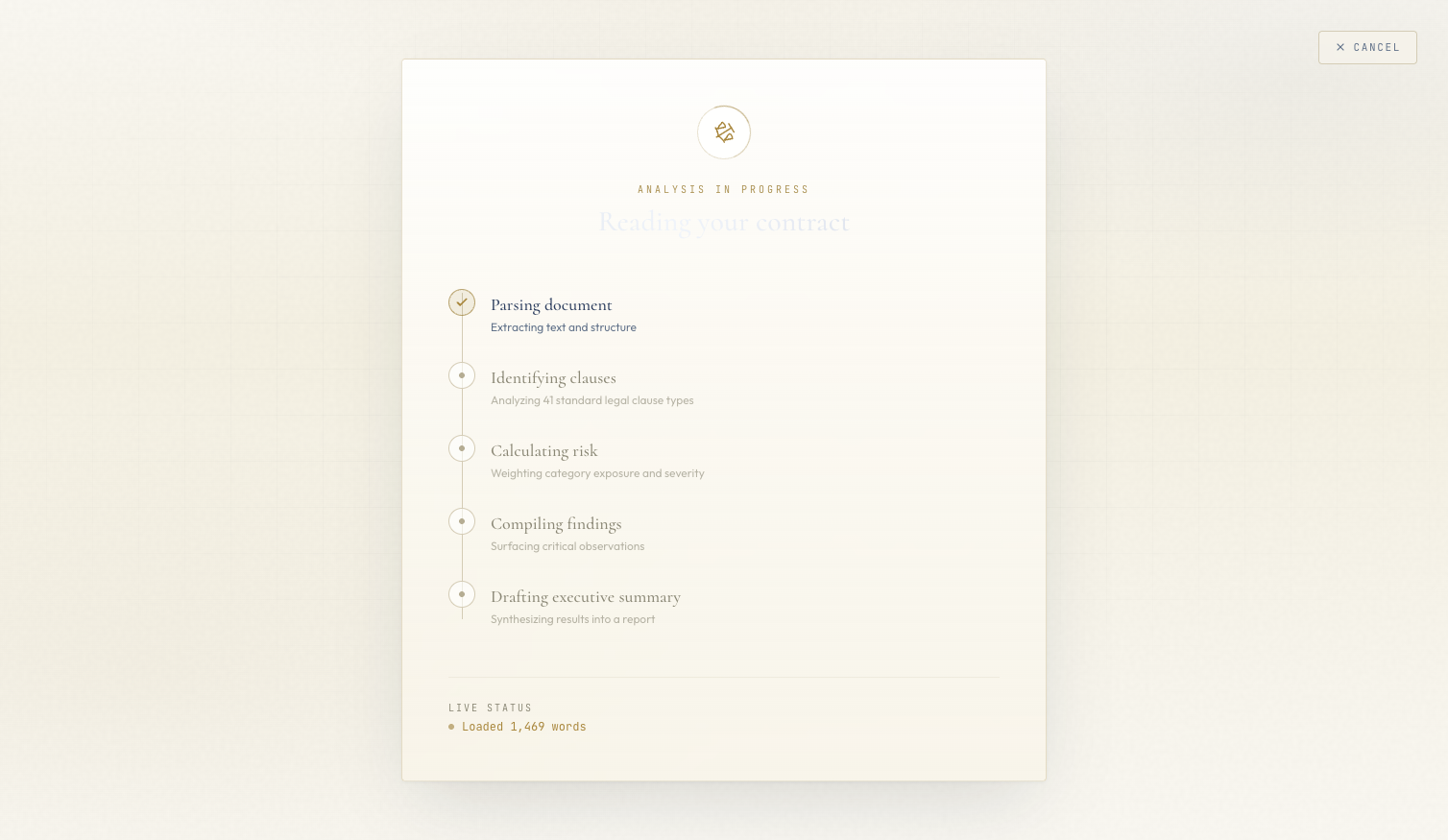 Five vertical steps that fill in as SSE events arrive. The active step pulses gold. Completed steps show a checkmark. The live status ticker shows the latest message.
What's Next#
In Blog 5: Legal-Tech Frontend & AI Trust UX, we'll build the dashboard that receives this streamed data and renders it in a way a lawyer would actually trust — including a custom SVG risk gauge, glass-morphism cards, and a dark/light theme system where every clause excerpt is traceable back to the source document.
This is post 4 of 5 in the Contract Analyzer Series. The full series covers architecture, clause extraction, risk scoring, streaming UX, and legal-tech frontend design for an AI-powered contract analyzer.
All code is open source: github.com/MinhQuanBuiSco/contract-analyzer