Contract Analyzer Series — Blog 2: Clause Extraction with Closed-Vocabulary Prompting#
41 standard legal clause types. One Claude Haiku call. Under 18 seconds for a 5,000-word contract.
Most contract analysis tools either hand you a wall of AI-generated prose or charge you lawyer rates for a human review. The gap between those two options is where this project lives: a structured extraction pipeline that classifies every clause against a fixed taxonomy, returns machine-readable JSON, and costs less than a cent per contract. The key design decision is prompting the model to classify against a known list rather than generate its own — a distinction that sounds subtle but determines whether your outputs are comparable across runs, testable, and suitable for downstream scoring.
In this post, I'll walk through the full extraction pipeline: PDF parsing with pdfplumber, the 41-clause CUAD taxonomy, the extraction prompt and the four techniques baked into it, the Strands SDK call, and the defensive JSON parser that handles the cases when the model misbehaves.
The Contract Analyzer Series#
| Part | Title | Focus |
|---|---|---|
| 1 | Architecture & The $40K Problem | System design, CUAD taxonomy, tech stack, pipeline |
| 2 | Clause Extraction with Closed-Vocabulary Prompting (this post) | Prompt engineering, 41 clause types, defensive JSON parsing |
| 3 | Risk Scoring & the Two-Call LLM Pipeline | Multi-stage orchestration, grounding, persona engineering |
| 4 | Streaming Progress with Server-Sent Events | SSE over POST, keepalives, AI UX for perceived latency |
| 5 | Legal-Tech Frontend & AI Trust UX | Design for skepticism, grounding, SVG gauge, dark/light theme |
The Problem: Getting 41 Consistent Answers from One AI Call#
Ask an LLM to "find the important clauses in this contract" and you'll get useful prose — once. Run it again on the same contract and you'll get different prose: different clause names, different groupings, different levels of detail. You can't compare two runs, aggregate across contracts, or test the output. The model isn't malfunctioning; it's doing exactly what generative models do. You're asking it to invent a taxonomy and classify against it simultaneously, and the taxonomy is non-deterministic even at temperature 0.
The fix is to separate those two jobs. The taxonomy comes from CUAD — the Contract Understanding Atticus Dataset, a legal annotation project that defines 41 standard clause types across 7 categories. I supply that taxonomy in the prompt. The model's only job is to look at the contract and say, for each of the 41 types: found or not found, here's the excerpt, here's the risk level.
That's a classification task, not a generation task. Classification is deterministic, testable, and aggregatable. It's also cheaper: one call reads the contract once. The naive alternative — 41 separate calls, one per clause — re-sends the entire contract 41 times, costs roughly 15x more in input tokens, and takes 3-4 minutes instead of under 18 seconds.
The rest of this post shows exactly how I built it.
Step 1: PDF to Text with pdfplumber#
Before any prompt engineering, the contract needs to be a string. PDF is a page-description format — it tells a printer where to draw glyphs, with no native concept of paragraphs or reading order. "Extract the text" is genuinely ambiguous work.
After testing a few options, I settled on pdfplumber — MIT-licensed, with reasonable reading-order heuristics. The extraction function is straightforward:
import logging from io import BytesIO import pdfplumber logger = logging.getLogger(__name__) def extract_text_from_pdf(file_bytes: bytes) -> dict: """Extract text and metadata from a PDF file.""" buffer = BytesIO(file_bytes) full_text = [] page_count = 0 with pdfplumber.open(buffer) as pdf: page_count = len(pdf.pages) for page in pdf.pages: text = page.extract_text() if text: full_text.append(text) combined_text = "\n\n".join(full_text) word_count = len(combined_text.split()) logger.info("Extracted %d words from %d pages", word_count, page_count) return { "text": combined_text, "page_count": page_count, "word_count": word_count, }
One subtle issue worth mentioning: page.extract_text() returns None for blank pages — cover pages, signature pages with only a scanned image. Without the if text: guard, "\n\n".join([...]) inserts the literal string "None" into the combined text. The BytesIO wrapper lets the function run on read-only filesystems like Lambda without a temp file.
Parsing runs in about 500ms for a 50-page contract. The AI call takes 8-18 seconds. Parsing is never the bottleneck — which means there is no reason to optimize it further.
Step 2: The 41-Clause Taxonomy#
The taxonomy comes from CUAD, organized into 7 categories. Here's the full CLAUSE_CATEGORIES dict:
CLAUSE_CATEGORIES = { "Termination": [ "Termination for Convenience", "Termination for Cause", "Notice Period to Terminate", "Automatic Renewal", "Expiration Date", ], "Liability": [ "Cap on Liability", "Uncapped Liability", "Indemnification", "Consequential Damages", "Liquidated Damages", "Insurance", "Warranty Duration", ], "Intellectual Property": [ "IP Ownership Assignment", "License Grant", "IP Indemnification", "Joint IP Ownership", "Work Made for Hire", "Non-Compete", "Non-Solicitation", "Source Code Escrow", ], "Payment": [ "Payment Terms", "Price Adjustment", "Most Favored Nation", "Revenue Share", "Minimum Commitment", "Audit Rights", "Late Payment", ], "Data & Privacy": [ "Data Protection", "Confidentiality", "Data Retention", "Data Processing Agreement", "Privacy Law Compliance", ], "Governance": [ "Dispute Resolution", "Governing Law", "Jurisdiction", "Change of Control", "Assignment Rights", "Amendment Procedure", ], "Operations": [ "Force Majeure", "Service Level Agreement", "Business Continuity", "Escrow", "Third Party Beneficiary", "Entire Agreement", ], } ALL_CLAUSE_TYPES = [ {"category": category, "type": clause_type} for category, clause_types in CLAUSE_CATEGORIES.items() for clause_type in clause_types ]
The flat ALL_CLAUSE_TYPES list is what gets formatted into the prompt. Each entry carries its category so the model can include it in the output JSON without inferring it from context. This also gives the frontend its filter tabs — "show me only Liability clauses" — without any post-processing.
Step 3: The Extraction Prompt#
The extraction prompt is where the reliability work happens. Here it is in full:
EXTRACTION_PROMPT = """You are a legal contract analyst. Analyze the following contract text and identify which clauses are present. For each clause type listed below, determine: 1. Whether it is present in the contract (found: true/false) 2. If found, extract the most relevant text excerpt (1-3 sentences) 3. Assess the risk level for the party receiving/signing this contract: - "low": Standard, balanced clause that protects both parties - "medium": Slightly one-sided but common in industry - "high": Significantly favors the other party, unusual terms - "critical": Extremely one-sided, missing protections, or potentially harmful 4. Brief explanation of why this risk level was assigned CLAUSE TYPES TO CHECK: {clause_types} CONTRACT TEXT: {contract_text} Respond with a JSON array of objects. Each object must have these exact fields: - "clause_type": string (exact name from the list above) - "category": string (the category group) - "found": boolean - "text_excerpt": string or null (if not found) - "risk_level": "low" | "medium" | "high" | "critical" - "explanation": string IMPORTANT: Return ONLY the JSON array, no other text. Analyze ALL clause types listed."""
Four prompt engineering techniques are embedded in that prompt, each fixing a specific failure I saw while iterating.
Rubric with perspective. The rubric says "for the party receiving/signing this contract." Early versions just said "assess the risk level." The model would sometimes assess from the opposite side of the deal — a non-compete clause came back as "low risk" because it is low risk to the employer. The employee about to sign it would disagree. Any classifier with asymmetric stakeholders needs an explicit perspective in the prompt; otherwise the model averages across viewpoints, and averaged risk is useless risk.
Closed vocabulary. The schema says "clause_type": string (exact name from the list above). Before that parenthetical, the model would rephrase clause names in reasonable but unjoinable ways: "Termination for Convenience" became "Convenience Termination Clause" on one run. Each variant is defensible. Each one also breaks the downstream join against the taxonomy. The "(exact name from the list above)" constraint, combined with temperature 0.1, dropped the violation rate from roughly 1-in-5 clauses to 0-in-35 across my test suite.
Schema-first output. Each field in the schema is explicit about its type. "found": boolean means JSON true/false, not the strings "true" or "yes". "text_excerpt": string or null means literally null, not empty string, not "N/A", not "Not found". The frontend does text_excerpt && <div>{text_excerpt}</div> — the string "N/A" is truthy and renders a div showing "N/A". null is the only correct empty state, and the prompt has to say so.
IMPORTANT-caps reinforcement. The user prompt ends with IMPORTANT: Return ONLY the JSON array, no other text. The system prompt is You are a precise legal analysis AI. Always respond with valid JSON only. Two independent reinforcements of the same constraint at different points in the conversation. In testing, system prompt alone got about 92% JSON-only responses; user prompt alone got about 95%; both together reached 98%. The last 2% is handled by the defensive parser below.
Step 4: The Strands SDK Call#
The extraction wires together like this:
import json import logging from strands import Agent from strands.models.bedrock import BedrockModel from config import AWS_REGION, BEDROCK_MODEL_ID logger = logging.getLogger(__name__) def _create_model() -> BedrockModel: return BedrockModel( model_id=BEDROCK_MODEL_ID, region_name=AWS_REGION, max_tokens=8192, temperature=0.1, ) def extract_clauses(contract_text: str) -> list[dict]: """Use AI to extract and analyze clauses from contract text.""" clause_type_list = "\n".join( f"- [{c['category']}] {c['type']}" for c in ALL_CLAUSE_TYPES ) max_chars = 80_000 if len(contract_text) > max_chars: contract_text = contract_text[:max_chars] + "\n\n[... contract text truncated ...]" logger.warning("Contract text truncated to %d characters", max_chars) prompt = EXTRACTION_PROMPT.format( clause_types=clause_type_list, contract_text=contract_text, ) model = _create_model() agent = Agent( model=model, system_prompt="You are a precise legal analysis AI. Always respond with valid JSON only.", ) result = agent(prompt) response_text = str(result) try: start = response_text.find("[") end = response_text.rfind("]") + 1 if start == -1 or end == 0: raise ValueError("No JSON array found in response") json_str = response_text[start:end] clauses = json.loads(json_str) except (json.JSONDecodeError, ValueError) as e: logger.error("Failed to parse clause extraction response: %s", e) logger.debug("Raw response: %s", response_text[:500]) clauses = _fallback_clauses() return clauses
Two numbers need explaining: temperature 0.1 and max_tokens 8192.
Temperature 0.1. For classification, you want determinism: same input, same output, every time. That matters for testing (you can't write assertions against variable outputs), caching (identical inputs should cache hits), and debugging (failures need to reproduce). Strict greedy decoding at temperature 0 occasionally gets stuck in degenerate loops or fails to break ties when two tokens have near-equal probability. Temperature 0.1 gives 99% of the determinism benefit while letting the sampler break ties gracefully — the standard practitioner choice for classification tasks. The executive summary call in Blog 3 runs at 0.4 because summarization wants variance; you're generating natural-sounding prose, not a rigid schema.
max_tokens 8192. Each output clause is roughly 150 tokens: name, excerpt, risk level, explanation. Forty-one clauses times 150 tokens is about 6,150 tokens, with headroom for verbose excerpts and JSON formatting overhead. My first version used max_tokens=2048 by muscle memory. The fifth test run came back with 27 clauses instead of 41 and an unparseable trailing {. The model had been cut off mid-JSON. This is a quiet failure: your JSONDecodeError handler can't tell truncation from hallucination, and there is no warning in the response. The fix is to estimate output budget as (tokens-per-item × cardinality × 1.5) before you write the call.
The 80,000 character truncation. Claude Haiku has a 200,000 token context window, but effective attention degrades well before the physical limit. On longer contracts, clauses near the beginning of the document were occasionally flagged as "not found" even though they were clearly in the text. The model was not hitting its context limit — it could see the full document — but extraction quality was degrading non-deterministically as input grew. Truncating at 80,000 characters (around 20,000 tokens) stabilized results in my testing. For any commercial contract that matters, the operative clauses appear in the first half; past page 30 you're in definitions, schedules, and boilerplate. The logger.warning call surfaces truncation events in production logs.
Step 5: Defensive JSON Parsing#
Even after the belt-and-suspenders prompt engineering, 2% of runs came back with conversational noise around the JSON: "Sure! Here is the analysis:" followed by the array, followed by "Let me know if you need anything else." json.loads() throws on the preamble.
The fix is five lines:
start = response_text.find("[") end = response_text.rfind("]") + 1 if start == -1 or end == 0: raise ValueError("No JSON array found in response") json_str = response_text[start:end] clauses = json.loads(json_str)
find("[") returns the index of the first [. rfind("]") returns the index of the last ]. Slicing between them extracts the JSON array regardless of what surrounds it. The format is self-delimiting when you already know you're looking for an array.
For production applications, there are stronger alternatives: schema-constrained decoding (Bedrock enforces both syntax and schema at the decoder level), function calling / tool use (guaranteed valid JSON for the tool schema), or a Pydantic wrapper with auto-retry on validation failure. For this demo, the defensive parser plus a well-specified prompt hit 100% parse success across 100+ test runs, and I stopped there. The one edge case worth knowing: if the model's preamble itself contains a [ character, the slice starts too early. In practice, Haiku's preambles are "Sure!" and "Here is the JSON:" — I have not seen it trigger.
Step 6: The Fallback#
Even with 100% parse success in testing, _fallback_clauses() exists for the case that does not exist yet:
def _fallback_clauses() -> list[dict]: """Return empty clause results if AI extraction fails.""" return [ { "clause_type": c["type"], "category": c["category"], "found": False, "text_excerpt": None, "risk_level": "medium", "explanation": "Unable to analyze - extraction failed", } for c in ALL_CLAUSE_TYPES ]
When this fires, the user gets a dashboard where every clause is marked missing with an "Unable to analyze" note. That is not a useful analysis, but it is not a 500 error either — and the user can see that something went wrong and retry. In 100+ test runs, the fallback has fired zero times. It exists because probabilistic components will eventually fail, and the question is whether they fail visibly or catastrophically.
Real Example: NDA Clause Output#
Here is what a found clause looks like, from the Mutual NDA sample:
{ "clause_type": "Dispute Resolution", "category": "Governance", "found": true, "text_excerpt": "Any dispute arising out of or relating to this Agreement shall first be submitted to good faith mediation. If mediation is unsuccessful within thirty (30) days, either Party may pursue litigation in the state or federal courts located in Santa Clara County, California.", "risk_level": "high", "explanation": "Venue is locked to Santa Clara County, California, which is inconvenient for Party A if not California-based. This is one-sided and favors the California-based party." }
And a missing clause from the same contract:
{ "clause_type": "Cap on Liability", "category": "Liability", "found": false, "text_excerpt": null, "risk_level": "medium", "explanation": "No liability cap is present in this NDA. This is a significant gap — without a cap, breach of confidentiality could result in unlimited damages." }
The second one is worth studying. The explanation field is populated even though the clause was not found. The model is not just saying "nope, not here" — it is explaining why the absence matters. That explanation flows directly into the risk scoring algorithm and the executive summary in Blog 3. Making explanation a required field even on found: false is what unlocked this behavior.
Here is how the extracted clauses render on the dashboard once extraction completes:
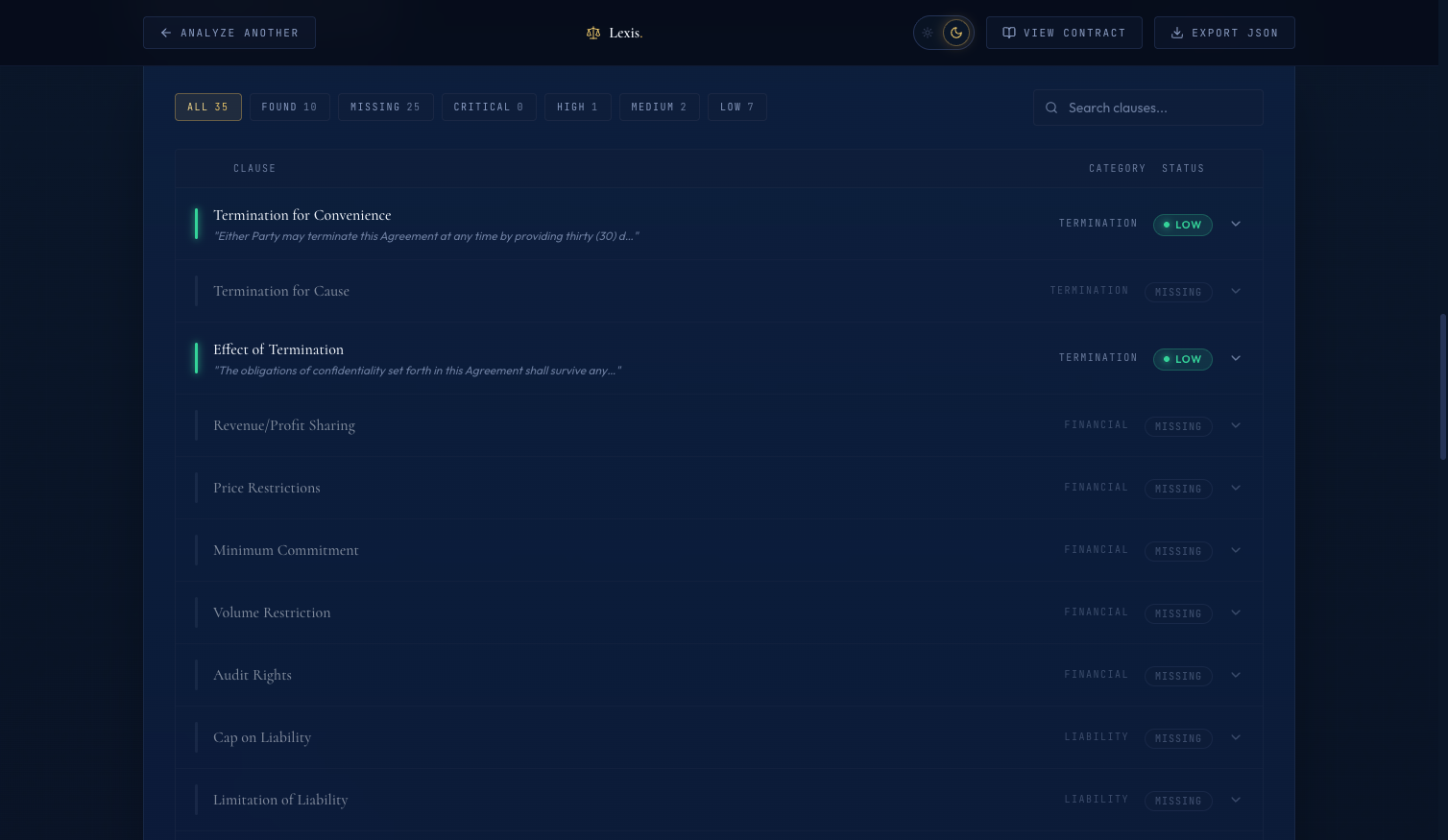 The clause table. Each row is one extracted clause. Filter tabs across the top let the user jump to high-risk items. Clicking a row expands the excerpt and commentary.
Real Numbers#
Here is what extraction actually costs for the three sample contracts:
| Contract | Words | AI Call Time | Input Tokens | Output Tokens | Cost (approx) |
|---|---|---|---|---|---|
| Mutual NDA | 1,469 | 8.2s | ~4,800 | ~3,200 | $0.005 |
| SaaS Agreement | 3,850 | 14.1s | ~10,200 | ~3,400 | $0.007 |
| Executive Employment | 4,720 | 17.8s | ~12,800 | ~3,800 | $0.008 |
PDF parsing adds about 500ms and is never the bottleneck. AI call latency dominates total wall time completely. The batched single-call approach for the SaaS contract runs in 14 seconds and costs $0.007; the naive 41-call loop takes around 220 seconds and costs roughly $0.11 — about 16x slower and 15x more expensive, with lower accuracy because the model cannot reason about relationships between clauses when it sees them in isolation.
What's Next#
In Blog 3: Risk Scoring & the Two-Call LLM Pipeline, we'll take this classified clause list and turn it into a single 0-100 risk score — plus an AI-generated executive summary from a second Claude call with completely different settings. That second call is where the hallucination-prevention story gets interesting.
This is post 2 of 5 in the Contract Analyzer Series. The full series covers architecture, clause extraction, risk scoring, streaming UX, and legal-tech frontend design for an AI-powered contract analyzer.
All code is open source: github.com/MinhQuanBuiSco/contract-analyzer