Aurora Market Series — Blog 4: Realtime — SSE, Live Agent Chips, Token Streams#
A multi-agent turn in Aurora Market takes between 8 and 14 seconds. That number is roughly: one router call (1s), one to three specialist agents in series (2–4s each, including their tool-calling loops), and one composer call (2–3s streamed). The amount of work is fixed; the wall-clock cost is fixed by the model and the network.
What's not fixed is whether the user sees it happen.
The cheap version is a spinner for the whole 12 seconds and a final assembled response. I shipped that version first. It felt broken — three of the people I asked to try it had refreshed the page before the response landed. The same 12 seconds, streamed as three layers of progress, feels like watching the system work. The agents announce themselves as they start. Product cards land as soon as the search/recommend specialists return. The composer's reply types out word by word. Same wall-clock cost, completely different perceived UX.
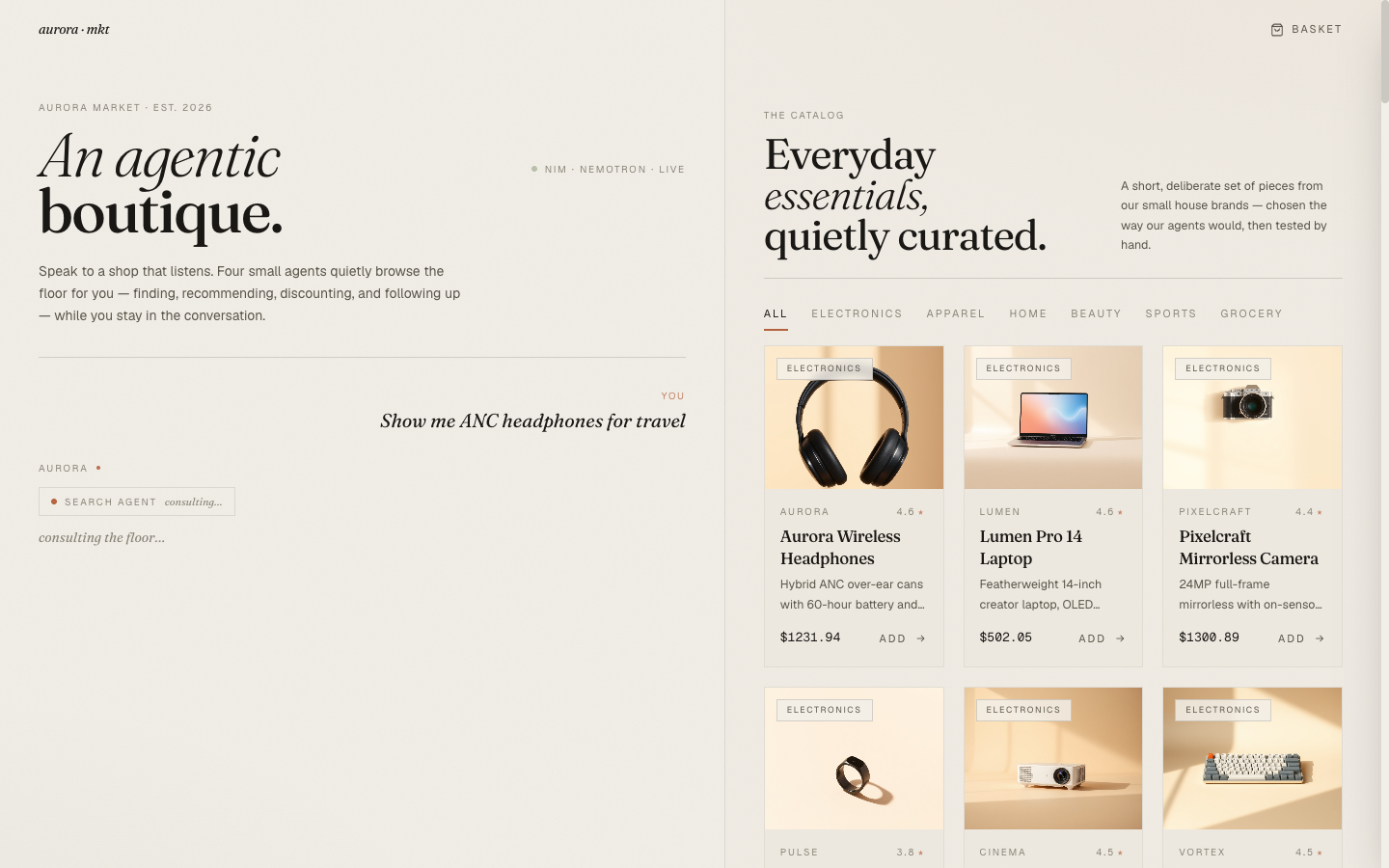
The contract analyzer series (Blog 4 there) covered the basics of SSE-over-POST against a FastAPI backend. This post focuses on the parts that are different in an agentic-commerce context: emitting structured events for multiple specialist phases, streaming the composer's tokens after non-streaming agent work has finished, and the frontend reducer that mutates a single assistant turn in place as events arrive.
The Aurora Market Series#
| Part | Title | Focus |
|---|---|---|
| 1 | Architecture & The Agentic Commerce Bet | Four specialists, NIM as inference, ACP-style checkout |
| 2 | Four Specialists, One Tool-Calling Loop | The base loop, per-agent prompts, cart context as a tool |
| 3 | The Router That Wouldn't Route + the Nemotron <think> Trap | LLM router + keyword backstop, reasoning-mode reply truncation |
| 4 | Realtime: SSE, Live Agent Chips, Token Streams (this post) | SSE-over-POST events, in-flight pills, React reducer pattern |
| 5 | Generating the Catalog: Picsum → LoremFlickr → FLUX.1-schnell | Three iterations of thumbnail accuracy |
| 6 | Editorial Aesthetic for an AI Storefront | Fraunces + Geist, clay + sage, agent chips as transparency |
The Seven Event Types#
The orchestrator yields a small, fixed vocabulary of event types. Naming them up front makes the wire shape self-documenting and the frontend trivial to write.
event: route            data: {"agents": ["search", "promotion"]}
event: agent_start      data: {"agent": "search"}
event: agent_done       data: {"agent": "search", "summary": "...", "tool_calls": [...]}
event: products         data: [{...product hits...}]
event: promo            data: {"code": "GEARUP20", ...}
event: composer_start   data: {}
event: token            data: {"delta": "Here are"}
...more tokens...
event: done             data: {"reply": "...", "events": [...], "products": [...], ...}
Three of these (route, agent_start, composer_start) are progress markers — they tell the UI which phase we're in. Three are data deliveries (agent_done, products, promo) that the UI can render the moment they arrive. And one (token) is a streaming primitive that fires many times per turn for the composer's response. The done event is a final consolidated payload that mirrors the non-streaming endpoint's response shape, so if the connection breaks mid-stream the frontend still has a clear "this is what would have arrived."
The orchestrator's streaming function (orchestrate_stream) is a plain Python generator:
def orchestrate_stream(db, session_id, user_message, history): chosen = _route(user_message, history) yield {"event": "route", "data": {"agents": chosen}} events, products, agent_texts = [], [], [] suggested_promo = None for agent in chosen: yield {"event": "agent_start", "data": {"agent": agent}} r = AGENT_RUNNERS[agent](db, session_id, user_message) agent_texts.append(f"[{agent}] {r['text']}") if agent in ("search", "recommend"): products.extend(r.get("products", [])) if agent == "promotion" and r.get("suggested_promo"): suggested_promo = r["suggested_promo"] events.append(...) yield {"event": "agent_done", "data": {"agent": agent, "summary": ..., "tool_calls": ...}} deduped = _dedup(products)[:8] if deduped: yield {"event": "products", "data": [_to_hit(p) for p in deduped]} if suggested_promo: yield {"event": "promo", "data": suggested_promo} yield {"event": "composer_start", "data": {}} full = [] for delta in chat_completion_stream(composer_messages, temperature=0.4, max_tokens=800): full.append(delta) yield {"event": "token", "data": {"delta": delta}} yield {"event": "done", "data": {"reply": "".join(full).strip(), "events": [...], "products": ..., "suggested_promo": ...}}
Two things to notice. First, the specialist agents are not streamed — their tool-calling loop is synchronous and returns a complete answer. The streaming happens between them (the agent_start / agent_done bracketing) and inside the composer (the token events). This is the right granularity. Each specialist is opaque in the same way a database query is opaque — you don't try to stream rows from inside a transaction, you signal start and finish. Second, the done event carries the full assembled state. If the user opened the dev tools and only saw the final event, they'd still have everything they needed. The streaming is additive, never authoritative-only.
The FastAPI Side#
FastAPI's StreamingResponse is the obvious choice. The wrapper is twenty lines:
@router.post("/stream") def chat_stream(req: ChatRequest, db: Session = Depends(get_db)) -> StreamingResponse: def event_source(): try: for ev in orchestrate_stream(db, req.session_id, req.message, req.history): payload = json.dumps(ev["data"], default=str) yield f"event: {ev['event']}\ndata: {payload}\n\n" except Exception as e: err = json.dumps({"message": str(e)}) yield f"event: error\ndata: {err}\n\n" return StreamingResponse( event_source(), media_type="text/event-stream", headers={ "Cache-Control": "no-cache", "Connection": "keep-alive", "X-Accel-Buffering": "no", }, )
The three response headers are mandatory. Cache-Control: no-cache is obvious. Connection: keep-alive keeps the TCP socket open while events trickle out. X-Accel-Buffering: no is the one that bites people in production — without it, nginx (and CloudFront, and a number of reverse proxies) will buffer the response body and deliver all events in one batch when the stream closes. It's the single most common reason "SSE works locally but not in production." If you don't know whether a proxy buffers your response, set this header. It's free.
The try/except around the generator yields a final error event before the connection closes. Without it, an exception inside the orchestrator surfaces as a bare TCP close, which the frontend has no way to distinguish from a normal stream end.
Why SSE Over POST (Not WebSockets, Not EventSource)#
The interaction shape here is one-shot: the user sends a message, the server streams events, then closes. There's no multi-turn conversation living on a long-lived connection. There's no server-initiated push outside the lifetime of a request. WebSockets are the wrong tool — they'd add connection lifecycle (heartbeats, reconnect, session cleanup) for an interaction that lives 12 seconds and ends.
The browser's EventSource API is the textbook SSE client. It handles reconnection, parses the wire format for you, and is exactly four lines of code. It also only supports GET. There's no option to send a POST body. The chat endpoint takes a body ({session_id, message, history}) — there's no way to pass that to EventSource short of stuffing the entire chat history into a query string, which breaks at ~2KB on most servers.
The standard workaround when you need SSE-over-POST is to skip EventSource and use fetch() directly, taking the response as a ReadableStream and parsing the SSE wire format by hand. That's about twenty lines of TypeScript:
export async function* chatStream( session_id: string, message: string, history: ChatMessage[] ): AsyncGenerator<StreamEvent> { const res = await fetch(`${BASE}/chat/stream`, { method: 'POST', headers: { 'Content-Type': 'application/json' }, body: JSON.stringify({ session_id, message, history }), }); if (!res.ok || !res.body) throw new Error(`stream failed: ${res.status}`); const reader = res.body.getReader(); const decoder = new TextDecoder(); let buffer = ''; while (true) { const { value, done } = await reader.read(); if (done) break; buffer += decoder.decode(value, { stream: true }); // SSE frames are separated by blank lines (\n\n). let idx; while ((idx = buffer.indexOf('\n\n')) !== -1) { const frame = buffer.slice(0, idx); buffer = buffer.slice(idx + 2); let evt = 'message'; const dataLines: string[] = []; for (const line of frame.split('\n')) { if (line.startsWith('event: ')) evt = line.slice(7).trim(); else if (line.startsWith('data: ')) dataLines.push(line.slice(6)); } if (dataLines.length === 0) continue; try { const data = JSON.parse(dataLines.join('\n')); yield { event: evt, data } as StreamEvent; } catch { /* ignore malformed frame */ } } } }
It's an async generator, which means the consuming React component can write for await (const ev of chatStream(...)) and treat the stream like an ordinary iterable. The TextDecoder with stream: true is necessary so multi-byte UTF-8 characters don't get split across read() calls. The buffer-with-\n\n parser is the SSE wire format in three lines.
The Reducer Pattern: One Assistant Turn That Mutates#
The frontend trick that makes all this feel coherent is that the assistant turn is created before the first event arrives, and every subsequent event mutates that same turn in place. There's no "pending" intermediate state, no list of half-rendered messages getting swapped for a finished one. The assistant bubble exists from the moment the user hits Send, with streaming: true and empty content. As events stream in, fields fill: activeAgents populates from route, events grows on each agent_done, products lands as one array, content accumulates token-by-token, and finally streaming flips to false on done.
const mutateLastAssistant = useCallback((fn: (a: AssistantTurn) => AssistantTurn) => { setTurns(prev => { for (let i = prev.length - 1; i >= 0; i--) { if (prev[i].kind === 'assistant') { const updated = fn(prev[i] as AssistantTurn); return [...prev.slice(0, i), updated, ...prev.slice(i + 1)]; } } return prev; }); }, []); const sendMessage = useCallback(async (msg: string) => { setTurns(prev => [ ...prev, { kind: 'user', content: msg, ts: Date.now() }, { kind: 'assistant', content: '', events: [], products: [], promo: null, streaming: true, activeAgents: [], ts: Date.now() + 1 }, ]); try { for await (const ev of chatStream(session.id, msg, history)) { switch (ev.event) { case 'route': mutateLastAssistant(a => ({ ...a, activeAgents: ev.data.agents })); break; case 'agent_done': mutateLastAssistant(a => ({ ...a, events: [...a.events, { agent: ev.data.agent, summary: ev.data.summary, payload: { tool_calls: ev.data.tool_calls } }] })); break; case 'products': mutateLastAssistant(a => ({ ...a, products: ev.data })); break; case 'promo': mutateLastAssistant(a => ({ ...a, promo: ev.data })); break; case 'token': mutateLastAssistant(a => ({ ...a, content: a.content + ev.data.delta })); break; case 'done': mutateLastAssistant(a => ({ ...a, content: ev.data.reply || a.content, streaming: false })); break; } } } finally { mutateLastAssistant(a => ({ ...a, streaming: false })); } }, [history, session, showError, mutateLastAssistant]);
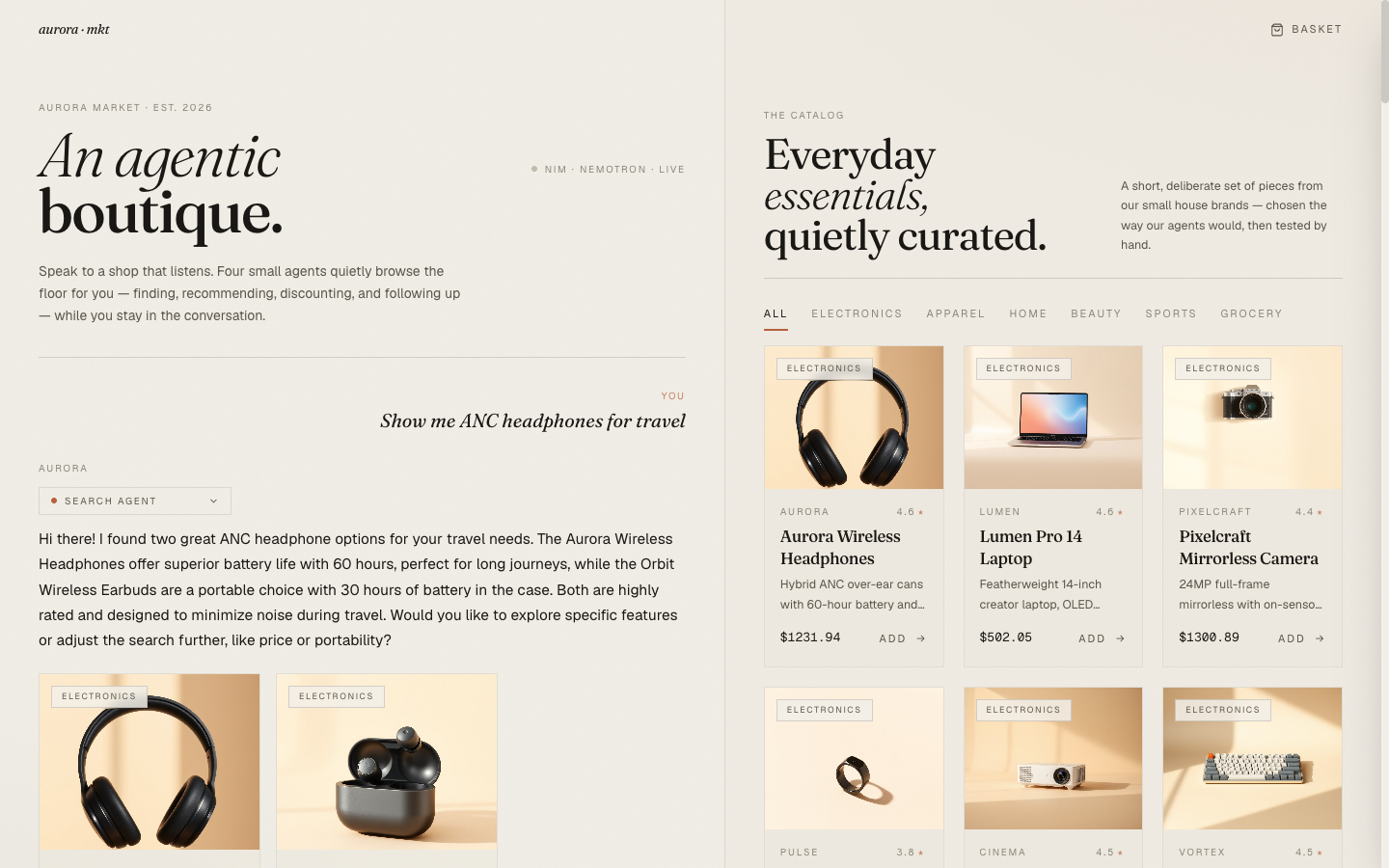
The render side is then simple: the same AssistantMessage component renders whether the turn is mid-stream or finished. While streaming is true and content is empty, it shows a pulsing pill ("Search agent · consulting…"). When content is non-empty, it shows the prose with a blinking caret next to the last token. When events arrives, the placeholder pill is replaced by a real AgentChip the user can expand.
The Three Visible Layers#
Three things land at different times during a turn. Each one is a feedback signal of its own.
Layer 1 — in-flight agent pills. The route event arrives within ~100ms. The frontend immediately renders one placeholder pill per chosen agent: "Search agent · consulting…", "Promotion agent · consulting…". The user can see, before the first agent has done any work, which specialists are being engaged for their question. This is the difference between a system that looks like it's "thinking" and a system that looks like it's deciding what to think about.
Layer 2 — product cards before the composer starts. Search and recommend agents finish their work in 2–4 seconds. As soon as the products event lands, the frontend renders the product carousel directly under the assistant bubble — before the composer has emitted a single token. The user often sees what the agent will recommend before reading why. That sequence — show first, explain second — is more honest to how shoppers actually scan a recommendation, and it removes the latency lull between "agents finished" and "composer about to start."
Layer 3 — token-by-token composer reply. Once the composer call fires, tokens stream in at ~30/s. The blinking caret marks the live insertion point. By the time the composer finishes, the shopper has already been reading for 2–3 seconds.
Token Streaming, With a <think> Sniper#
The composer's NIM call uses the same client as the agents, but with stream=True. The streaming wrapper in nim_client.py is thirty lines, and most of those lines are dealing with Blog 3's reasoning-mode artifact — a stray <think>...</think> block can still slip into a streamed reply on some Nemotron variants. So the streaming function filters per-chunk:
def chat_completion_stream(messages, temperature=0.4, max_tokens=2048): stream = client.chat.completions.create( model=NIM_LLM_MODEL, messages=messages, temperature=temperature, max_tokens=max_tokens, stream=True, extra_body={"chat_template_kwargs": {"thinking": False}}, ) in_think = False for chunk in stream: delta = chunk.choices[0].delta.content if not delta: continue # Per-chunk <think> filter — defensive against template leaks if "<think>" in delta.lower(): in_think = True delta = delta.split("<think>", 1)[0] if in_think: if "</think>" in delta.lower(): in_think = False delta = delta.split("</think>", 1)[-1] else: continue if delta: yield delta
The state machine has two states. Outside a <think> block, deltas are yielded normally. Inside one, deltas are dropped until </think> closes the block, at which point any trailing post-close text is yielded. This is the streaming counterpart of the non-streaming _strip_thought() from Blog 3.
This is also why the streaming and non-streaming paths share a single regex (_THINK_RE) and a single fallback: when defensive parsing happens in two places in your codebase, the same logic should compile to the same regex, even if the consumers are different.
What's Next#
The system now feels alive — agents announce themselves, product cards land early, the composer types its reply in real time. The next post is about the cards themselves: three iterations of "what photo goes on each one," ending at FLUX.1-schnell generations of every base product so the catalog images finally match the items they're selling.