Aurora Market Series — Blog 5: Generating the Catalog — Picsum → LoremFlickr → FLUX.1-schnell#
A synthetic catalog needs synthetic images. Aurora Market has 39 base products across six categories, plus three brand-variant spins per category — about 57 cards on the page. Each one needs a thumbnail. None of them are real, so I can't just download Stripe-quality product photography for them.
The iteration went through three providers, and the gap between the second and the third is the difference between "this looks like a demo" and "this looks like a store."
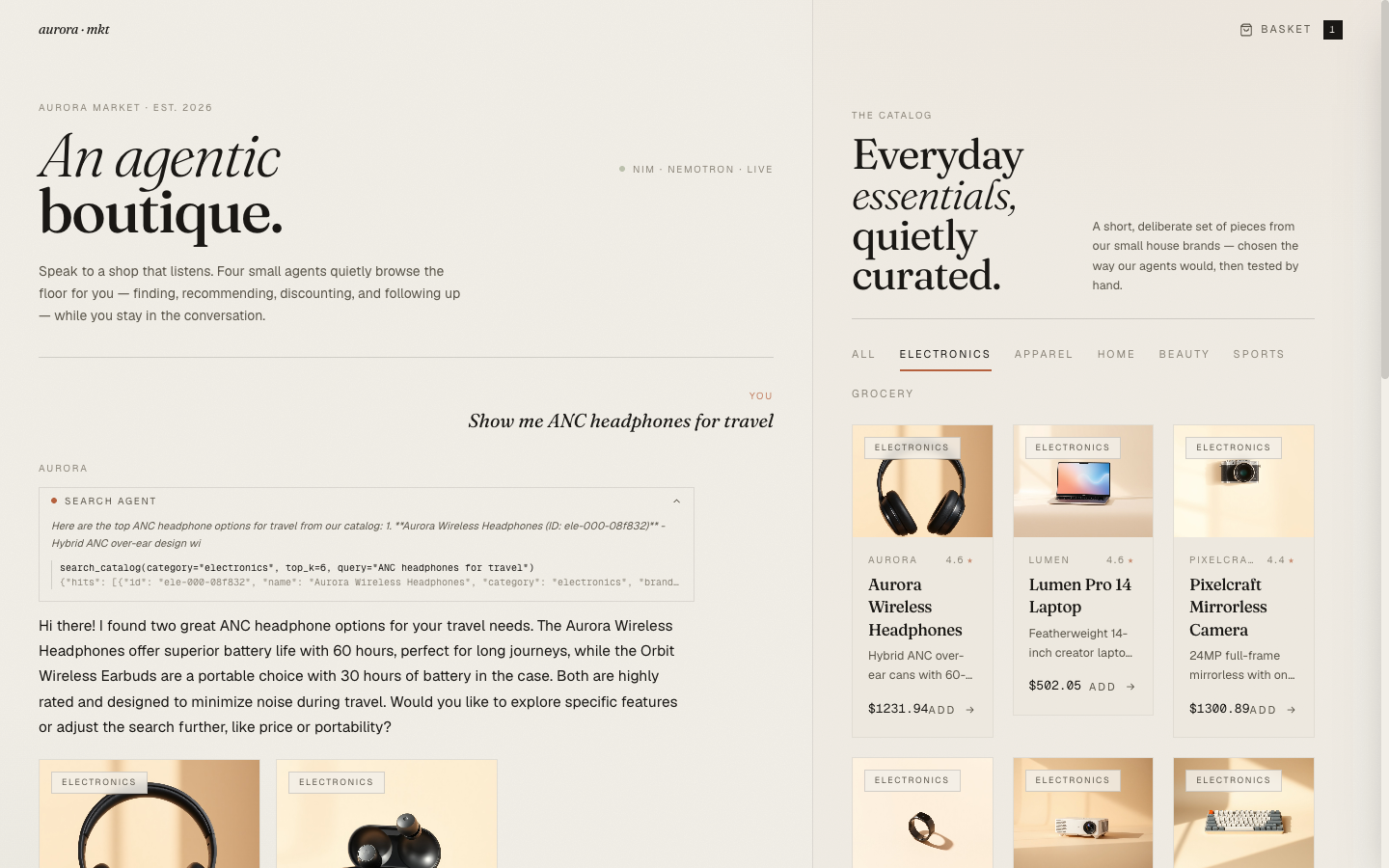
The Aurora Market Series#
| Part | Title | Focus |
|---|---|---|
| 1 | Architecture & The Agentic Commerce Bet | Four specialists, NIM as inference, ACP-style checkout |
| 2 | Four Specialists, One Tool-Calling Loop | The base loop, per-agent prompts, cart context as a tool |
| 3 | The Router That Wouldn't Route + the Nemotron <think> Trap | LLM router + keyword backstop, reasoning-mode reply truncation |
| 4 | Realtime: SSE, Live Agent Chips, and Token Streams | SSE-over-POST events, in-flight pills, React reducer pattern |
| 5 | Generating the Catalog: Picsum → LoremFlickr → FLUX.1-schnell (this post) | Three iterations, the prompt template, variant cache trick |
| 6 | Editorial Aesthetic for an AI Storefront | Fraunces + Geist, clay + sage, agent chips as transparency |
Iteration 1 — Picsum (Wrong, but Fast)#
The first pass used picsum.photos. Their URL pattern accepts a seed parameter that maps to a deterministic image, so I could write https://picsum.photos/seed/electronics-001/600/400 per product and get reproducible thumbnails for free.
What I forgot is that Picsum serves random nature and lifestyle photos. The deterministic seeding meant "Aurora Wireless Headphones" always showed a photo of a sunset over a lake, and "Cinema Mini Projector" always showed a wooden bridge. Beautiful images. None of them looked like the product.
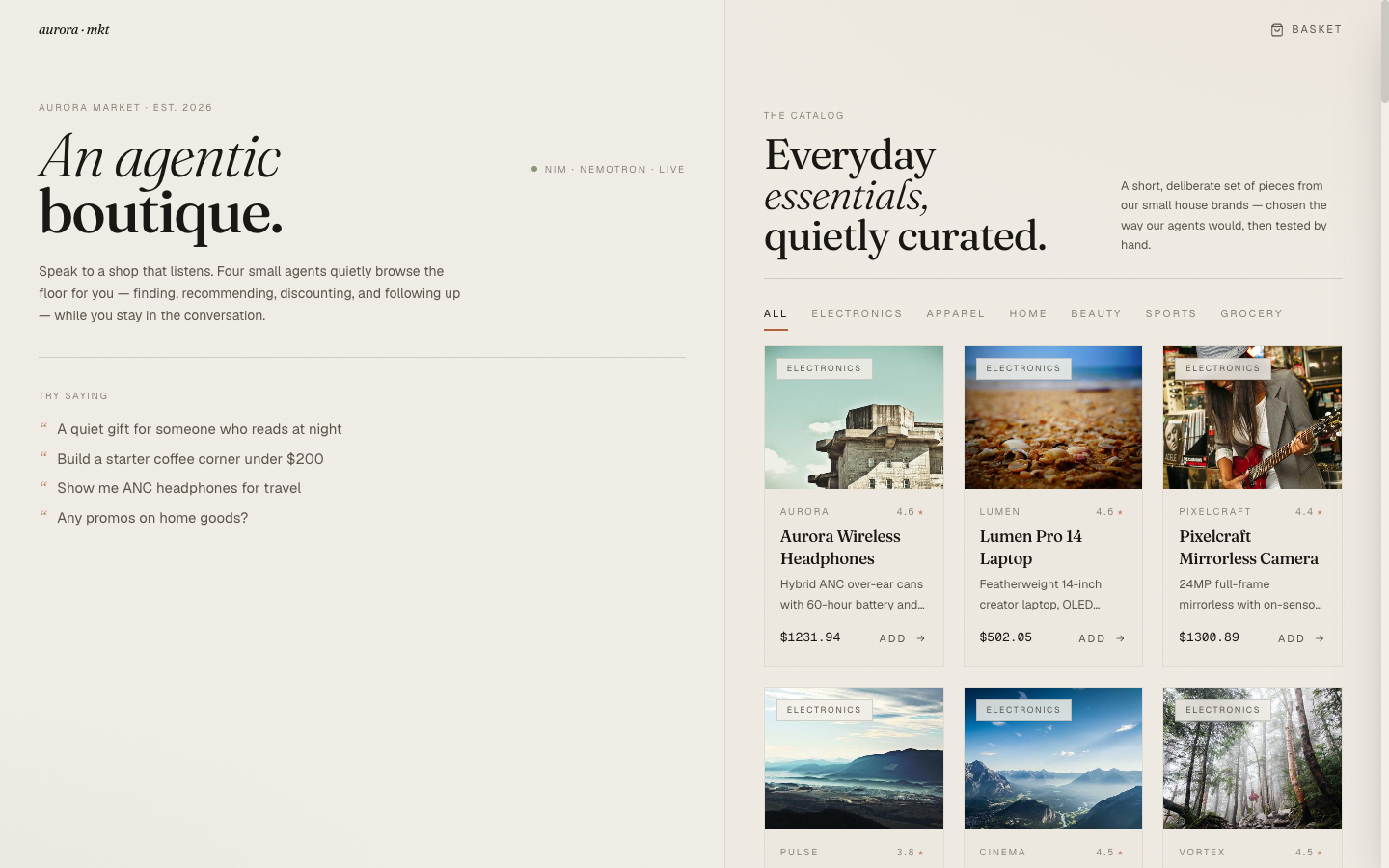
This survived for about ten minutes of self-testing. Then I asked a colleague to look and her first reaction was "why are you selling landscape photos?"
The right answer was a keyword-based image source.
Iteration 2 — LoremFlickr (Closer, But Fuzzy)#
LoremFlickr is a Flickr keyword-search proxy that's been around for over a decade. The URL format is https://loremflickr.com/600/400/<keywords>?lock=<seed>. The lock parameter makes the choice deterministic. No API key. CC-licensed source photos.
I added an explicit photo_keyword to each entry in my product catalog:
CATEGORIES = { "electronics": [ ("Aurora Wireless Headphones", "...", ["headphones", "audio", "anc"], "headphones"), ("Lumen Pro 14 Laptop", "...", ["laptop", "creator", "oled"], "laptop"), ("Pixelcraft Mirrorless Camera", "...", ["camera", "photography"], "camera"), ("Pulse Smart Ring", "...", ["wearable", "health"], "ring,jewelry"), ... ], ... }
Each entry got a 4th field — the photo keyword(s) — and the seed function built URLs like loremflickr.com/600/400/headphones?lock=1. Variants of a base product reused the base's keyword so brand spin-offs ("Aurora Mechanical Keyboard Lite") all shared a keyboard photo with the original ("Vortex Mechanical Keyboard").
This was a massive jump in quality from Picsum. Headphones returned a headphone photo. Coffee returned coffee. Chinos returned someone wearing chinos.

The remaining problem was stylistic noise. LoremFlickr is searching Flickr's CC pool, which includes everything from professional product photography to amateur stage shots to someone's vacation gallery. "Headphones" might return a clean studio photo or it might return a band's tour setup with a pair of DJ cans on a table. "Tee" might return a folded merino shirt or it might return a person mid-laugh wearing one. The catalog felt like a Pinterest board, not a store.
For an editorial boutique aesthetic (Blog 6), that variance is exactly the wrong signal. The cards should look like they were art-directed by the same person. They weren't.
Iteration 3 — FLUX.1-schnell on NIM#
The right answer for an editorial catalog is to generate the images yourself, so you control the prompt. NIM hosts FLUX.1-schnell at ai.api.nvidia.com/v1/genai/black-forest-labs/flux.1-schnell. Schnell is a distilled FLUX variant — 4 steps, ~3 seconds per image on the hosted endpoint, free tier eligible, no GPU on my side.
The non-obvious thing about schnell is that cfg_scale must be 0. It's a distilled model that doesn't use classifier-free guidance; passing the usual 3.5 or 7.5 returns a validation error. The endpoint will tell you this if you make the mistake once.
The NIM image client is plain HTTP — no fancy SDK is needed. Thirty lines including retry:
@retry(stop=stop_after_attempt(2), wait=wait_exponential(multiplier=0.7, max=6)) def generate_product_image(prompt: str, seed: int = 0, width: int = 1024, height: int = 1024) -> bytes: headers = { "Authorization": f"Bearer {NVIDIA_API_KEY}", "Accept": "application/json", "Content-Type": "application/json", } payload = { "prompt": prompt, "width": width, "height": height, "steps": 4, "seed": int(seed) % 4_294_967_295, "cfg_scale": 0, } with httpx.Client(timeout=120.0) as client: r = client.post( "https://ai.api.nvidia.com/v1/genai/black-forest-labs/flux.1-schnell", json=payload, headers=headers, ) r.raise_for_status() data = r.json() return base64.b64decode(data["artifacts"][0]["base64"])
Response shape is {"artifacts": [{"base64": "...", "finishReason": "...", "seed": ...}]}. The tenacity.retry decorator handles transient 429/5xx responses.
The Prompt Template#
This is the single most important block of code in the entire image pipeline. Get this wrong and every product card looks slightly off; get it right and they all look like they were shot by the same photographer.
def _image_prompt(name: str, desc: str) -> str: return ( f"professional product photo of a {name}: {desc} " "Soft neutral beige background, soft natural light from the left, " "editorial e-commerce style, minimal composition, no people, no text, " "no logos, single object centered, ultra-detailed, shot on 50mm." )
A few decisions in there worth pulling apart:
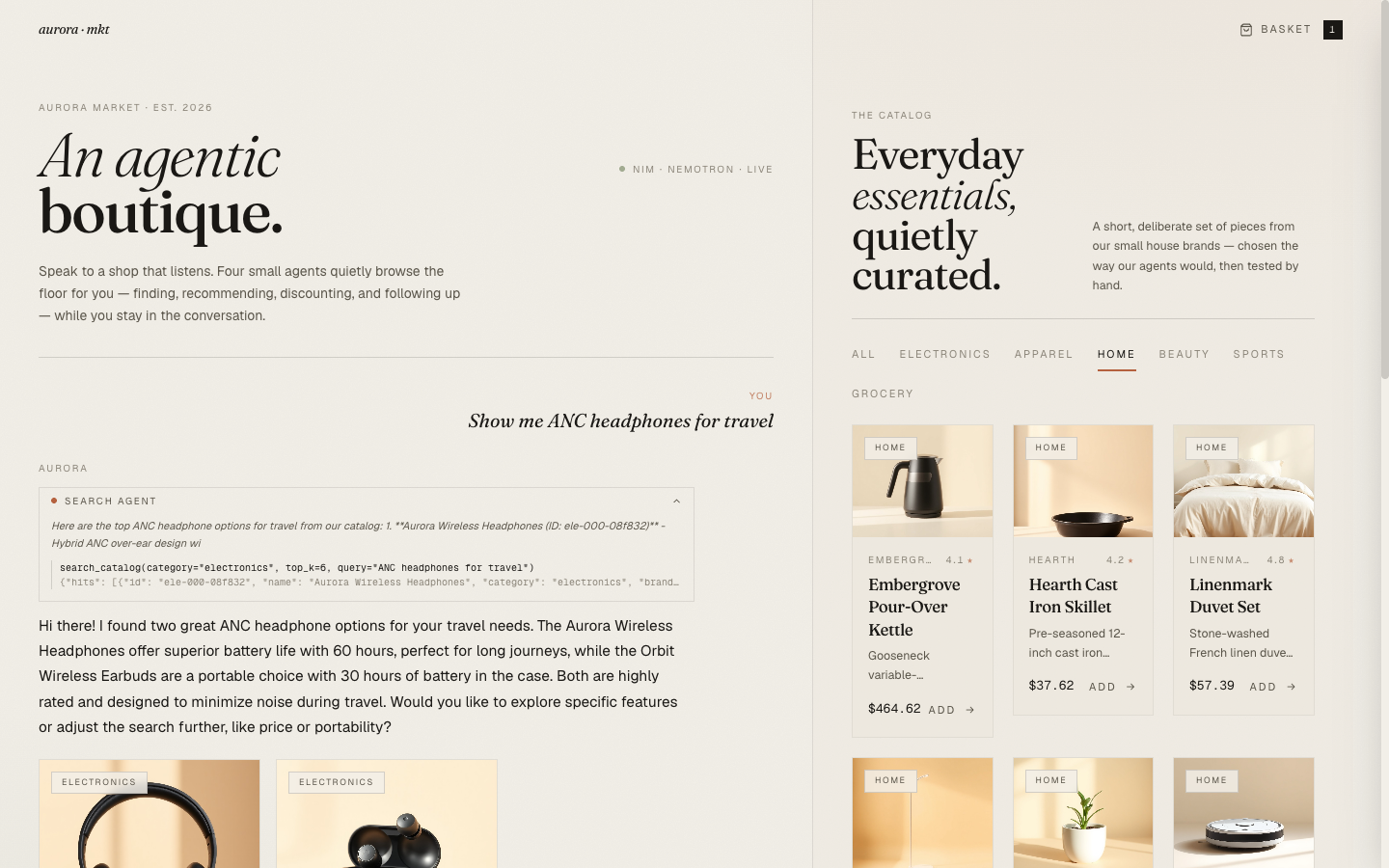
{name}: {desc}— the model gets both the product's name and its description. The name carries the what (headphones, kettle, parka). The description carries the details (60-hour battery, gooseneck variable-temperature, 800-fill responsibly-sourced). FLUX is good enough to incorporate both into the image — a kettle prompt with "gooseneck variable-temperature" produces a gooseneck kettle with a temperature display, not a generic kettle.- "Soft neutral beige background" — locks the color of the entire catalog. Every product card now has the same warm bone background, which matches Aurora Market's brand palette (Blog 6). The catalog reads as a single visual story instead of 57 disconnected product shots.
- "no people, no text, no logos" — the most important negative constraint. Without "no text," FLUX likes to invent label text ("ULTRA SOUND," "EDITION X") that's almost-readable but not quite. Without "no people," it occasionally generates an arm reaching for the product, which breaks the still-life feel.
- "single object centered" — every shot is a hero. No styling props, no companion items in the frame.
- "shot on 50mm" — adds a slight technical specificity that pushes the model toward realistic product photography aesthetics over illustrative or 3D-rendery output.
The result is a 1024×1024 PNG per product, around 30–70KB each, generated in 3–5 seconds. For 39 base products plus the seed-time overhead, the full catalog re-seed takes about three minutes.
The Variant-Share-Base-Photo Cache#
The catalog has 39 base products and 18 variants (three per category) — 57 cards total. Generating 57 separate images would be wasteful, and the variants are spec spin-offs of the same physical object ("Summit Down Parka," "Field & Co Down Parka Classic," "Trailhead Down Parka Edition X" are all parkas). They should share a photo.
The seed function caches generated images by (category, base_name) and reuses them for variants:
def _build_products() -> list[Product]: products = [] image_cache: dict[tuple[str, str], str] = {} for category, items in CATEGORIES.items(): for i, (name, desc, tags, photo_kw) in enumerate(items): img = _ensure_image(name, desc, photo_kw, lock=...) image_cache[(category, name)] = img products.append(Product(..., image_url=img, ...)) for _ in range(3): # variants base = random.choice(items) img = image_cache[(category, base[0])] # reuse base photo products.append(Product(..., image_url=img, ...)) return products
This drops the generation count from 57 to 39 — a 32% saving in API calls and seed time. More importantly, the variants visually cohere with their base ("Summit Down Parka" and the three brand-spin variants all show the same brown parka shot), which reinforces the perception that these are real product families.
_ensure_image is the actual generator entry point. It checks for a cached PNG on disk first, generates only if absent, and falls back to LoremFlickr if FLUX is unavailable:
def _ensure_image(name: str, desc: str, photo_kw: str, lock: int) -> str: IMAGES_DIR.mkdir(parents=True, exist_ok=True) slug = f"{_slug(photo_kw)}-{lock:03d}" out_path = IMAGES_DIR / f"{slug}.png" rel_url = f"{PUBLIC_API_BASE}/static/images/{slug}.png" if out_path.exists() and out_path.stat().st_size > 0: return rel_url try: png = generate_product_image(_image_prompt(name, desc), seed=lock * 7 + 1) out_path.write_bytes(png) return rel_url except Exception as e: log.warning("FLUX failed for %s (%s) — falling back to LoremFlickr", name, e) return f"https://loremflickr.com/600/400/{photo_kw}?lock={lock}"
The cache-on-disk-then-skip means a docker compose restart doesn't regenerate anything. The full catalog is re-seeded only when the user explicitly hits POST /admin/seed?force=true, which deletes the existing rows and forces a full rebuild.
Serving the PNGs: The Static Mount#
The generated PNGs live in backend/data/images/ inside the container, which is bind-mounted from ./backend/data on the host. FastAPI serves them via a StaticFiles mount:
import os from fastapi.staticfiles import StaticFiles os.makedirs("data/images", exist_ok=True) app.mount("/static", StaticFiles(directory="data"), name="static")
Every product's stored image_url is an absolute URL — http://localhost:8000/static/images/<slug>.png — built from a configurable PUBLIC_API_BASE env var at seed time. That decision is intentional: the frontend doesn't need to know whether an image is an external CDN URL or a backend-served PNG, because the URL stored in the database resolves either way. When you deploy this somewhere with a different public host, you set PUBLIC_API_BASE once in the env and re-seed.
The alternative — store relative URLs (/static/images/...) and have the frontend prepend the API host — was tempting because it's more orthogonal. But it punts the host-resolution problem to the frontend, which means the frontend has to know which URLs are relative and which aren't. Storing the absolute URL upfront keeps the rendering side dumb.
What FLUX Can and Can't Do#
Two specific limits showed up during testing.
Text is unreliable. FLUX is good enough at text to make labels look real-ish, but not good enough to actually spell them. A coffee bag prompt produced "Daybreak Origin Drip Coffee Lite" as ETHIOPIA YIGACHEFFE LIGHT ROST with one "S" missing. That's actually charming for a synthetic catalog — it reads as plausible product packaging at thumbnail size — but you can't rely on it for legibility. The fix is the prompt's "no text" constraint, which mostly works but lets the occasional partial label through.
Multiple objects are unreliable. The "single object centered" constraint matters. Prompts that ask for two items in one shot (a phone and a case) end up with melded geometry where the case becomes part of the phone. For an e-commerce catalog where you're selling one SKU per card, this is the right constraint anyway.
Style consistency is excellent. Once the prompt template was fixed, every category's photos look like they were art-directed by the same person. That's the single biggest reason the upgrade from LoremFlickr was worth it.
What's Next#
The catalog is now visually coherent and every product photo matches the item it represents. The next post is the design layer that surrounds all of it: the editorial boutique aesthetic that keeps Aurora Market from looking like another AI chat clone. Fraunces and Geist, a clay-and-sage palette, the chat-as-storefront layout, and the agent chip as a transparency device the user can actually open.