Azure Auth Series — Blog 6: Service-to-Service Authentication#
In Blogs 1–5, the frontend talked to one backend. But real-world systems have multiple services that talk to each other. When the Task API needs to send a notification, should it just call the Notification Service directly? Or should it prove its identity — and optionally, the user's identity — to the downstream service?
In this blog, we'll build a microservice architecture with two service-to-service authentication patterns:
- 🔑 On-Behalf-Of (OBO) — Task API calls Notification Service as the user. The downstream service knows exactly who triggered the action.
- 🤖 Client Credentials (CC) — Task API calls Audit Service as itself. No user context needed — the app proves its own identity.
- 📦 Three FastAPI services on different ports, each validating tokens independently
- 🔔 Notification Service — accepts OBO tokens with user claims (name, email, tenant)
- 📋 Audit Service — accepts CC tokens with application roles (
AuditLog.Write) - ⚡ Graceful failure — service calls are non-blocking; task creation succeeds even if downstream calls fail
The key question this blog answers: when should a service call another service as the user, vs. as itself?
The Azure Auth Series#
| Blog | Topic | What You'll Learn |
|---|---|---|
| 1. Basic Login | Frontend auth | Sign in with Microsoft Entra ID |
| 2. Protected API | Backend auth | Build a FastAPI backend that validates tokens |
| 3. RBAC | Authorization | Control access based on user roles |
| 4. Managed Identity | Zero secrets | Deploy to Azure without storing credentials |
| 5. Multi-Tenant | Organizations | Let users from any org sign in |
| 6. Service-to-Service | You are here | Authenticate services to each other |
| 7. API Gateway | APIM | Centralize auth with Azure API Management |
What We're Building#
Architecture#
User (Browser)
  │
  ├─ Signs in via MSAL (popup OAuth)
  ├─ Gets access token for Task API
  │  scope: api://{task-api}/access_as_user
  │
  ▼
Task API (Port 8000)
  ├─ Validates user JWT (multi-tenant JWKS)
  ├─ RBAC: Admin/Editor/Reader
  ├─ Tenant-isolated task store
  │
  ├─ On task create:
  │  │
  │  ├─── OBO Flow ─────────────────────────┐
  │  │  acquire_token_on_behalf_of()        │
  │  │  Token preserves: oid, name, tid     │
  │  │                                       ▼
  │  │                          Notification Service
  │  │                          (Port 8001)
  │  │                          Knows WHO created the task
  │  │
  │  └─── Client Credentials ───────────────┐
  │     acquire_token_for_client()          │
  │     Token has: roles=["AuditLog.Write"] │
  │     NO user context                      ▼
  │                              Audit Service
  │                              (Port 8002)
  │                              Knows WHICH APP called it
  │
  └─ Returns: {task, notification_status, audit_status}
What Changed from Blog 5#
| Blog 5 (Multi-Tenant) | Blog 6 (Service-to-Service) |
|---|---|
| 1 backend service | 3 backend services |
| Public client (no secret) | Confidential client (has secret) |
| No MSAL in backend | msal==1.31.0 for OBO + CC |
| 2 app registrations | 4 app registrations |
| User tokens only | User + OBO + CC tokens |
| No downstream calls | OBO → Notification, CC → Audit |
Live Demo#
Landing page — describes OBO, Client Credentials, and the microservice architecture:
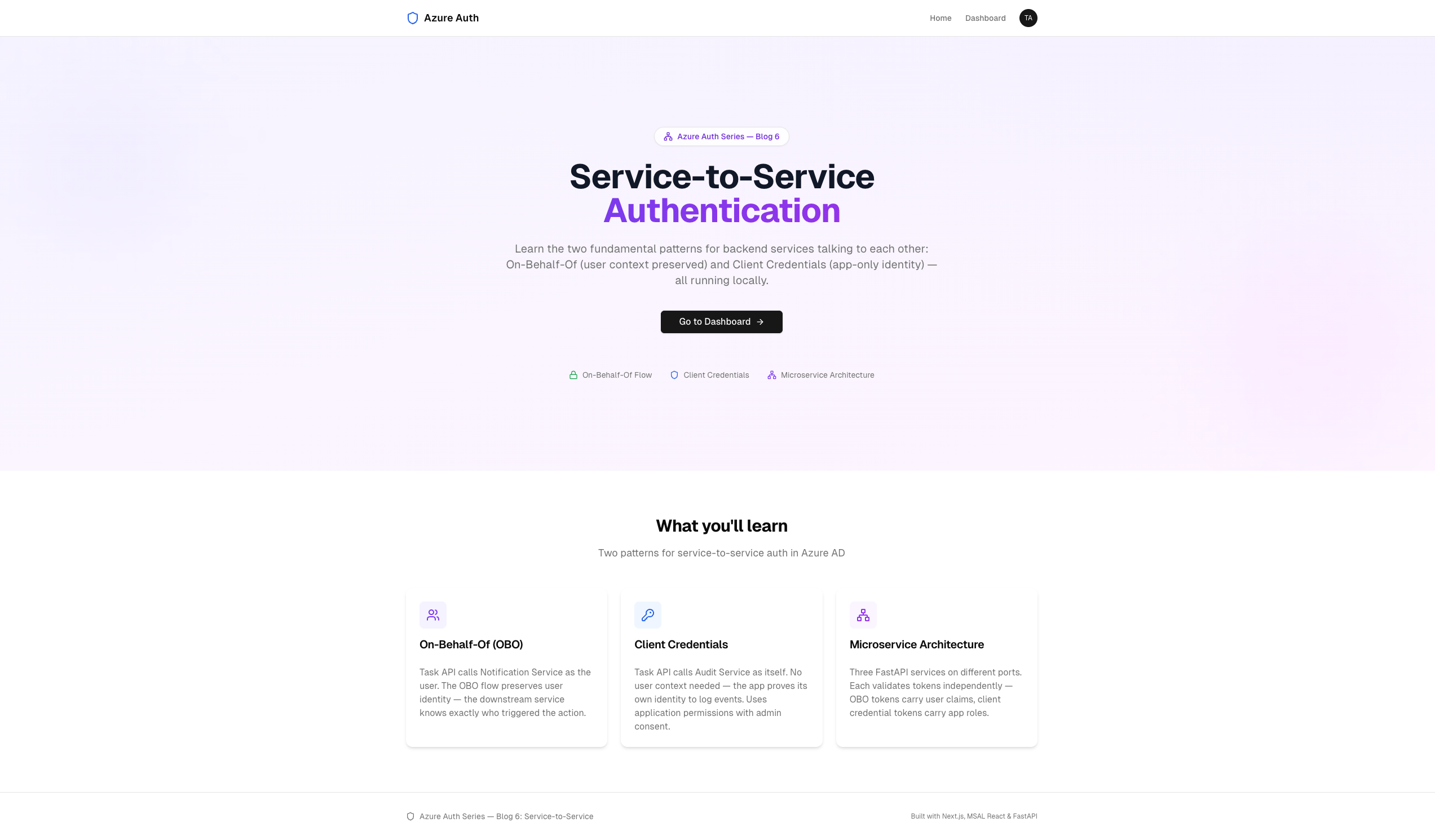 The landing page highlights the two S2S patterns and microservice architecture
Admin dashboard — newly created tasks show "Notify: sent" and "Audit: logged" badges:
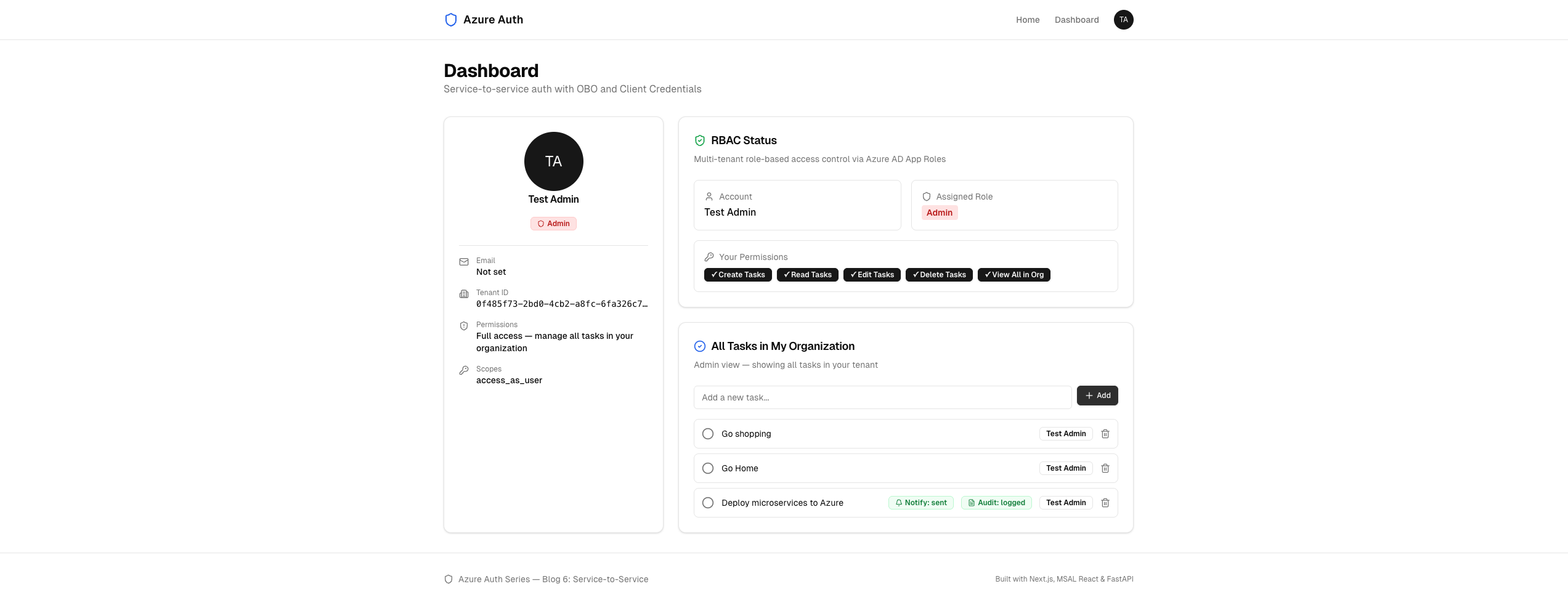 When a task is created, the OBO and CC calls fire — status badges confirm both services responded
OBO vs Client Credentials: When to Use Which#
Before diving into code, understand the two patterns:
On-Behalf-Of (OBO):
  "Task API, please call Notification as ME (the user)"

  User token → Task API → MSAL OBO → Notification Service
  The notification knows: "John Doe created a task"
  Token has: oid, name, preferred_username, tid

Client Credentials (CC):
  "Task API, please call Audit as YOURSELF (the app)"

  No user token needed → Task API → MSAL CC → Audit Service
  The audit knows: "Task API logged an event"
  Token has: roles=["AuditLog.Write"], appid, tid
| On-Behalf-Of | Client Credentials | |
|---|---|---|
| Identity | User (delegated) | App (application) |
| MSAL method | acquire_token_on_behalf_of() | acquire_token_for_client() |
| Input | User's access token | Client secret only |
| Authority | Tenant-specific (/{tid}) | Home tenant (/{home-tid}) |
| Token claims | oid, name, tid, scp | appid, tid, roles |
| Consent | User consent (delegated scope) | Admin consent (app role) |
| Use case | "Send notification to John" | "Log audit event from system" |
| Scope format | api://{app}/.default | api://{app}/.default |
Rule of thumb: Use OBO when the downstream service needs to know who the user is. Use CC when it only needs to know which app is calling.
Step 1: App Registrations — 4 Apps#
The setup script creates four app registrations:
1. Notification Service (AzureADMyOrg)
   → Exposes delegated scope: Notify.Send
   → Consumed via OBO (user context)

2. Audit Service (AzureADMyOrg)
   → Defines app role: AuditLog.Write
   → Consumed via Client Credentials (app-only)

3. Task API (AzureADMultipleOrgs)
   → Has client secret (required for OBO + CC)
   → Exposes scope: access_as_user
   → Defines App Roles: Admin, Editor, Reader
   → Requests permission to Notification + Audit

4. SPA Frontend (AzureADMultipleOrgs)
   → Requests permission to Task API scope
Key difference: The Task API now has a client secret. In previous blogs it was a public client. OBO and CC both require ConfidentialClientApplication — a secret proves the app's identity when exchanging tokens.
Permission Model#
SPA Frontend
  └─ Delegated: api://{task-api}/access_as_user

Task API
  ├─ Delegated: api://{notification}/Notify.Send
  │  (for OBO — user must consent)
  │
  └─ Application: api://{audit}/AuditLog.Write
     (for CC — admin must consent, no user involved)
The setup script also creates knownClientApplications on the Notification Service — this allows the SPA's consent dialog to include the Notification scope transitively, so the user doesn't get prompted twice.
Step 2: Task API Config — S2S Targets#
File: task-api/config.py
# ── Multi-Tenant Configuration (same as Blog 5) ────── HOME_TENANT_ID = os.getenv("AZURE_HOME_TENANT_ID", "") API_CLIENT_ID = os.getenv("AZURE_API_CLIENT_ID", "") AUDIENCE = f"api://{API_CLIENT_ID}" ALLOW_ANY_TENANT = os.getenv("ALLOW_ANY_TENANT", "false").lower() == "true" ALLOWED_TENANT_IDS: set[str] = { ... } ALLOWED_ORIGINS = os.getenv("ALLOWED_ORIGINS", "http://localhost:3000") # ── NEW in Blog 6: Service-to-Service Config ───────── # Client secret — required for OBO and client credentials flows API_CLIENT_SECRET = os.getenv("AZURE_API_CLIENT_SECRET", "") # Notification Service (OBO target) NOTIFICATION_CLIENT_ID = os.getenv("AZURE_NOTIFICATION_CLIENT_ID", "") NOTIFICATION_URL = os.getenv("NOTIFICATION_URL", "http://localhost:8001") # Audit Service (client credentials target) AUDIT_CLIENT_ID = os.getenv("AZURE_AUDIT_CLIENT_ID", "") AUDIT_URL = os.getenv("AUDIT_URL", "http://localhost:8002")
Three new config values: the client secret (for proving identity), and the client ID + URL for each downstream service.
Step 3: OBO — Calling Notification Service as the User#
This is the core of the OBO pattern. The Task API exchanges the user's token for a new token targeting the Notification Service.
File: task-api/obo_client.py
from msal import ConfidentialClientApplication from config import ( API_CLIENT_ID, API_CLIENT_SECRET, NOTIFICATION_CLIENT_ID, NOTIFICATION_URL, ) def _get_obo_app(tenant_id: str) -> ConfidentialClientApplication: """Create an MSAL confidential client for OBO in the user's tenant.""" return ConfidentialClientApplication( client_id=API_CLIENT_ID, client_credential=API_CLIENT_SECRET, authority=f"https://login.microsoftonline.com/{tenant_id}", ) async def notify_task_created( incoming_token: str, tenant_id: str, task: dict ) -> dict: """ Acquire an OBO token and call the Notification Service. Graceful failure — logs warning but doesn't block task creation. """ try: app = _get_obo_app(tenant_id) result = app.acquire_token_on_behalf_of( user_assertion=incoming_token, scopes=[f"api://{NOTIFICATION_CLIENT_ID}/.default"], ) if "access_token" not in result: error = result.get("error_description", "unknown") logger.warning("OBO token acquisition failed: %s", error) return {"status": "failed", "error": error} obo_token = result["access_token"] async with httpx.AsyncClient() as client: resp = await client.post( f"{NOTIFICATION_URL}/notify", json={ "event": "task_created", "task_title": task.get("title", ""), }, headers={"Authorization": f"Bearer {obo_token}"}, timeout=10.0, ) resp.raise_for_status() return resp.json() except Exception as e: logger.warning("Notification failed (non-blocking): %s", str(e)) return {"status": "failed", "error": str(e)}
How it works:
1. User's token arrives at Task API
   aud=api://{task-api}, scp=access_as_user

2. Task API calls MSAL:
   app.acquire_token_on_behalf_of(
     user_assertion = user's token,
     scopes = ["api://{notification}/.default"]
   )

3. MSAL sends to Entra ID:
   POST https://login.microsoftonline.com/{tid}/oauth2/v2.0/token
   grant_type=urn:ietf:params:oauth:grant-type:jwt-bearer
   assertion=<user's token>
   client_id=<task-api-id>
   client_secret=<task-api-secret>
   scope=api://{notification}/.default

4. Entra ID returns a NEW token:
   aud=api://{notification}
   oid=<same user>, name=<same user>, tid=<same tenant>
   ← User identity is PRESERVED

5. Task API sends OBO token to Notification Service
   Authorization: Bearer <obo-token>
Why per-tenant authority? The OBO flow happens in the user's tenant — the authority is /{tid}, not /organizations. Each tenant issues tokens with their own keys.
Step 4: Client Credentials — Calling Audit Service as the App#
The CC pattern is simpler — no user token involved, just the app proving its own identity.
File: task-api/service_client.py
from msal import ConfidentialClientApplication from config import ( API_CLIENT_ID, API_CLIENT_SECRET, HOME_TENANT_ID, AUDIT_CLIENT_ID, AUDIT_URL, ) # Reuse a single confidential client for client credentials _cc_app: ConfidentialClientApplication | None = None def _get_cc_app() -> ConfidentialClientApplication: """Get or create the MSAL confidential client for CC.""" global _cc_app if _cc_app is None: _cc_app = ConfidentialClientApplication( client_id=API_CLIENT_ID, client_credential=API_CLIENT_SECRET, authority=( f"https://login.microsoftonline.com/{HOME_TENANT_ID}" ), ) return _cc_app async def audit_log( action: str, resource_id: int, actor: str, tenant_id: str ) -> dict: """ Acquire a client credentials token and call the Audit Service. Graceful failure — logs warning but doesn't block. """ try: app = _get_cc_app() result = app.acquire_token_for_client( scopes=[f"api://{AUDIT_CLIENT_ID}/.default"], ) if "access_token" not in result: error = result.get("error_description", "unknown") logger.warning("CC token acquisition failed: %s", error) return {"status": "failed", "error": error} cc_token = result["access_token"] async with httpx.AsyncClient() as client: resp = await client.post( f"{AUDIT_URL}/audit", json={ "action": action, "resource_id": resource_id, "actor": actor, "tenant_id": tenant_id, }, headers={"Authorization": f"Bearer {cc_token}"}, timeout=10.0, ) resp.raise_for_status() return resp.json() except Exception as e: logger.warning("Audit logging failed (non-blocking): %s", str(e)) return {"status": "failed", "error": str(e)}
Key differences from OBO:
| OBO (Notification) | CC (Audit) |
|---|---|
_get_obo_app(tenant_id) — new app per tenant | _get_cc_app() — global singleton |
Authority: /{user's tenant} | Authority: /{home tenant} |
acquire_token_on_behalf_of(user_assertion=...) | acquire_token_for_client(scopes=...) |
| Token has user claims | Token has app role only |
Why singleton for CC? The authority is always the home tenant (app-to-app), so one MSAL instance works for all requests. OBO needs per-tenant instances because each user's tenant has a different authority.
Step 5: Task API — Wiring It Together#
The create_task endpoint now calls both downstream services after creating the task:
File: task-api/main.py
from obo_client import notify_task_created from service_client import audit_log def _extract_raw_token(request: Request) -> str: """Extract the raw Bearer token from the Authorization header.""" auth = request.headers.get("Authorization", "") if auth.startswith("Bearer "): return auth[7:] return "" @app.post("/api/tasks") async def create_task( task: dict, request: Request, claims: dict = Depends(require_role("Admin", "Editor")), ): tenant_id = claims.get("tid", "") user_id = claims.get("oid", "") user_name = claims.get("name", "Unknown") # ... create task in tenant store ... # ── Service-to-Service calls (non-blocking) ──── raw_token = _extract_raw_token(request) # 1. OBO → Notification Service (preserves user context) notification_result = await notify_task_created( raw_token, tenant_id, new_task ) # 2. Client Credentials → Audit Service (app identity only) audit_result = await audit_log( action="task_created", resource_id=new_task["id"], actor=user_name, tenant_id=tenant_id, ) return { **new_task, "notification_status": notification_result.get("status", "unknown"), "audit_status": audit_result.get("status", "unknown"), }
The raw token is extracted from the Authorization header — this is the user's original token that MSAL uses as the user_assertion in the OBO flow. The CC flow doesn't need it.
Delete also calls audit:
@app.delete("/api/tasks/{task_id}") async def delete_task( task_id: int, request: Request, claims: dict = Depends(require_role("Admin")), ): # ... delete task ... # Audit the deletion (client credentials — app identity) audit_result = await audit_log( action="task_deleted", resource_id=task_id, actor=claims.get("name", "Unknown"), tenant_id=claims.get("tid", ""), ) return { "status": "deleted", "audit_status": audit_result.get("status", "unknown"), }
Step 6: Notification Service — OBO Token Consumer#
The Notification Service accepts tokens acquired via the OBO flow. These tokens contain user context.
File: notification-service/main.py
@app.post("/notify") async def notify(body: dict, claims: dict = Depends(validate_token)): """ Receive a notification triggered via OBO flow. The token contains user context (oid, name, tid) because it was acquired on-behalf-of the signed-in user. """ user_name = claims.get("name", "Unknown User") user_email = claims.get("preferred_username", "") user_oid = claims.get("oid", "") tenant_id = claims.get("tid", "") event = body.get("event", "unknown") task_title = body.get("task_title", "") notification = { "id": len(notifications) + 1, "event": event, "task_title": task_title, "to": user_name, "email": user_email, "user_oid": user_oid, "tenant_id": tenant_id, "timestamp": datetime.now(timezone.utc).isoformat(), } notifications.append(notification) logger.info( "Notification sent — event=%s, to=%s (%s), tenant=%s", event, user_name, user_email, tenant_id, ) return { "status": "sent", "to": user_name, "event": event, "task_title": task_title, }
The point: The Notification Service knows who triggered the notification — it reads name, preferred_username, and oid from the OBO token. This is the same user who signed into the frontend. The identity flowed through: User → Frontend → Task API → (OBO) → Notification Service.
Its validate_token (in auth.py) is the same multi-tenant JWKS validation from Blog 5, with audience=api://{notification-client-id}.
Step 7: Audit Service — Client Credentials Consumer#
The Audit Service accepts app-only tokens. There's no user context — only the calling app's identity.
File: audit-service/main.py
@app.post("/audit") async def create_audit_entry( body: dict, claims: dict = Depends(validate_app_token) ): """ Record an audit event. Called via client credentials flow. The token is app-only — no user context, just the calling app's identity. """ caller_app_id = claims.get("azp", claims.get("appid", "unknown")) caller_tenant = claims.get("tid", "") entry = { "id": len(audit_log) + 1, "action": body.get("action", "unknown"), "resource_id": body.get("resource_id"), "actor": body.get("actor", "system"), "tenant_id": body.get("tenant_id", caller_tenant), "caller_app_id": caller_app_id, "timestamp": datetime.now(timezone.utc).isoformat(), } audit_log.append(entry) return {"status": "logged", "audit_id": entry["id"]}
App-Only Token Validation#
The Audit Service's validate_app_token has one key difference from the Notification Service's validate_token — it checks for an application role instead of user claims:
File: audit-service/auth.py
async def validate_app_token( credentials: HTTPAuthorizationCredentials = Depends(security), ) -> dict: """ Validate app-only Bearer token (client credentials flow). Expects `roles` claim (application permissions), NOT `scp` (delegated). """ # ... standard JWKS validation (same as Notification) ... # Verify this is an app-only token with the required role roles = claims.get("roles", []) if "AuditLog.Write" not in roles: raise HTTPException( status_code=status.HTTP_403_FORBIDDEN, detail=f"Missing required application role: AuditLog.Write. " f"Token roles: {roles}", ) return claims
OBO tokens have scp (scopes). CC tokens have roles. The Audit Service checks for the AuditLog.Write role — this was assigned to the Task API's service principal via admin consent in the setup script.
Step 8: Verifying the Calls — Terminal Logs#
The frontend shows "Notify: sent" and "Audit: logged" badges on each task, but you can also verify the service-to-service calls by watching the terminal output of each service.
When you create a task, you'll see logs in the Notification Service terminal (port 8001):
INFO:     127.0.0.1:52340 - "POST /notify HTTP/1.1" 200 OK
INFO:main:Notification sent — event=task_created,
  to=John Doe (john@contoso.com), tenant=0f485f73-...
And in the Audit Service terminal (port 8002):
INFO:     127.0.0.1:52341 - "POST /audit HTTP/1.1" 200 OK
INFO:main:Audit logged — action=task_created, resource=5,
  actor=John Doe, caller_app=f831278f-95dc-...
Notice the difference: the Notification Service logs the user's name and email (from the OBO token), while the Audit Service logs the caller app ID (from the CC token). This is the fundamental distinction — OBO preserves user identity, CC proves app identity.
The Complete Token Journey#
User signs in (browser)
  │
  │  Token A: aud=api://{task-api}
  │           scp=access_as_user
  │           oid=user-123, name=John Doe
  │
  ▼
Task API receives Token A
  │
  ├── OBO Exchange ──────────────────────┐
  │  MSAL sends Token A to Entra ID     │
  │  "Give me a token for Notification   │
  │   on behalf of this user"            │
  │                                       │
  │  Token B: aud=api://{notification}   │
  │           scp=Notify.Send            │
  │           oid=user-123, name=John ◄──┘
  │           (same user!)
  │
  │  POST /notify with Token B
  │  Notification Service → "John created a task"
  │
  ├── CC Exchange ───────────────────────┐
  │  MSAL sends client_id + secret      │
  │  "Give me a token for Audit          │
  │   as the Task API app"               │
  │                                       │
  │  Token C: aud=api://{audit}          │
  │           roles=["AuditLog.Write"]   │
  │           appid={task-api-id} ◄──────┘
  │           (no user!)
  │
  │  POST /audit with Token C
  │  Audit Service → "Task API logged an event"
  │
  ▼
Response: {task, notification_status: "sent", audit_status: "logged"}
Three tokens, three audiences, two identity models. Token A is the user's token for Task API. Token B is the user's token (via OBO) for Notification. Token C is the app's token for Audit.
Running the App#
1. Register the Apps#
az login ./setup.sh
This creates 4 app registrations, 3 test users, role assignments, and admin consent for the CC flow.
2. Start All Three Services#
Open three terminal windows:
Terminal 1 — Task API (port 8000):
cd task-api python -m venv .venv && source .venv/bin/activate pip install -r requirements.txt uvicorn main:app --reload --port 8000
Terminal 2 — Notification Service (port 8001):
cd notification-service python -m venv .venv && source .venv/bin/activate pip install -r requirements.txt uvicorn main:app --reload --port 8001
Terminal 3 — Audit Service (port 8002):
cd audit-service python -m venv .venv && source .venv/bin/activate pip install -r requirements.txt uvicorn main:app --reload --port 8002
3. Start the Frontend#
cd frontend npm install npm run dev
4. Test the Flow#
- Open http://localhost:3000 and sign in
- Navigate to Dashboard
- Create a task — you should see "Notify: sent" and "Audit: logged" badges
- Watch the Notification Service terminal — it logs the user's name and email
- Watch the Audit Service terminal — it logs the caller app ID and action
Cleanup#
./cleanup.sh
Common Pitfalls#
1. "AADSTS50013: Assertion failed signature validation" in OBO#
The incoming token's audience doesn't match the Task API's client ID, or the client secret is wrong.
Fix: Ensure AZURE_API_CLIENT_ID and AZURE_API_CLIENT_SECRET in task-api/.env are correct. The OBO user_assertion must be a token issued for the Task API's audience.
2. "AADSTS7000215: Invalid client secret" in CC#
The client secret has expired or doesn't match.
Fix: Regenerate the secret via az ad app credential reset --id {app-id} and update task-api/.env.
3. OBO Fails but CC Works (or vice versa)#
OBO requires user consent for delegated scopes. CC requires admin consent for application permissions. They're different consent models.
Fix for OBO: The user must consent to the Notify.Send scope. The knownClientApplications setting on the Notification Service allows the SPA to request this transitively.
Fix for CC: Run az ad app permission admin-consent --id {task-api-id} to grant the AuditLog.Write application role.
4. "Notification failed (non-blocking)" in Task API Logs#
The Notification Service isn't running, or its port doesn't match NOTIFICATION_URL in Task API's .env.
Fix: Start the Notification Service on port 8001 and verify NOTIFICATION_URL=http://localhost:8001 in task-api/.env.
5. Audit Service Returns 403 "Missing required application role"#
The Task API's service principal hasn't been granted the AuditLog.Write role.
Fix: The setup script handles this via appRoleAssignments. If you're setting up manually, assign the role via Azure Portal → Enterprise Applications → Audit Service → App role assignments.
What's Next#
In Blog 7: API Gateway, we'll:
- Put Azure API Management in front of all three services
- Centralize JWT validation — validate once at the gateway, forward claims as headers
- Add rate limiting — 100 requests per minute per user, enforced at the gateway
- Deploy everything with Terraform — APIM + Container Apps + ACR in one
terraform apply
Service-to-service auth gives you the building blocks. An API gateway makes them production-ready.
Conclusion#
You've built a microservice architecture with two service-to-service auth patterns:
- On-Behalf-Of (OBO) — preserves user identity across service boundaries. The Notification Service knows exactly who triggered the action — same
oid,name, andtidfrom the original user token. - Client Credentials (CC) — proves app identity without user context. The Audit Service validates the
AuditLog.Writeapplication role — it only cares that the Task API is a trusted caller. - ConfidentialClientApplication — MSAL class that uses a client secret for both OBO and CC flows
- Per-tenant OBO authority — each user's OBO exchange happens against their own tenant
- Singleton CC authority — client credentials always use the home tenant
- Graceful failure — downstream call failures don't block task creation
- Independent token validation — each service validates tokens against its own audience and expected claims
The three tokens (user → Task API → Notification / Audit) demonstrate the full spectrum of Azure AD token flows: delegated user access, delegated on-behalf-of, and application-only credentials.
Resources#
- Source Code: GitHub — azure_auth_series/06_service_to_service
- Blog 5: Multi-Tenant Authentication
- Microsoft — OBO Flow: On-Behalf-Of Flow
- Microsoft — Client Credentials: Client Credentials Flow
- MSAL Python: ConfidentialClientApplication
- Microsoft — Application Permissions: App Roles
Happy building!