Azure Auth Series — Blog 5: Multi-Tenant Authentication#
In Blogs 1–4, the app only accepted users from your Azure AD tenant. If someone from another organization tried to sign in, they'd get rejected. That's fine for internal tools, but what about SaaS products? What about apps that serve multiple companies?
In this blog, we'll make the app multi-tenant — users from any Azure AD organization can sign in:
- 🌐 Authority changes to
/organizations— MSAL allows any Azure AD tenant - 🔑 Dynamic JWKS validation — each tenant has its own signing keys at a different endpoint
- 📋 Tenant allow-list — control which organizations can access your app
- 🏢 Per-tenant data isolation — tasks are nested by tenant ID, not just user ID
- 🛡️ Admin scope is tenant-bound — Admins see all tasks in their org, never across tenants
The RBAC system from Blog 3 stays intact. The only changes are: how we validate tokens (dynamic per tenant) and how we store data (nested by tenant).
The Azure Auth Series#
| Blog | Topic | What You'll Learn |
|---|---|---|
| 1. Basic Login | Frontend auth | Sign in with Microsoft Entra ID |
| 2. Protected API | Backend auth | Build a FastAPI backend that validates tokens |
| 3. RBAC | Authorization | Control access based on user roles |
| 4. Managed Identity | Zero secrets | Deploy to Azure without storing credentials |
| 5. Multi-Tenant | You are here | Let users from any org sign in |
| 6. Service-to-Service | OBO + Client Credentials | Authenticate services to each other |
| 7. API Gateway | APIM | Centralize auth with Azure API Management |
What We're Building#
Architecture#
Tenant A user signs in
   → Entra ID issues JWT with tid="aaa-..."
   → JWKS fetched from login.microsoftonline.com/aaa-.../keys

Tenant B user signs in
   → Entra ID issues JWT with tid="bbb-..."
   → JWKS fetched from login.microsoftonline.com/bbb-.../keys

Both tokens validated by the SAME backend
   → Dynamic issuer: sts.windows.net/{tid}/
   → Dynamic JWKS: per-tenant key cache
   → Same audience: api://{your-app-id}
+-----------------------------------------------------------+
|  FastAPI Backend                                          |
|                                                           |
|  1. Peek at unverified token → extract tid                |
|  2. Check tenant allow-list                               |
|  3. Fetch JWKS for that tenant (cached)                   |
|  4. Verify signature + issuer + audience                  |
|  5. Route to tenant-isolated data store                   |
|                                                           |
|  tasks_db = {                                             |
|    "tenant-aaa": {                                        |
|      "user-1": [task, task],                              |
|      "user-2": [task],                                    |
|    },                                                     |
|    "tenant-bbb": {                                        |
|      "user-3": [task, task, task],                        |
|    },                                                     |
|  }                                                        |
+-----------------------------------------------------------+
What Changed from Blog 3/4#
| Blog 3/4 (Single-Tenant) | Blog 5 (Multi-Tenant) |
|---|---|
Authority: /{tenant-id} | Authority: /organizations |
| One JWKS endpoint | Dynamic JWKS per tenant |
| Hardcoded issuer | Dynamic issuer from tid claim |
| No tenant gating | Configurable allow-list |
tasks_db[user_id] | tasks_db[tenant_id][user_id] |
| Admin sees all tasks globally | Admin sees all tasks in their org |
signInAudience: AzureADMyOrg | signInAudience: AzureADMultipleOrgs |
Live Demo#
Landing page — "Any Azure AD organization can sign in":
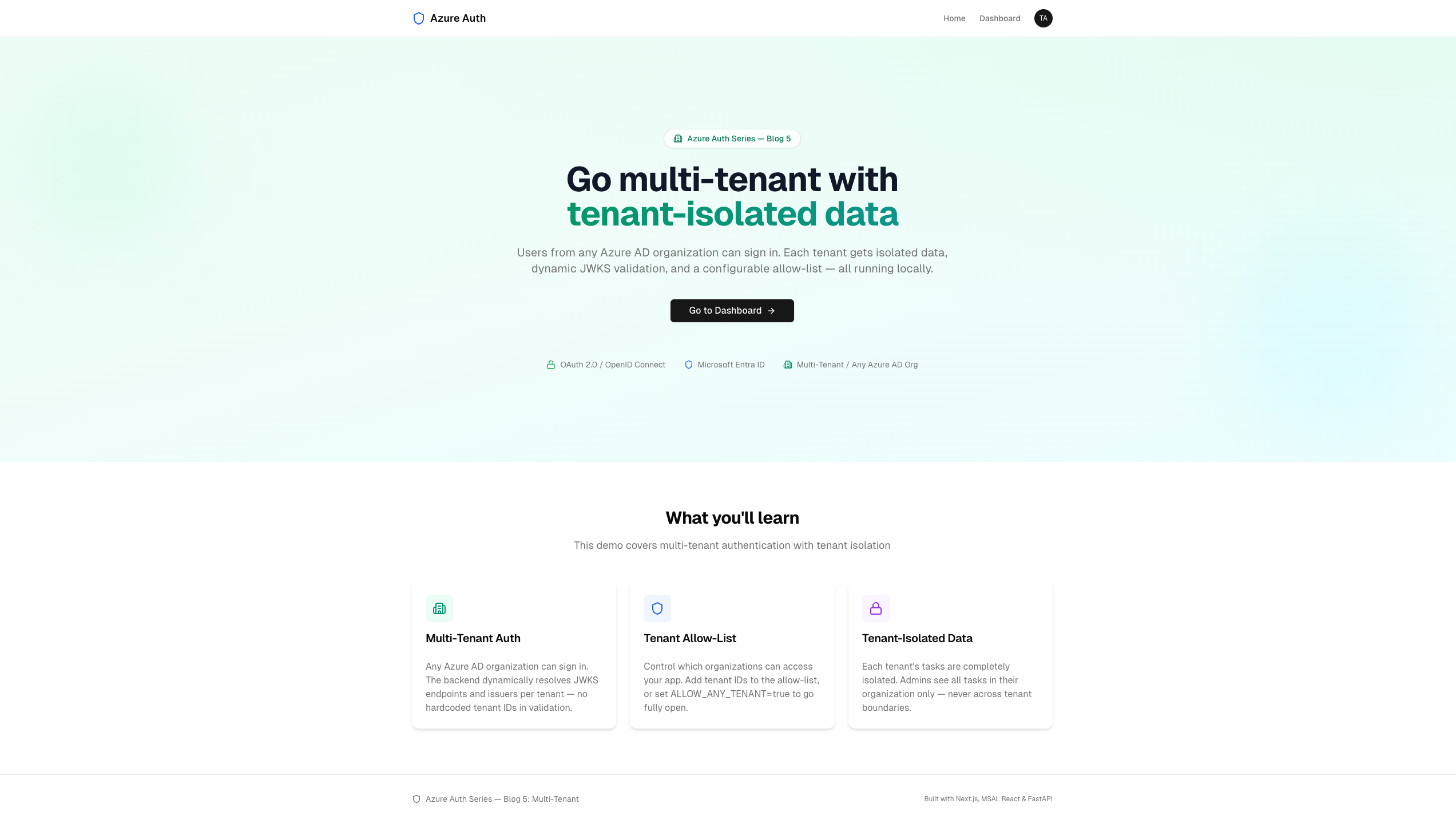 The landing page highlights multi-tenant auth, tenant allow-list, and tenant-isolated data
Admin dashboard — Tenant ID visible, "All Tasks in My Organization":
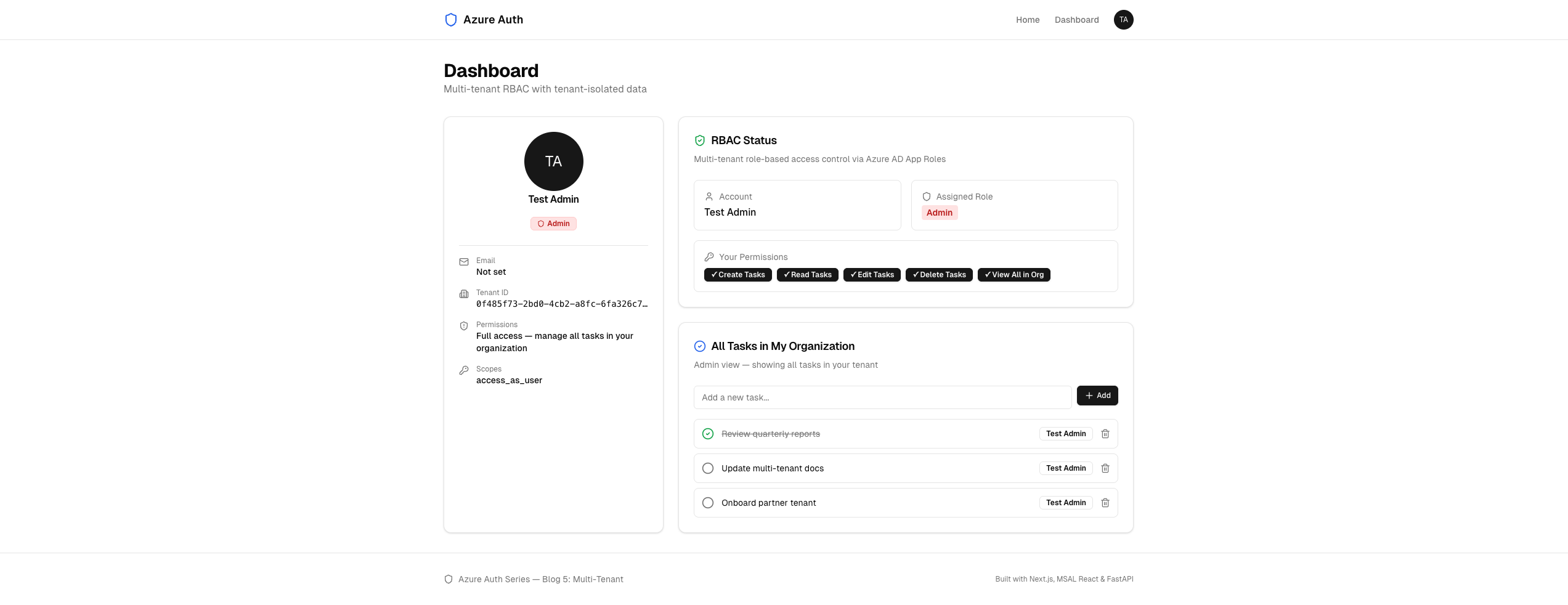 Admin sees tenant ID in the profile card, and "All Tasks in My Organization" scoped to their tenant
How Multi-Tenant Auth Works#
In single-tenant mode, the MSAL authority is login.microsoftonline.com/{your-tenant-id}. Only users from that tenant can sign in, and the backend validates against one JWKS endpoint and one issuer.
In multi-tenant mode:
1. Frontend MSAL authority: /organizations
   → Any Azure AD user can authenticate

2. User signs in → Entra ID returns a JWT
   The token includes: tid = "their-tenant-id"

3. Backend receives the token
   → Peek at unverified claims to get tid
   → Check: is this tenant on the allow-list?
   → Fetch JWKS from that tenant's endpoint
   → Verify with dynamic issuer

4. Data is stored under the tenant's namespace
   → Tenant A can never see Tenant B's data
Why can't we use one JWKS endpoint? Each Azure AD tenant has its own signing keys. A token from Tenant A is signed with Tenant A's private key. To verify it, you need Tenant A's public key from Tenant A's JWKS endpoint.
Step 1: App Registration — AzureADMultipleOrgs#
The setup script creates both app registrations with multi-tenant audience:
File: setup.sh (key difference)
# Single-tenant (Blog 3/4): az ad app create --display-name "Blog3-API" # signInAudience defaults to AzureADMyOrg # Multi-tenant (Blog 5): az ad app create \ --display-name "Blog5-MT-API" \ --sign-in-audience AzureADMultipleOrgs
Both the API and SPA registrations use AzureADMultipleOrgs. This tells Entra ID to issue tokens for users from any Azure AD tenant, not just your own.
The App Roles (Admin/Editor/Reader) are defined the same way as Blog 3. Role assignments work per-tenant — each tenant's admin assigns roles to their users on the service principal in their tenant.
Step 2: Frontend — Authority /organizations#
One line changes in the MSAL config:
File: frontend/src/config/auth-config.ts
export const msalConfig: Configuration = { auth: { clientId: process.env.NEXT_PUBLIC_AZURE_CLIENT_ID || "", authority: "https://login.microsoftonline.com/organizations", redirectUri: "/", postLogoutRedirectUri: "/", navigateToLoginRequestUrl: false, }, // ... cache and logger config unchanged };
| Authority | Who Can Sign In |
|---|---|
/{tenant-id} | Only users from that specific tenant |
/organizations | Any Azure AD work/school account |
/common | Azure AD accounts + personal Microsoft accounts |
/consumers | Personal Microsoft accounts only |
We use /organizations (not /common) because App Roles only work with Azure AD organizational accounts, not personal accounts.
No NEXT_PUBLIC_AZURE_TENANT_ID needed — the frontend doesn't pin to any tenant. The tenant ID comes from the token at runtime.
Step 3: Backend Config — Tenant Allow-List#
File: backend/config.py
import os import logging from dotenv import load_dotenv load_dotenv() logger = logging.getLogger(__name__) # Home tenant (your own Azure AD tenant — used for setup reference only) HOME_TENANT_ID = os.getenv("AZURE_HOME_TENANT_ID", "") # API app registration (same client ID works for all tenants) API_CLIENT_ID = os.getenv("AZURE_API_CLIENT_ID", "") AUDIENCE = f"api://{API_CLIENT_ID}" # ── Tenant Allow-List ──────────────────────────────── # Comma-separated list of tenant IDs that are allowed. # Set ALLOW_ANY_TENANT=true to skip the check. ALLOW_ANY_TENANT = os.getenv("ALLOW_ANY_TENANT", "false").lower() == "true" _raw_tenants = os.getenv("ALLOWED_TENANT_IDS", HOME_TENANT_ID) ALLOWED_TENANT_IDS: set[str] = { t.strip() for t in _raw_tenants.split(",") if t.strip() } if ALLOW_ANY_TENANT: logger.info("ALLOW_ANY_TENANT=true — accepting tokens from any Azure AD tenant") else: logger.info("Allowed tenants: %s", ALLOWED_TENANT_IDS) # ── CORS ───────────────────────────────────────────── ALLOWED_ORIGINS = os.getenv("ALLOWED_ORIGINS", "http://localhost:3000")
Two modes:
| Mode | Config | Behavior |
|---|---|---|
| Allow-list | ALLOWED_TENANT_IDS=aaa,bbb | Only listed tenants can access |
| Open | ALLOW_ANY_TENANT=true | Any Azure AD org can access |
The .env file starts with only your home tenant allowed. To onboard another organization, add their tenant ID to ALLOWED_TENANT_IDS.
Step 4: Backend — Dynamic Token Validation#
This is the core change. The validate_token function now handles tokens from any tenant:
File: backend/auth.py
from config import AUDIENCE, ALLOWED_TENANT_IDS, ALLOW_ANY_TENANT # ── Per-tenant JWKS cache ──────────────────────────── # In single-tenant we cached one JWKS. Now we cache per tenant ID. _jwks_cache: dict[str, dict] = {} async def _get_jwks(tenant_id: str) -> dict: """Fetch (and cache) the JWKS for a specific tenant.""" if tenant_id not in _jwks_cache: url = ( f"https://login.microsoftonline.com" f"/{tenant_id}/discovery/v2.0/keys" ) async with httpx.AsyncClient() as client: resp = await client.get(url) resp.raise_for_status() _jwks_cache[tenant_id] = resp.json() return _jwks_cache[tenant_id] def _check_tenant_allowed(tenant_id: str) -> None: """Raise 403 if the tenant is not on the allow-list.""" if ALLOW_ANY_TENANT: return if tenant_id not in ALLOWED_TENANT_IDS: raise HTTPException( status_code=status.HTTP_403_FORBIDDEN, detail=f"Tenant {tenant_id} is not allowed " f"to access this application", )
Single-tenant vs multi-tenant JWKS:
Single-tenant (Blog 3):
  JWKS_URI = login.microsoftonline.com/{YOUR_TENANT}/keys
  _jwks_cache = { ... }  ← one global cache

Multi-tenant (Blog 5):
  JWKS_URI = login.microsoftonline.com/{TOKEN_TID}/keys
  _jwks_cache = {
    "tenant-aaa": { ... },
    "tenant-bbb": { ... },
  }  ← per-tenant cache
The Validation Flow#
async def validate_token( credentials: HTTPAuthorizationCredentials = Depends(security), ) -> dict: token = credentials.credentials # 1. Peek at unverified header + claims unverified_header = jwt.get_unverified_header(token) unverified_claims = jwt.get_unverified_claims(token) tenant_id = unverified_claims.get("tid", "") if not tenant_id: raise HTTPException( status_code=status.HTTP_401_UNAUTHORIZED, detail="Token missing tenant ID (tid) claim", ) # 2. Gate: is this tenant allowed? _check_tenant_allowed(tenant_id) # 3. Fetch JWKS for this specific tenant jwks = await _get_jwks(tenant_id) rsa_key = _find_rsa_key(jwks, unverified_header.get("kid", "")) if rsa_key is None: # Key might have rotated — clear cache and retry _jwks_cache.pop(tenant_id, None) jwks = await _get_jwks(tenant_id) rsa_key = _find_rsa_key(jwks, unverified_header.get("kid", "")) if rsa_key is None: raise HTTPException( status_code=status.HTTP_401_UNAUTHORIZED, detail="Unable to find signing key", ) # 4. Verify — dynamic issuer per tenant expected_issuer = f"https://sts.windows.net/{tenant_id}/" claims = jwt.decode( token, rsa_key, algorithms=["RS256"], audience=AUDIENCE, issuer=expected_issuer, ) return claims
Step-by-step:
Token arrives: eyJhbGciOiJSUzI1NiIsImtpZCI6Ijk4...
    │
    ▼
1. Peek (unverified) → kid="98ab...", tid="aaa-..."
    │
    ▼
2. Is "aaa-..." in ALLOWED_TENANT_IDS?
    │ ✓ Yes (or ALLOW_ANY_TENANT=true)
    ▼
3. Fetch JWKS from
   login.microsoftonline.com/aaa-.../keys
   Find RSA key where kid="98ab..."
    │
    ▼
4. jwt.decode(
     token, rsa_key,
     audience="api://{app-id}",
     issuer="https://sts.windows.net/aaa-.../"
   )
    │ ✓ Signature, audience, issuer, expiry all valid
    ▼
5. Return verified claims
Why peek at unverified claims? We need the tid (tenant ID) before we can verify the token, because the JWKS endpoint and expected issuer depend on it. This is safe — we only use tid to determine which public key to verify against. The actual verification happens in step 4 with jwt.decode().
Step 5: Backend — Tenant-Isolated Data Store#
The task store is now nested: tenant_id → user_id → tasks.
File: backend/main.py
# Structure: { tenant_id: { user_id: [tasks] } } tasks_db: dict[str, dict[str, list[dict]]] = {} def _get_tenant_store(tenant_id: str) -> dict[str, list[dict]]: """Get or create the task store for a specific tenant.""" if tenant_id not in tasks_db: tasks_db[tenant_id] = {} return tasks_db[tenant_id]
Read Tasks — Tenant-Scoped#
@app.get("/api/tasks") async def get_tasks( claims: dict = Depends(require_role("Admin", "Editor", "Reader")), ): """Get tasks. Admin sees all in their tenant, others see own.""" tenant_id = claims.get("tid", "") user_id = claims.get("oid", "") roles = get_user_roles(claims) tenant_store = _get_tenant_store(tenant_id) if "Admin" in roles: # Admin sees all tasks — but only within their tenant all_tasks = [] for owner_id, user_tasks in tenant_store.items(): for task in user_tasks: all_tasks.append({**task, "owner_id": owner_id}) return all_tasks return tenant_store.get(user_id, [])
The critical difference from Blog 3: In Blog 3, Admin saw all tasks across all users globally. Now Admin sees all tasks within their tenant only. An Admin from Tenant A can never see Tenant B's data.
Create Task — Tagged with Tenant#
@app.post("/api/tasks") async def create_task( task: dict, claims: dict = Depends(require_role("Admin", "Editor")), ): tenant_id = claims.get("tid", "") user_id = claims.get("oid", "") tenant_store = _get_tenant_store(tenant_id) if user_id not in tenant_store: tenant_store[user_id] = [] new_task = { "id": _next_id(), "title": task.get("title", ""), "completed": False, "owner_name": claims.get("name", "Unknown"), "tenant_id": tenant_id, } tenant_store[user_id].append(new_task) return new_task
Delete Task — Tenant-Scoped#
@app.delete("/api/tasks/{task_id}") async def delete_task( task_id: int, claims: dict = Depends(require_role("Admin")), ): """Delete any task within the admin's tenant.""" tenant_id = claims.get("tid", "") tenant_store = _get_tenant_store(tenant_id) for user_id, user_tasks in tenant_store.items(): tenant_store[user_id] = [ t for t in user_tasks if t["id"] != task_id ] return {"status": "deleted"}
Every endpoint now starts with tenant_id = claims.get("tid", "") and scopes all data operations to that tenant.
Step 6: Frontend — Tenant Info in Dashboard#
The dashboard now displays the tenant ID and uses org-scoped language:
// Profile card shows Tenant ID <div className="flex items-start gap-3 min-w-0"> <Building2 className="mt-0.5 h-4 w-4 shrink-0 text-muted-foreground" /> <div className="min-w-0"> <p className="text-xs text-muted-foreground">Tenant ID</p> <p className="truncate text-sm font-mono font-medium"> {profile?.tenant_id || "Unknown"} </p> </div> </div>
// Admin sees "All Tasks in My Organization" <CardTitle> {isAdmin ? "All Tasks in My Organization" : "My Tasks"} </CardTitle> <CardDescription> {isAdmin ? "Admin view — showing all tasks in your tenant" : canCreate ? "Create and manage your own tasks" : "Read-only view of your tasks"} </CardDescription>
The permission badge also changes from "View All Users" to "View All in Org" — reflecting that Admin access is now organization-scoped, not global.
Step 7: Onboarding Other Tenants#
The setup script generates an admin consent URL for onboarding new organizations:
CONSENT_URL="https://login.microsoftonline.com/organizations/adminconsent?client_id=$API_APP_ID"
Onboarding flow:
1. Share the admin consent URL with the other org's IT admin

2. They open the URL → Azure shows a consent dialog
   "This app wants to access your organization's data"

3. The admin clicks "Accept"
   → Creates a service principal for your app in their tenant
   → Their users can now sign in

4. You add their tenant ID to ALLOWED_TENANT_IDS
   in your backend/.env

5. Their admin assigns App Roles to their users
   via Azure Portal → Enterprise Applications → Your app
After onboarding, users from the new tenant sign in with their own credentials, get tokens with their own tid, and the backend validates against their tenant's JWKS. Their data is isolated in tasks_db["their-tenant-id"].
Running the App#
1. Register the Apps#
az login ./setup.sh
The script outputs the admin consent URL and test account credentials:
   Test accounts (home tenant):
   ┌──────────────────────────────────────────────┐
   │ Role    │ Username              │ Password    │
   ├──────────────────────────────────────────────┤
   │ Admin   │ testuser-admin@...    │ SecureP@ss  │
   │ Editor  │ testuser-editor@...   │ SecureP@ss  │
   │ Reader  │ testuser-reader@...   │ SecureP@ss  │
   └──────────────────────────────────────────────┘

   Admin consent URL (for onboarding other tenants):
   https://login.microsoftonline.com/organizations/adminconsent?client_id=...
2. Start the Backend#
cd backend python -m venv .venv && source .venv/bin/activate pip install -r requirements.txt uvicorn main:app --reload
3. Start the Frontend#
cd frontend npm install npm run dev
4. Test#
- Sign in as Admin → see "All Tasks in My Organization"
- Create tasks → they're stored under your tenant's namespace
- Sign in as Editor/Reader → same RBAC behavior as Blog 3
- To test cross-tenant: share the consent URL with another org, add their tenant ID to
ALLOWED_TENANT_IDS, and have their users sign in
Cleanup#
./cleanup.sh
Common Pitfalls#
1. "Tenant is not allowed to access this application"#
The user's tenant ID isn't in ALLOWED_TENANT_IDS.
Fix: Add their tenant ID to the comma-separated list in backend/.env. Or set ALLOW_ANY_TENANT=true if you want open access.
2. "Unable to find signing key" for External Tenant#
The JWKS cache might have stale data, or the tenant's keys rotated.
Fix: The code already handles this — it clears the cache and retries once. If it still fails, check that the tenant ID is a valid Azure AD tenant (not a B2C directory).
3. External Users Have No Roles#
App Roles must be assigned per-tenant. Your role assignments don't carry over to other tenants.
Fix: The external tenant's admin must assign roles to their users via Azure Portal → Enterprise Applications → your app → Users and groups.
4. "AADSTS50020: User account from identity provider does not exist in tenant"#
The user is trying to sign in but the service principal doesn't exist in their tenant.
Fix: The external tenant's admin must complete the admin consent flow first (using the consent URL from setup.sh).
5. Admin Sees Tasks from Other Tenants#
This shouldn't happen with the Blog 5 code. If it does, the data store isn't properly scoped by tid.
Fix: Verify that all endpoints use _get_tenant_store(tenant_id) and never access tasks_db directly.
Security Considerations#
Peeking at Unverified Claims#
We read tid from the unverified token to know which JWKS endpoint to call. Is this safe?
Yes, because:
- We only use the unverified
tidto select the JWKS endpoint - The actual verification (
jwt.decode) checks the signature against those keys - If someone forges a
tid, the signature won't match the real tenant's keys - The
issuercheck provides a second layer — it must matchsts.windows.net/{tid}/
An attacker can't claim to be Tenant A by putting tid="aaa" in a forged token — the signature verification will fail because they don't have Tenant A's private key.
Cross-Tenant Data Leaks#
Every data operation is scoped by tenant_id = claims.get("tid", ""). The tid comes from the verified claims (after jwt.decode), not the unverified peek. So the tenant scoping is cryptographically guaranteed.
Tenant Allow-List vs Open Access#
| Approach | Use Case | Risk |
|---|---|---|
| Allow-list | B2B SaaS, known partners | Low — only approved orgs |
Open (ALLOW_ANY_TENANT=true) | Public SaaS, marketplace app | Higher — any org can sign in |
For most B2B scenarios, use the allow-list. Only go open if you have additional controls (billing, onboarding workflow, etc.).
What's Next#
In Blog 6: Service-to-Service, we'll:
- Implement On-Behalf-Of (OBO) — call downstream services while preserving user identity
- Use Client Credentials — app-to-app calls with no user context
- Build a microservice architecture with three independently secured FastAPI services
- Mix B2B (organizational) and B2C (consumer) auth in one app
Multi-tenant handles organizations. B2C handles individual consumers — a different identity model entirely.
Conclusion#
You've built a multi-tenant authentication system with Microsoft Entra ID:
AzureADMultipleOrgs— app registrations accept users from any Azure AD tenant- Authority
/organizations— MSAL allows any organizational account to sign in - Dynamic JWKS — each tenant's signing keys fetched and cached independently
- Dynamic issuer —
sts.windows.net/{tid}/derived from the token's tenant ID - Tenant allow-list — configurable gating with
ALLOWED_TENANT_IDSorALLOW_ANY_TENANT - Per-tenant data isolation — nested store
{tenant_id: {user_id: [tasks]}} - Org-scoped Admin — "All Tasks in My Organization", never cross-tenant
- Admin consent URL — one-click onboarding for external organizations
The RBAC system (Admin/Editor/Reader) works exactly the same within each tenant. Multi-tenancy adds the tenant dimension — every token is validated against the right keys, every data operation is scoped to the right tenant, and no organization can see another's data.
Resources#
- Source Code: GitHub — azure_auth_series/05_multi_tenant
- Blog 3: RBAC with Azure AD App Roles
- Blog 4: Managed Identity & Key Vault
- Microsoft — Multi-Tenant Apps: Tenancy in Azure AD
- Microsoft — Admin Consent: Admin Consent Endpoint
- Microsoft — App Roles in Multi-Tenant: Configure App Roles
- JWKS Endpoint: Each tenant has its own at
https://login.microsoftonline.com/{tid}/discovery/v2.0/keys
Happy building!