Azure Auth Series — Blog 3: Role-Based Access Control (RBAC)#
In Blog 2, we built a FastAPI backend that validates JWT tokens and protects CRUD endpoints. Every authenticated user gets the same access — they can create, read, update, and delete tasks. But in a real application, not everyone should have the same permissions. A reader shouldn't delete records. An editor shouldn't manage other users. Only admins should see everything.
In this blog, we'll add Role-Based Access Control using Azure AD App Roles:
- 🛡️ Define three App Roles in Azure — Admin, Editor, Reader
- 👥 Create test users and assign roles via the setup script
- 🔐 Build a
require_roledecorator in FastAPI that checks roles before endpoints execute - 🎨 Render the UI conditionally — different permissions, different interface
- 📋 Enforce data isolation — Admins see all tasks, others see only their own
The roles travel inside the JWT token as a roles claim. The backend reads this claim and decides what to allow. The frontend reads the same claim and decides what to show. Authorization happens on both sides.
The Azure Auth Series#
| Blog | Topic | What You'll Learn |
|---|---|---|
| 1. Basic Login | Frontend auth | Sign in with Microsoft Entra ID |
| 2. Protected API | Backend auth | Build a FastAPI backend that validates tokens |
| 3. RBAC | You are here | Control access based on user roles |
| 4. Managed Identity | Zero secrets | Deploy to Azure without storing credentials |
| 5. Multi-Tenant | Organization support | Let users from any org sign in |
| 6. Service-to-Service | OBO + Client Credentials | Authenticate services to each other |
| 7. API Gateway | APIM | Centralize auth with Azure API Management |
What We're Building#
Architecture#
User signs in → Entra ID issues JWT with "roles" claim
     |
     |  Token contains: { "roles": ["Admin"] }
     |                   { "roles": ["Editor"] }
     |                   { "roles": ["Reader"] }
     |
     v
+------------------------------------------------------------+
|  FastAPI Backend — require_role() decorator                 |
|                                                            |
|  GET  /api/me          → Any authenticated user            |
|  GET  /api/tasks       → Admin, Editor, Reader             |
|  POST /api/tasks       → Admin, Editor only                |
|  PATCH /api/tasks/:id  → Admin, Editor only                |
|  DELETE /api/tasks/:id → Admin only                        |
|                                                            |
|  Admin sees ALL tasks across users                         |
|  Editor/Reader sees only OWN tasks                         |
+------------------------------------------------------------+
     |
     v
+------------------------------------------------------------+
|  Next.js Frontend — role-adaptive UI                       |
|                                                            |
|  Admin:  red badge, all permissions, "All Tasks" view      |
|  Editor: blue badge, create/edit, "My Tasks" view          |
|  Reader: green badge, read-only, no form, no buttons       |
+------------------------------------------------------------+
What Changed from Blog 2#
| Blog 2 | Blog 3 |
|---|---|
| Every user has the same access | Access depends on assigned role |
No roles claim in token | Token includes roles: ["Admin"] etc. |
Single validate_token check | require_role("Admin", "Editor") per endpoint |
| Everyone sees their own tasks | Admin sees all users' tasks |
| Uniform UI for all users | Role-adaptive UI (badges, forms, buttons) |
| One app registration user | Three test users with different roles |
Live Demo#
Here's what the same app looks like for three different users:
Admin Dashboard — Full access with red badge, all permissions enabled, "All Tasks" across all users:
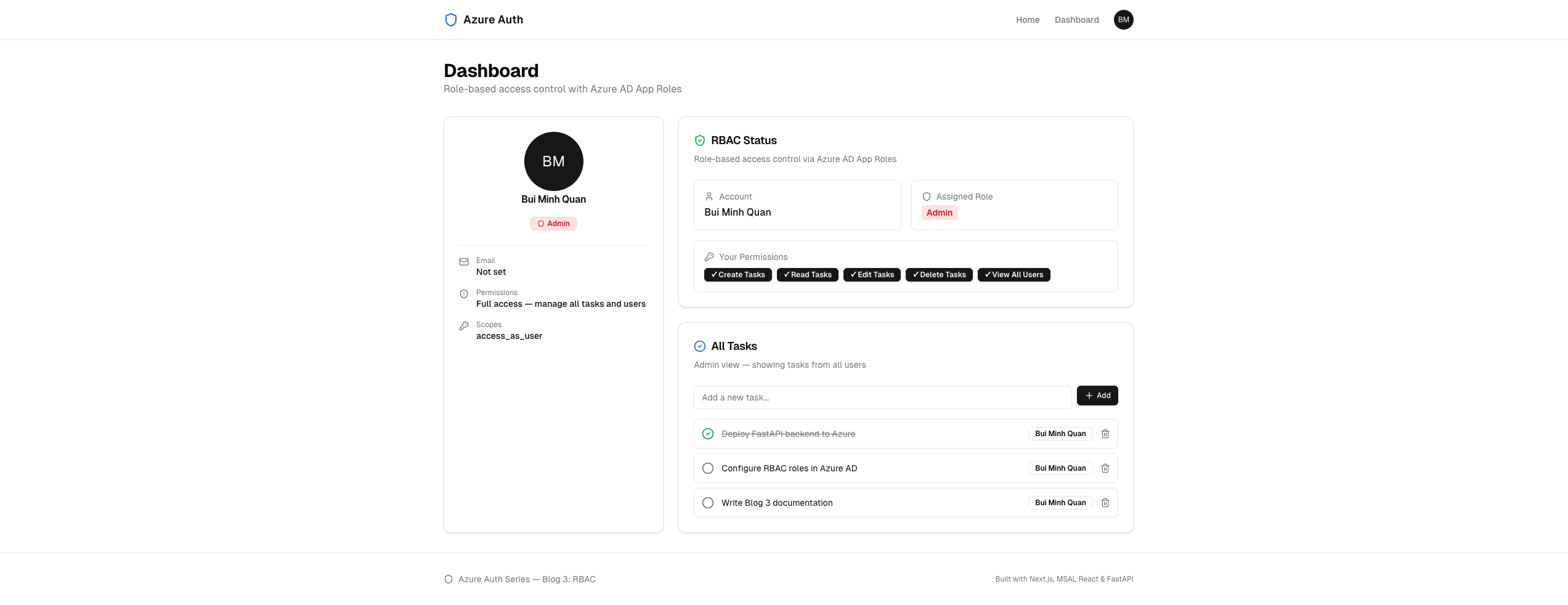 Admin sees all tasks from all users, can create, edit, and delete
Editor Dashboard — Blue badge, can create and edit own tasks, but no delete and no "View All Users":
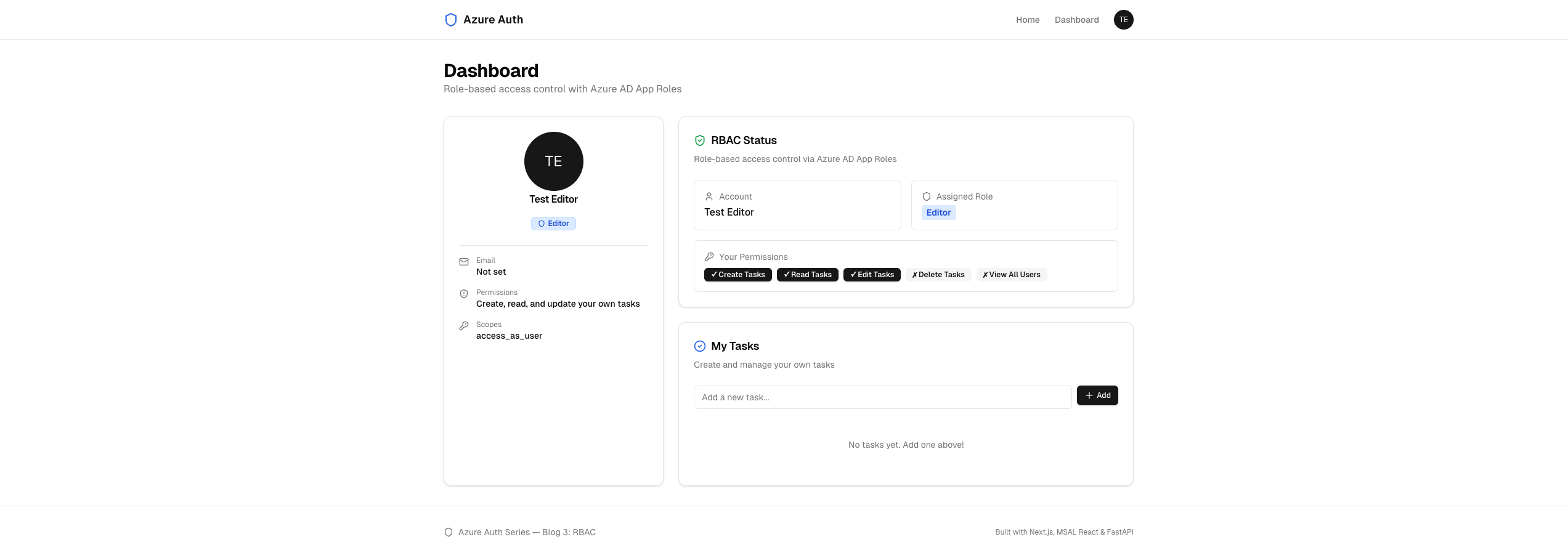 Editor can create and manage their own tasks, but cannot delete or see other users' tasks
Reader Dashboard — Green badge, read-only with no add form, non-clickable checkboxes:
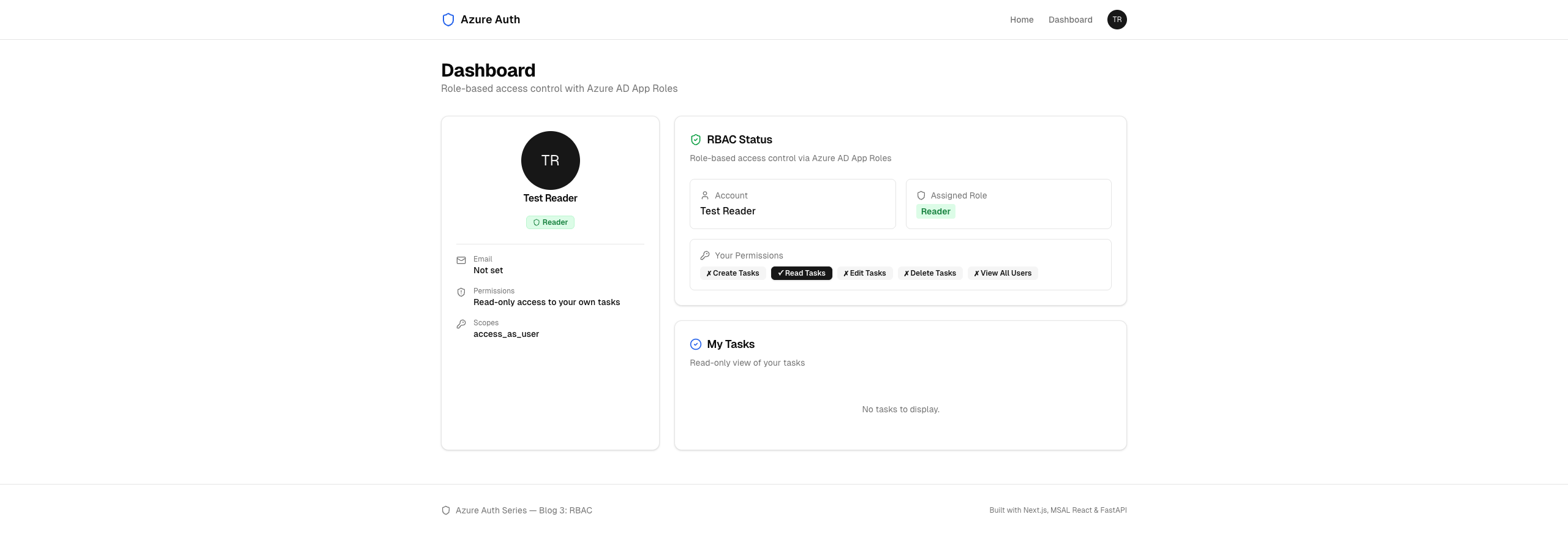 Reader has view-only access — no add form, no edit buttons, no delete
How App Roles Work in Azure AD#
Before writing code, let's understand the mechanism:
1. Register App Roles in your API app registration
   (Admin, Editor, Reader — defined in the app manifest)

2. Assign roles to users
   (via Azure Portal, CLI, or Graph API)

3. User signs in → Entra ID issues a token
   The token now includes a "roles" claim:
   { "roles": ["Editor"] }

4. Backend reads the "roles" claim from the JWT
   require_role("Admin", "Editor") → checks if any match

5. Frontend reads the same "roles" claim
   Hides/shows UI elements based on the role
App Roles are defined on the API app registration (not the SPA). When a user is assigned a role on the API's service principal, Entra ID includes that role in tokens issued for that API's audience. The role claim is part of the signed JWT — it cannot be tampered with on the client.
Step 1: Define App Roles in Azure#
App Roles are defined in the appRoles array of the API app registration manifest. Our setup script creates three:
File: setup.sh (relevant section)
# Role IDs (fixed UUIDs for consistency) ADMIN_ROLE_ID="a1b2c3d4-0001-0001-0001-000000000001" EDITOR_ROLE_ID="a1b2c3d4-0001-0001-0001-000000000002" READER_ROLE_ID="a1b2c3d4-0001-0001-0001-000000000003" az rest --method PATCH \ --uri "https://graph.microsoft.com/v1.0/applications/$API_OBJ_ID" \ --headers "Content-Type=application/json" \ --body "{ \"api\": { \"oauth2PermissionScopes\": [{ \"id\": \"$SCOPE_ID\", \"isEnabled\": true, \"type\": \"User\", \"value\": \"$SCOPE_NAME\" }] }, \"appRoles\": [ { \"allowedMemberTypes\": [\"User\"], \"description\": \"Full access: manage all tasks and users\", \"displayName\": \"Admin\", \"id\": \"$ADMIN_ROLE_ID\", \"isEnabled\": true, \"value\": \"Admin\" }, { \"allowedMemberTypes\": [\"User\"], \"description\": \"Create, read, and update own tasks\", \"displayName\": \"Editor\", \"id\": \"$EDITOR_ROLE_ID\", \"isEnabled\": true, \"value\": \"Editor\" }, { \"allowedMemberTypes\": [\"User\"], \"description\": \"Read-only access to own tasks\", \"displayName\": \"Reader\", \"id\": \"$READER_ROLE_ID\", \"isEnabled\": true, \"value\": \"Reader\" } ] }"
Each role has:
| Field | Purpose |
|---|---|
allowedMemberTypes | ["User"] — assignable to users and groups |
displayName | Human-readable name shown in Azure Portal |
value | The string that appears in the JWT roles claim |
id | A unique UUID for the role definition |
isEnabled | Whether the role is active |
Important: The value field is what your code checks against. The displayName is only for the portal UI.
Step 2: Create Test Users and Assign Roles#
The setup script creates two test users and assigns all three roles:
# Create test users EDITOR_UPN="testuser-editor@${DOMAIN}" READER_UPN="testuser-reader@${DOMAIN}" TEMP_PASSWORD="SecureP@ss123!" az ad user create \ --display-name "Test Editor" \ --user-principal-name "$EDITOR_UPN" \ --password "$TEMP_PASSWORD" \ --force-change-password-next-sign-in false az ad user create \ --display-name "Test Reader" \ --user-principal-name "$READER_UPN" \ --password "$TEMP_PASSWORD" \ --force-change-password-next-sign-in false # Get current user's object ID for Admin role MY_OBJ_ID=$(az ad signed-in-user show --query id --output tsv)
Role assignments use the Graph API's appRoleAssignments endpoint on the API's service principal:
# Assign Admin role to your account az rest --method POST \ --uri "https://graph.microsoft.com/v1.0/servicePrincipals/$API_SP_ID/appRoleAssignments" \ --headers "Content-Type=application/json" \ --body "{ \"principalId\": \"$MY_OBJ_ID\", \"resourceId\": \"$API_SP_ID\", \"appRoleId\": \"$ADMIN_ROLE_ID\" }" # Assign Editor role to test editor az rest --method POST \ --uri "https://graph.microsoft.com/v1.0/servicePrincipals/$API_SP_ID/appRoleAssignments" \ --body "{ \"principalId\": \"$EDITOR_OBJ_ID\", \"resourceId\": \"$API_SP_ID\", \"appRoleId\": \"$EDITOR_ROLE_ID\" }" # Assign Reader role to test reader az rest --method POST \ --uri "https://graph.microsoft.com/v1.0/servicePrincipals/$API_SP_ID/appRoleAssignments" \ --body "{ \"principalId\": \"$READER_OBJ_ID\", \"resourceId\": \"$API_SP_ID\", \"appRoleId\": \"$READER_ROLE_ID\" }"
After running the script, you have three accounts:
| Role | Account | Access Level |
|---|---|---|
| Admin | Your account | Full access — manage all tasks and users |
| Editor | testuser-editor@{domain} | Create, read, and update own tasks |
| Reader | testuser-reader@{domain} | Read-only access to own tasks |
Step 3: The JWT Token with Roles#
When a user with an assigned role signs in and requests a token for the API audience, the JWT now contains a roles claim:
{ "aud": "api://9b28cc57-ebc1-48ae-ad72-cb603bf14200", "iss": "https://sts.windows.net/{tenant-id}/", "name": "Bui Minh Quan", "oid": "b1b0160f-5d3f-484e-beca-15f233b78356", "preferred_username": "quanbm2710@gmail.com", "roles": ["Admin"], "scp": "access_as_user", "ver": "1.0" }
The roles claim is an array — a user could have multiple roles. Our code checks if any of the user's roles match the required roles for an endpoint.
No role assigned? If a user has no App Role assignment, the roles claim is either absent or an empty array. The backend treats this as "no permissions."
Step 4: Backend — The require_role Decorator#
This is the core of RBAC enforcement. We add two functions to the auth module:
File: backend/auth.py
def get_user_roles(claims: dict) -> list[str]: """Extract roles from the token claims.""" return claims.get("roles", []) def require_role(*allowed_roles: str) -> Callable: """Dependency that checks if the user has one of the allowed roles.""" async def check_role(claims: dict = Depends(validate_token)) -> dict: user_roles = get_user_roles(claims) if not any(role in user_roles for role in allowed_roles): raise HTTPException( status_code=status.HTTP_403_FORBIDDEN, detail=f"Insufficient permissions. Required: " f"{', '.join(allowed_roles)}. " f"Your roles: {', '.join(user_roles) or 'none'}", ) return claims return check_role
How it works:
require_role("Admin", "Editor")returns a FastAPI dependency function- That function first runs
validate_token(JWT signature, audience, issuer, expiry) - Then extracts the
rolesclaim from the decoded token - Checks if any of the user's roles are in the allowed set
- Returns 403 Forbidden with a descriptive message if no match
- Returns the claims dict if authorized — the endpoint can use it
This is a dependency factory — it generates a new dependency with the allowed roles baked in. FastAPI's dependency injection calls it automatically before the endpoint runs.
Token arrives
    │
    ▼
validate_token()
    │ ✓ JWT is valid
    ▼
get_user_roles()
    │ Extract ["Editor"] from claims
    ▼
Check: is "Editor" in ("Admin", "Editor")?
    │ ✓ Yes
    ▼
Endpoint runs
Step 5: Backend — Role-Tiered Endpoints#
With require_role in place, the endpoint definitions become declarative — you specify which roles are allowed, and the framework handles the rest:
File: backend/main.py
from auth import validate_token, require_role, get_user_roles # In-memory task store (keyed by user ID) tasks_db: dict[str, list[dict]] = {} _task_counter = 0 def _next_id() -> int: global _task_counter _task_counter += 1 return _task_counter
Profile — Any Authenticated User#
@app.get("/api/me") async def get_me(claims: dict = Depends(validate_token)): """Return the authenticated user's profile + roles from token claims.""" return { "id": claims.get("oid", ""), "name": claims.get("name", ""), "email": claims.get("preferred_username", ""), "tenant_id": claims.get("tid", ""), "roles": get_user_roles(claims), "scopes": claims.get("scp", ""), }
The /api/me endpoint uses validate_token directly (no role check) — any authenticated user can see their own profile. Notice it now returns roles from the claims.
Read Tasks — Admin, Editor, Reader#
@app.get("/api/tasks") async def get_tasks( claims: dict = Depends(require_role("Admin", "Editor", "Reader")), ): """Get tasks. Admin sees all, others see only their own.""" user_id = claims.get("oid", "") roles = get_user_roles(claims) if "Admin" in roles: all_tasks = [] for owner_id, user_tasks in tasks_db.items(): for task in user_tasks: all_tasks.append({**task, "owner_id": owner_id}) return all_tasks return tasks_db.get(user_id, [])
All three roles can read tasks, but Admin sees everything while others only see their own. The admin view includes owner_id so the frontend can show who owns each task.
Create and Update — Admin, Editor#
@app.post("/api/tasks") async def create_task( task: dict, claims: dict = Depends(require_role("Admin", "Editor")), ): """Create a new task. Editor+ only.""" user_id = claims.get("oid", "") if user_id not in tasks_db: tasks_db[user_id] = [] new_task = { "id": _next_id(), "title": task.get("title", ""), "completed": False, "owner_name": claims.get("name", "Unknown"), } tasks_db[user_id].append(new_task) return new_task @app.patch("/api/tasks/{task_id}") async def update_task( task_id: int, updates: dict, claims: dict = Depends(require_role("Admin", "Editor")), ): """Update a task. Editor can update own, Admin can update any.""" user_id = claims.get("oid", "") roles = get_user_roles(claims) if "Admin" in roles: for user_tasks in tasks_db.values(): for task in user_tasks: if task["id"] == task_id: if "completed" in updates: task["completed"] = updates["completed"] if "title" in updates: task["title"] = updates["title"] return task else: user_tasks = tasks_db.get(user_id, []) for task in user_tasks: if task["id"] == task_id: if "completed" in updates: task["completed"] = updates["completed"] if "title" in updates: task["title"] = updates["title"] return task return {"error": "Task not found"}
Readers are blocked at the dependency level — they never reach the function body. Within the endpoint, Admin can update any task while Editor only updates their own.
Delete — Admin Only#
@app.delete("/api/tasks/{task_id}") async def delete_task( task_id: int, claims: dict = Depends(require_role("Admin")), ): """Delete any task. Admin only.""" for user_id, user_tasks in tasks_db.items(): tasks_db[user_id] = [t for t in user_tasks if t["id"] != task_id] return {"status": "deleted"}
Only Admin can delete. The endpoint searches across all users' tasks — this is intentional since only Admin has this power.
Permission Summary#
| Endpoint | Admin | Editor | Reader | No Role |
|---|---|---|---|---|
GET /api/me | ✓ | ✓ | ✓ | ✓ |
GET /api/tasks | ✓ (all users) | ✓ (own) | ✓ (own) | 403 |
POST /api/tasks | ✓ | ✓ | 403 | 403 |
PATCH /api/tasks/:id | ✓ (any) | ✓ (own) | 403 | 403 |
DELETE /api/tasks/:id | ✓ (any) | 403 | 403 | 403 |
Step 6: Frontend — Role-Adaptive UI#
The frontend reads the roles array from the /api/me response and adjusts the UI. The same dashboard page renders completely differently for each role.
Role Configuration#
File: frontend/src/app/dashboard/page.tsx
const ROLE_CONFIG: Record< string, { color: string; bg: string; description: string } > = { Admin: { color: "text-red-700", bg: "bg-red-100 border-red-200", description: "Full access — manage all tasks and users", }, Editor: { color: "text-blue-700", bg: "bg-blue-100 border-blue-200", description: "Create, read, and update your own tasks", }, Reader: { color: "text-green-700", bg: "bg-green-100 border-green-200", description: "Read-only access to your own tasks", }, };
Each role gets a distinct color scheme — Admin is red (danger/power), Editor is blue (active/edit), Reader is green (safe/read-only). This makes the role instantly identifiable.
Permission Flags#
const roles = profile?.roles || []; const primaryRole = roles[0] || "No Role"; const roleConfig = ROLE_CONFIG[primaryRole]; const isAdmin = roles.includes("Admin"); const isEditor = roles.includes("Editor"); const canCreate = isAdmin || isEditor; const canEdit = isAdmin || isEditor; const canDelete = isAdmin;
These boolean flags drive every conditional in the UI. They're computed once from the roles array and used throughout the component.
Conditional Rendering#
The permission flags control four UI behaviors:
1. Add task form — only shown to Admin and Editor:
{canCreate && ( <form onSubmit={handleAddTask} className="flex gap-2 mb-4"> <input type="text" value={newTaskTitle} onChange={(e) => setNewTaskTitle(e.target.value)} placeholder="Add a new task..." className="flex-1 rounded-md border bg-background px-3 py-2 text-sm ..." /> <Button type="submit" size="sm" className="gap-1"> <Plus className="h-4 w-4" /> Add </Button> </form> )}
2. Task checkboxes — clickable for Editor/Admin, static for Reader:
{canEdit ? ( <button onClick={() => toggleTask(task.id, !task.completed)} className="shrink-0 text-muted-foreground hover:text-primary" > {task.completed ? ( <CheckCircle2 className="h-5 w-5 text-green-600" /> ) : ( <Circle className="h-5 w-5" /> )} </button> ) : ( <span className="shrink-0"> {task.completed ? ( <CheckCircle2 className="h-5 w-5 text-green-600" /> ) : ( <Circle className="h-5 w-5 text-muted-foreground" /> )} </span> )}
3. Delete button — only shown to Admin:
{canDelete && ( <button onClick={() => removeTask(task.id)} className="shrink-0 text-muted-foreground hover:text-destructive" > <Trash2 className="h-4 w-4" /> </button> )}
4. Task owner name — only visible to Admin:
{isAdmin && task.owner_name && ( <Badge variant="outline" className="text-xs"> {task.owner_name} </Badge> )}
Permission Badges#
The RBAC Status card shows a visual grid of what the current user can and cannot do:
<div className="flex flex-wrap gap-2"> <Badge variant={canCreate ? "default" : "secondary"}> {canCreate ? "✓" : "✗"} Create Tasks </Badge> <Badge variant="default">✓ Read Tasks</Badge> <Badge variant={canEdit ? "default" : "secondary"}> {canEdit ? "✓" : "✗"} Edit Tasks </Badge> <Badge variant={canDelete ? "default" : "secondary"}> {canDelete ? "✓" : "✗"} Delete Tasks </Badge> <Badge variant={isAdmin ? "default" : "secondary"}> {isAdmin ? "✓" : "✗"} View All Users </Badge> </div>
This gives users immediate feedback about their access level — no guessing, no confusion.
Step 7: Frontend — Title and Description Changes#
The task list heading and description adapt to the role:
<CardTitle className="flex items-center gap-2 text-lg"> <CheckCircle2 className="h-5 w-5 text-blue-600" /> {isAdmin ? "All Tasks" : "My Tasks"} </CardTitle> <CardDescription> {isAdmin ? "Admin view — showing tasks from all users" : canCreate ? "Create and manage your own tasks" : "Read-only view of your tasks"} </CardDescription>
And the empty state message:
{tasks.length === 0 ? ( <p className="py-8 text-center text-sm text-muted-foreground"> {canCreate ? "No tasks yet. Add one above!" : "No tasks to display."} </p> ) : ( // ... task list )}
Authorization: Backend vs Frontend#
A common question: if the frontend already hides the UI, why bother checking roles on the backend?
Frontend (UI layer)           Backend (enforcement layer)
─────────────────────         ──────────────────────────
Hides the delete button       Returns 403 if non-Admin calls DELETE
Removes the add form          Returns 403 if Reader calls POST
Shows read-only checkboxes    Returns 403 if Reader calls PATCH

Improves user experience      Enforces security
Can be bypassed (DevTools)    Cannot be bypassed
The frontend is courtesy; the backend is law. Anyone can open DevTools, modify the React state, or call the API directly with curl. The backend's require_role check is the actual security boundary. The frontend just makes it nice.
Running the App#
1. Register the Apps and Create Users#
az login ./setup.sh
The script outputs a credentials table:
   Test accounts:
   ┌──────────────────────────────────────────────┐
   │ Role    │ Username              │ Password    │
   ├──────────────────────────────────────────────┤
   │ Admin   │ (your account)        │ (yours)     │
   │ Editor  │ testuser-editor@...   │ SecureP@ss  │
   │ Reader  │ testuser-reader@...   │ SecureP@ss  │
   └──────────────────────────────────────────────┘
2. Start the Backend#
cd backend python -m venv .venv && source .venv/bin/activate pip install -r requirements.txt uvicorn main:app --reload
3. Start the Frontend#
cd frontend npm install npm run dev
4. Test Each Role#
- Sign in as yourself (Admin) → see all tasks, full CRUD, owner names
- Sign in as testuser-editor → see own tasks, can create and edit, no delete
- Sign in as testuser-reader → see own tasks, read-only, no form or buttons
Cleanup#
./cleanup.sh
Common Pitfalls#
1. "roles" Claim is Missing from the Token#
The user has no App Role assignment on the API's service principal.
Fix: Assign a role using the Azure Portal (Enterprise Applications → your API app → Users and groups → Add assignment) or run the setup script which does this automatically.
2. 403 Forbidden but the User Has a Role#
The role assignment is on the wrong service principal. Roles must be assigned on the API app's service principal, not the SPA's.
Fix: Verify the assignment target is the API app's service principal ID ($API_SP_ID in the setup script).
3. Frontend Shows Wrong Permissions#
The token might be cached from before the role was assigned. MSAL caches tokens aggressively.
Fix: Sign out completely, clear session storage, and sign in again. The new token will include the updated roles claim.
4. Reader Can Still Call POST via curl#
If you only hide the form in the frontend, a Reader can still call POST /api/tasks directly.
Fix: This is why require_role("Admin", "Editor") exists on the backend. The backend returns 403 regardless of what the frontend shows.
5. Admin Can't See Other Users' Tasks#
The /api/tasks endpoint checks if "Admin" in roles and aggregates all users' tasks. If the Admin only sees their own, the role claim might be admin (lowercase) instead of Admin.
Fix: Check that the value field in the appRoles definition exactly matches the string your code checks. It's case-sensitive.
What's Next#
In Blog 4: Managed Identity, we'll:
- Deploy the app to Azure Container Apps
- Replace secrets with Managed Identity — no client secrets, no connection strings
- Access Azure resources (Key Vault, Storage) with zero credentials in code
- Configure DefaultAzureCredential for seamless local-to-cloud development
RBAC controls who can do what. Managed Identity solves how the app itself authenticates to Azure services — without any secrets to manage or rotate.
Conclusion#
You've built a complete RBAC system with Microsoft Entra ID:
- Three App Roles defined in the Azure AD app manifest with distinct access levels
- Automated setup — a single script creates app registrations, test users, and role assignments
require_roledecorator — a clean, reusable FastAPI dependency that returns 403 for unauthorized access- Role-tiered endpoints — each endpoint declares which roles can access it
- Data isolation — Admin sees all, others see only their own
- Role-adaptive UI — color-coded badges, conditional forms, permission indicators
- Defense in depth — frontend hides what users can't do, backend enforces it
The roles are baked into the JWT by Entra ID, verified by the backend's RSA signature check, and reflected in the UI. At no point can a client-side change escalate privileges.
Resources#
- Source Code: GitHub — azure_auth_series/03_rbac
- Blog 1: Basic Login with Microsoft Entra ID
- Blog 2: Protected API with FastAPI
- Microsoft — App Roles: Add App Roles to Your Application
- Microsoft — Role-Based Authorization: Role Claims
- FastAPI — Dependencies: Dependencies
Happy building!