Document Analysis MCP Series — Blog 4: RAG Q&A & Financial Intelligence#
Source code: github.com/MinhQuanBuiSco/document-analysis-mcp
Three Claude calls, three different jobs. Haiku extracts metrics at temp 0.1. Sonnet answers questions at temp 0.3.
A common mistake in AI engineering is treating every LLM call the same. One model, one temperature, one system prompt -- and you wonder why your summarizer hallucinates numbers while your Q&A system gives vague answers. The problem is not the model. The problem is that summarization, question answering, and structured extraction are fundamentally different cognitive tasks. They demand different models, different temperatures, and different prompt structures.
In our Document Analysis MCP server, a single uploaded SEC filing triggers up to three distinct Claude interactions. Each one is calibrated for a specific job. This post walks through the engineering behind those three calls -- why we chose different models, why temperature matters more than you think, and how prompt design determines whether you get a useful financial analyst or an expensive autocomplete.
The Document Analysis MCP Series#
| Part | Title | Focus |
|---|---|---|
| 1 | Architecture & System Design | MCP protocol, session management, document pipeline |
| 2 | PDF Parsing & Chunking | Table extraction, section detection, semantic chunking |
| 3 | Vector Search & LanceDB | BGE-M3 embeddings, LanceDB indexing, similarity search |
| 4 | RAG Q&A & Financial Intelligence (this post) | Claude calls, prompt engineering, structured extraction |
| 5 | MCP Tools & Claude Desktop Integration | Tool definitions, MCP server, end-to-end demo |
The Core Abstraction: One Function, Three Behaviors#
Every Claude interaction in the system flows through a single function. This is not clever architecture -- it is the only sane way to manage multiple model configurations without duplicating Bedrock boilerplate:
def call_claude( prompt: str, system: str | None = None, model_id: str | None = None, max_tokens: int | None = None, temperature: float | None = None, ) -> str: """Call Bedrock Claude via the Converse API.""" client = get_client() model = model_id or settings.qa_model tokens = max_tokens or settings.max_tokens temp = temperature if temperature is not None else settings.temperature messages = [{"role": "user", "content": [{"text": prompt}]}] kwargs: dict = { "modelId": model, "messages": messages, "inferenceConfig": {"maxTokens": tokens, "temperature": temp}, } if system: kwargs["system"] = [{"text": system}] response = client.converse(**kwargs) text = response["output"]["message"]["content"][0]["text"] # Log token usage usage = response.get("usage", {}) logger.info( f"Bedrock call: model={model}, " f"input_tokens={usage.get('inputTokens', '?')}, " f"output_tokens={usage.get('outputTokens', '?')}" ) return text
Every parameter has a default that falls back to the global config. The qa_model (Sonnet) is the default because Q&A is the most common call and needs the strongest reasoning. But summarization and metrics extraction override both the model and the temperature. The token usage logging is not optional -- when you are running three different models at three different price points, you need to know exactly what each call costs.
The Bedrock Converse API is the key enabler here. Unlike the older invoke_model API that required model-specific request formats, Converse gives us a unified interface. One function calls Haiku at temp 0.1 for metrics, Sonnet at temp 0.3 for Q&A, and Haiku at temp 0.2 for summaries -- all through the same code path.
Task 1: Summarization -- The Fast Analyst#
When a user uploads a 10-K filing and asks for a summary, they want speed and accuracy. They do not want creative prose. They want the key numbers, the notable risks, and the material changes -- extracted fast and presented cleanly.
This is why summarization uses Claude Haiku:
def summarize_text(text: str, context: str = "SEC financial filing") -> str: """Summarize a section of text using Claude Haiku.""" system = ( f"You are a financial analyst summarizing a {context}. " "Be precise with numbers, percentages, and financial terms. " "Highlight key metrics, risks, and notable changes." ) prompt = f"Summarize the following section concisely:\n\n{text}" return call_claude( prompt=prompt, system=system, model_id=settings.summary_model, # Haiku max_tokens=1024, temperature=0.2, )
Why Haiku for Summaries#
Summarization is a compression task. The model reads a block of text and produces a shorter version that preserves the important information. This does not require deep reasoning or multi-step inference. It requires fast, accurate pattern recognition -- identifying which sentences carry the most information and condensing them.
Haiku is purpose-built for this. It is roughly 10x cheaper than Sonnet and significantly faster. For a task where the input is explicit text and the output is a distilled version of that same text, you are paying for speed and throughput, not reasoning depth. Using Sonnet here would be like hiring a senior engineer to copy-paste a spreadsheet.
Why Temperature 0.2#
Temperature controls randomness in token selection. At 0.0, the model always picks the most probable next token -- fully deterministic. At 1.0, it samples more broadly, producing more varied (and potentially creative) output.
For financial summaries, we want slight variation. Temperature 0.0 produces robotic, repetitive summaries -- every 10-K summary starts with "The company reported..." Temperature 0.2 allows just enough variation to produce natural-sounding prose while keeping the model anchored to the source text. It will not hallucinate a revenue figure that does not appear in the input. It will not rephrase "$4.2 billion" as "approximately $4 billion." The temperature is low enough to be precise but high enough to not sound like a template.
The 12,000-Character Truncation#
Full document summaries are truncated to 12,000 characters before being sent to Claude:
# Summarize full document (truncate to avoid token limits) text = doc.full_text[:12000]
A 10-K filing can be 100+ pages. Sending the entire text would blow past Haiku's context window and cost a fortune in input tokens. The first 12,000 characters typically cover the filing summary, business overview, and the beginning of risk factors -- the highest-signal content in any 10-K. The SEC requires companies to front-load material information, so truncating from the end loses boilerplate, not substance.
For section-specific summaries, there is no truncation. Individual sections like "Risk Factors" or "MD&A" are small enough to fit within token limits, so the full section text goes to Claude:
if section_title: matching = [ s for s in doc.sections if section_title.lower() in s.title.lower() ] text = "\n\n".join(s.content for s in matching)
Task 2: Question Answering -- The RAG Pipeline#
Summarization compresses. Q&A reasons. When a user asks "What was Apple's total revenue in FY2024 compared to FY2023?", the system needs to find the relevant passages, understand the numbers in context, and synthesize an answer that directly addresses the question. This is a fundamentally harder task than summarization.
The Retrieval Step#
Before Claude sees anything, the question goes through vector search:
# Retrieve relevant chunks results = search_index(session_id, question, top_k=settings.top_k) context_chunks = [r["text"] for r in results] sections_used = list({r["section"] for r in results})
The search_index function embeds the question using BGE-M3, searches the LanceDB index for the 5 most similar chunks, and returns them with their section metadata. This is the "R" in RAG -- retrieval. Without it, Claude would need the entire 100-page filing in its context window. With it, Claude gets only the 5 most relevant passages, typically 2,500-3,000 tokens total.
The top_k=5 default is deliberate. Too few chunks (1-2) and you risk missing relevant information spread across multiple sections. Too many (10-15) and you dilute the signal with irrelevant text, which increases cost and can confuse the model. Five chunks is the sweet spot for SEC filings, where financial data tends to cluster in specific sections.
The Generation Step#
The retrieved chunks become the context for Claude Sonnet:
def answer_question(question: str, context_chunks: list[str], doc_filename: str) -> str: """Answer a question using retrieved context chunks via Claude Sonnet.""" context = "\n\n---\n\n".join(context_chunks) system = ( "You are a financial analyst answering questions about SEC filings. " "Base your answers strictly on the provided context. " "Cite specific numbers, dates, and sections when available. " "If the context doesn't contain enough information, say so clearly." ) prompt = ( f"Document: {doc_filename}\n\n" f"Context from the filing:\n\n{context}\n\n" f"Question: {question}\n\n" "Provide a detailed, accurate answer based on the context above." ) return call_claude(prompt=prompt, system=system)
Why Sonnet for Q&A#
Question answering requires reasoning. The model must read five separate text chunks, identify which chunks contain information relevant to the question, reconcile potentially conflicting numbers from different sections, and compose a coherent answer. A question like "How did operating expenses change year-over-year?" requires the model to find the current year's figure in one chunk, last year's figure in another, calculate the percentage change, and explain the drivers.
Haiku can summarize text it is given. Sonnet can reason about text it is given. That distinction is worth the price difference. In our testing, Haiku's Q&A answers were often superficial -- it would quote a number without explaining its significance. Sonnet's answers connected the dots: "Operating expenses increased 12% to $54.8 billion, primarily driven by increased R&D spending in AI infrastructure."
Why Temperature 0.3#
Q&A temperature is slightly higher than summarization (0.3 vs 0.2) because answers benefit from more natural phrasing. A summary should be clinical. An answer should be conversational enough to be useful. But 0.3 is still firmly in the "grounded" range -- the model will not fabricate information or speculate beyond the context.
The critical constraint is in the system prompt: "Base your answers strictly on the provided context." This is the most important sentence in the entire system. Without it, Claude will happily supplement the retrieved context with its training data, which means it might answer a question about Apple's FY2024 filing using numbers from FY2022. The "strictly" constraint forces the model to treat the context as its only source of truth. When the context does not contain the answer, the model says so instead of guessing.
Sources and Traceability#
Every Q&A response includes the source chunks:
return { "question": question, "answer": answer, "sources": [ {"text": r["text"][:200] + "...", "section": r["section"], "score": r["score"]} for r in results ], "sections_referenced": sections_used, }
Each source includes the first 200 characters of the chunk, the section it came from, and the similarity score. This is not just good UX -- it is a verifiability requirement. When a financial analyst gets an answer about revenue figures, they need to know where in the filing that number came from. The section references ("Item 8 - Financial Statements", "Item 7 - MD&A") let them navigate directly to the source.
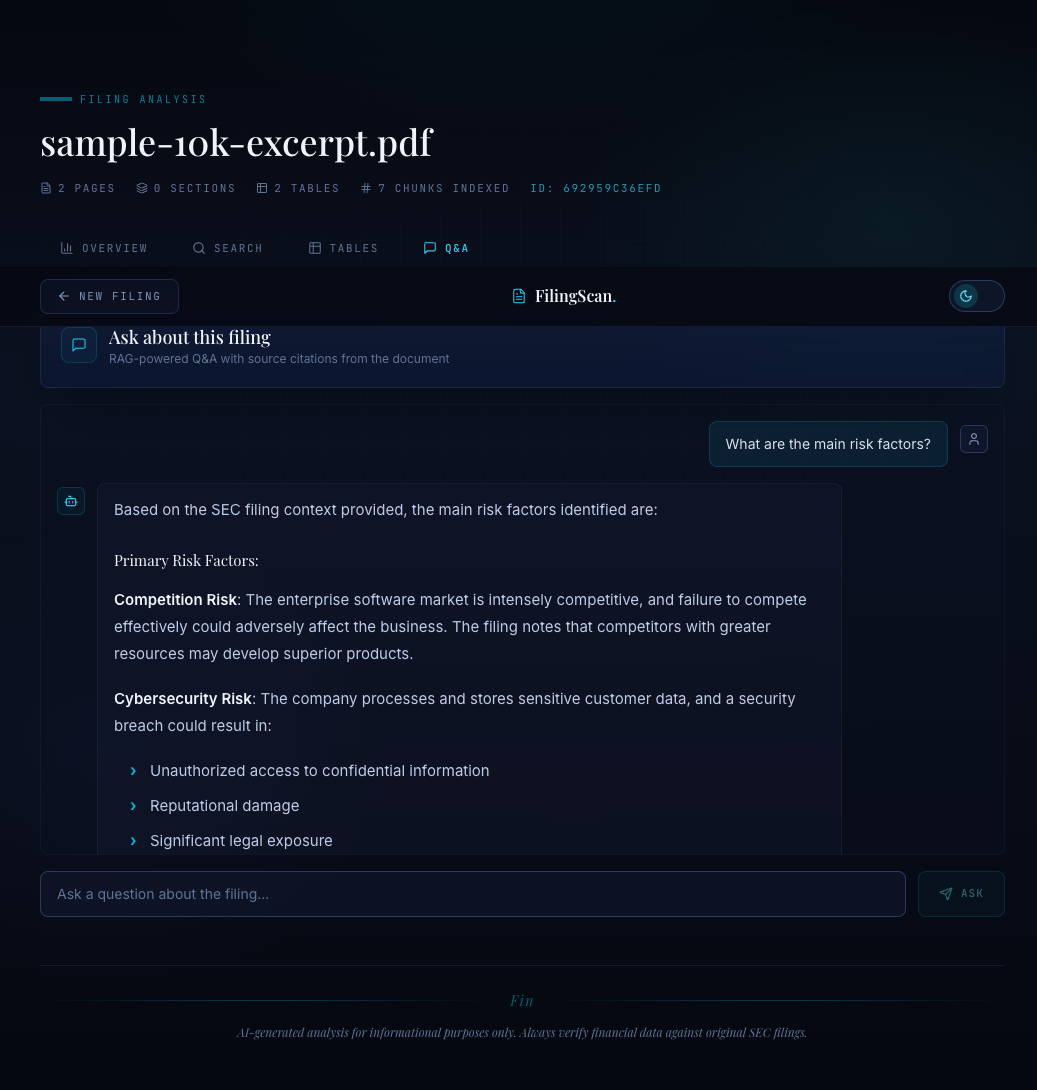
The sources panel shows exactly which passages Claude used to generate the answer. Each source is linked to its section, so the user can verify the numbers against the original filing. This is the difference between "the AI says revenue was $394 billion" and "the AI says revenue was $394 billion, and here are the three passages from Item 8 where it found that number."
Task 3: Financial Metrics Extraction -- Structured Intelligence#
Summarization produces prose. Q&A produces prose with citations. Metrics extraction produces JSON. This is the most constrained of the three tasks, and the constraints are the point.
def extract_financial_metrics(text: str) -> str: """Extract key financial metrics into structured JSON.""" system = ( "You are a financial data extraction system. " "Extract key financial metrics from the text and return valid JSON." ) prompt = ( "Extract the following financial metrics from this SEC filing text. " "Return a JSON object with these keys (use null if not found):\n\n" "- revenue (total revenue/net sales)\n" "- net_income\n" "- earnings_per_share (basic EPS)\n" "- total_assets\n" "- total_liabilities\n" "- cash_and_equivalents\n" "- operating_income\n" "- gross_margin_percent\n" "- year_over_year_revenue_change_percent\n" "- fiscal_year_end\n" "- period_covered\n\n" "For each numeric value, include the raw number and the unit " "(e.g., millions, billions).\n\n" f"Text:\n\n{text}" ) return call_claude( prompt=prompt, system=system, model_id=settings.summary_model, # Haiku max_tokens=2048, temperature=0.1, )
Why Temperature 0.1#
This is the lowest temperature in the system, and it is intentional. Structured extraction is the one task where creativity is a liability. When you ask for revenue and the filing says "$394.3 billion," the model should return 394.3 with unit "billions". Not 394. Not "approximately $394 billion". Not a creative restatement. The exact number, the exact unit.
Temperature 0.1 is effectively deterministic for this kind of extraction. The model has almost no room to deviate from the most probable token sequence, which for structured data means it will copy the numbers exactly as they appear in the source. We use 0.1 instead of 0.0 to avoid the occasional degenerate behavior that fully deterministic decoding can produce (repeated tokens, stuck loops), but the practical difference between 0.0 and 0.1 for structured output is negligible.
Why Haiku for Metrics#
Metrics extraction is pattern matching, not reasoning. The model scans the text for specific financial terms, finds the associated numbers, and maps them to predefined JSON keys. This is exactly what Haiku excels at -- fast, structured, low-cost extraction from explicit text.
Using Sonnet for this task would triple the cost without improving accuracy. In fact, Sonnet's tendency to "explain" can be counterproductive for structured output. When asked for JSON, Sonnet sometimes adds commentary: "Based on the filing, here are the metrics..." followed by the JSON. Haiku tends to produce cleaner, more direct structured output because it is less inclined to pad its responses.
The Input Strategy: Text + Tables#
The metrics extraction input is carefully constructed:
# Use the first ~8000 chars for metrics extraction text_for_extraction = doc.full_text[:8000] # Also include table data if available table_texts = [] for t in doc.tables[:5]: # first 5 tables table_texts.append(f"Table: {t.caption}\n{t.markdown}") if table_texts: text_for_extraction += "\n\n" + "\n\n".join(table_texts)
Two data sources, one prompt. The first 8,000 characters of the filing catch the narrative financial highlights -- the paragraphs where the company reports "total revenue was $394.3 billion." The first 5 tables catch the structured financial statements -- the income statement, balance sheet, and cash flow statement where the same numbers appear in tabular form.
Combining text and tables is not redundancy. It is cross-validation. If the narrative says revenue was $394.3 billion and the income statement table shows $394,328 (in millions), Claude can reconcile these into a single accurate figure. If one source is ambiguous -- a table without clear column headers, or a narrative paragraph that discusses revenue growth without stating the absolute number -- the other source fills the gap.
The 8,000-character limit for text and the 5-table limit exist for the same reason as the summary truncation: cost control. Financial metrics are almost always in the first few pages and first few tables of a 10-K. Sending the entire filing would multiply input token costs by 10x for zero additional accuracy.
Parsing the Response#
Claude returns a string, not structured data. The extraction function handles the inevitable format variations:
# Try to parse as JSON try: json_str = raw_response if "```json" in json_str: json_str = json_str.split("```json")[1].split("```")[0] elif "```" in json_str: json_str = json_str.split("```")[1].split("```")[0] metrics = json.loads(json_str.strip()) except (json.JSONDecodeError, IndexError): metrics = {"raw_response": raw_response}
Even with a system prompt that says "return valid JSON," Claude sometimes wraps its response in markdown code blocks. The parser strips those. And if the response is not valid JSON at all -- which happens occasionally with unusual filing formats -- the raw response is preserved so the caller can see what went wrong. The fallback to raw_response is better than throwing an exception because a partially useful response is better than no response.
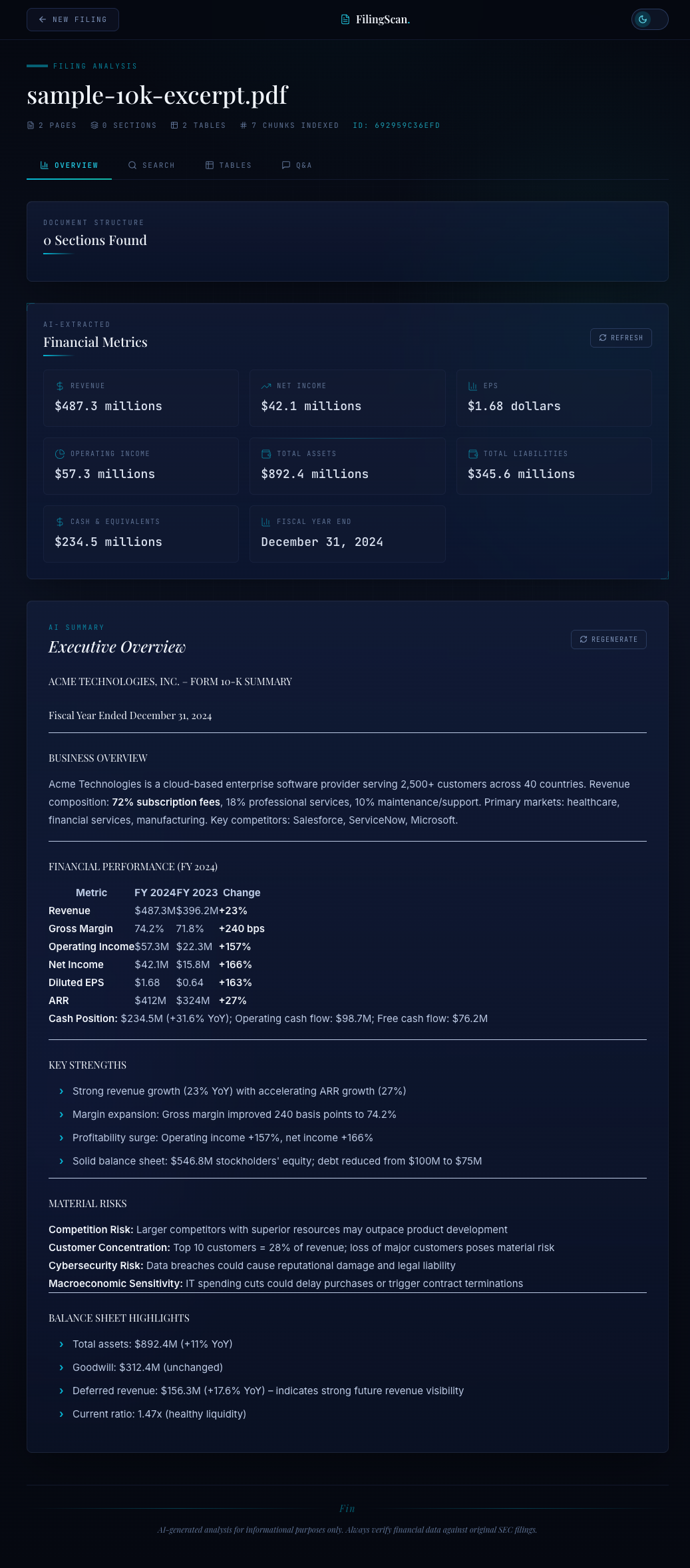
The overview panel renders the extracted metrics as a structured dashboard. Revenue, net income, EPS, total assets -- each metric is displayed with its value and unit. Null values (metrics not found in the filing) are shown as "N/A" rather than hidden, so the user knows what was and was not extractable.
The Model Selection Matrix#
Here is the complete decision framework:
| Task | Model | Temperature | Why This Model | Why This Temperature |
|---|---|---|---|---|
| Summarization | Haiku | 0.2 | Compression, not reasoning. Fast and cheap. | Precise but not robotic. |
| Q&A (RAG) | Sonnet | 0.3 | Multi-chunk reasoning, synthesis, citation. | Natural phrasing, still grounded. |
| Metrics Extraction | Haiku | 0.1 | Pattern matching into structured output. | Near-deterministic for exact numbers. |
The cost implications are significant. A typical document analysis session might involve 1 summary call, 5-10 Q&A calls, and 1 metrics extraction call. If all of those used Sonnet, the cost per session would be roughly 3-4x higher. By using Haiku for the two tasks that do not need deep reasoning, we keep the per-session cost low while reserving Sonnet's capabilities for the one task that genuinely needs them.
This is not a theoretical optimization. When you are running an MCP server that handles multiple concurrent sessions with multiple documents each, model selection is the single biggest lever for cost control. Choosing the right model for each task is not premature optimization -- it is basic engineering.
The Prompt Engineering Patterns#
Three patterns recur across all three prompts:
1. Role assignment in the system prompt. Every system prompt starts with "You are a financial analyst" or "You are a financial data extraction system." This is not flavor text. Role assignment activates domain-specific knowledge in the model's weights. A Claude instance told it is a financial analyst will use financial terminology correctly, understand that "GAAP" and "non-GAAP" metrics are different things, and know that a negative year-over-year change in revenue is a red flag, not just a number.
2. Explicit constraints on behavior. "Base your answers strictly on the provided context." "Use null if not found." "Be precise with numbers, percentages, and financial terms." Each constraint eliminates a failure mode. Without "strictly on context," the model supplements with training data. Without "null if not found," the model guesses. Without "precise with numbers," the model rounds.
3. Output format specification in the prompt, not just the system message. The metrics extraction prompt lists every JSON key by name. The Q&A prompt asks for "a detailed, accurate answer." The summary prompt asks for "concise" output. These are not suggestions. They are specifications. An LLM without output constraints will produce whatever format feels natural to it, which varies wildly between calls.
What's Next#
We have three working Claude calls: summarization, Q&A, and metrics extraction. But right now they are just Python functions. The user has no way to invoke them from Claude Desktop or any MCP-compatible client.
In Blog 5, we wrap everything into MCP tools: upload_filing, list_sections, search_content, summarize_section, ask_question, and get_financial_metrics. Each tool gets a description that teaches Claude when to use it, parameter schemas that enforce valid inputs, and return types that structure the output. The result is a document analysis server that Claude Desktop can operate autonomously -- upload a 10-K, extract the key metrics, answer follow-up questions, and cite its sources, all through natural conversation.
This is post 4 of 5 in the Document Analysis MCP Series. The full series covers architecture, PDF parsing, vector search, RAG intelligence, and MCP tool integration for an SEC filing analysis system.