Document Analysis MCP Series — Blog 5: FilingScan Frontend & Real-Time Progress#
Source code: github.com/MinhQuanBuiSco/document-analysis-mcp
The contract analyzer's frontend was designed around a single question: would a lawyer trust this? Gold accents, Cormorant serif, courthouse aesthetics. It worked because the domain demanded authority signals.
FilingScan asks a different question: would a financial analyst use this daily? That changes everything. Authority is table stakes in finance -- Bloomberg has it, Reuters has it, every terminal on every trading desk has it. What finance professionals actually select for is information density and speed. They want to see twelve metrics in the time it takes to read a sentence. They want the interface to feel like an instrument panel, not a document.
That distinction -- legal report vs. financial dashboard -- drove every design decision in this frontend. Different color palette, different typography weighting, different layout strategy, different motion patterns. Same React + Tailwind v4 stack, completely different product personality.
The Document Analysis MCP Series#
| Part | Title | Focus |
|---|---|---|
| 1 | Architecture & MCP Tool Design | System design, 7 MCP tools, Docling + LanceDB pipeline |
| 2 | PDF Parsing with Docling | PDF extraction, section detection, table recovery |
| 3 | Semantic Search & RAG Pipeline | BGE-M3, Chonkie chunking, LanceDB vector search |
| 4 | Claude Integration & MCP Orchestration | Claude tool use, metrics extraction, Q&A pipeline |
| 5 | FilingScan Frontend & Real-Time Progress (this post) | Design system, SSE streaming, tabbed workspace, Docker |
Why Cyan, Not Gold#
The Lexis contract analyzer uses a gold-on-navy palette:
| Signal | Lexis (Contract Analyzer) | FilingScan (This Project) |
|---|---|---|
| Domain | Legal review | Financial intelligence |
| Aesthetic | Courthouse authority | Bloomberg terminal |
| Accent | Gold (#d4a843) | Cyan (#22d3ee) / Teal (#14b8a6) |
| Surface | Deep navy (#050a18) | Deep slate-indigo (#050810) |
| Feeling | "This document has been reviewed" | "This data is live" |
Gold reads as institutional, archival, authoritative -- the color of legal seals and gilt-edged certificates. Cyan reads as electronic, current, data-driven -- the color of terminal cursors, radar screens, and real-time dashboards. Both are deliberate domain signals. Neither would work in the other's context.
The surface palette shifted too. Lexis uses pure navy (#050a18 base). FilingScan shifts toward slate-indigo (#050810 base, #0b1120 primary surface) -- just enough blue-gray to feel different from the legal product, while keeping the depth needed for glass morphism surfaces to read correctly.
The background isn't flat. It's a layered atmospheric gradient with three radial overlays:
.bg-atmosphere { background: radial-gradient(ellipse 80% 50% at 50% -15%, rgba(6, 182, 212, 0.08), transparent 55%), radial-gradient(ellipse 60% 40% at 85% 20%, rgba(20, 184, 166, 0.07), transparent 50%), radial-gradient(ellipse 50% 40% at 10% 70%, rgba(99, 102, 241, 0.05), transparent 55%), linear-gradient(180deg, #050810 0%, #0b1120 35%, #050810 100%); }
Three colored ellipses -- cyan at the top center, teal at the upper right, a faint indigo at the lower left -- layered on top of a vertical gradient. The result is a surface that has atmospheric depth without being a noisy hero image. Add the CSS noise overlay (feTurbulence in an inline SVG at 6% opacity) and the 40px grid lines at 3% opacity, and you get a background that feels like a financial application rather than a marketing page.
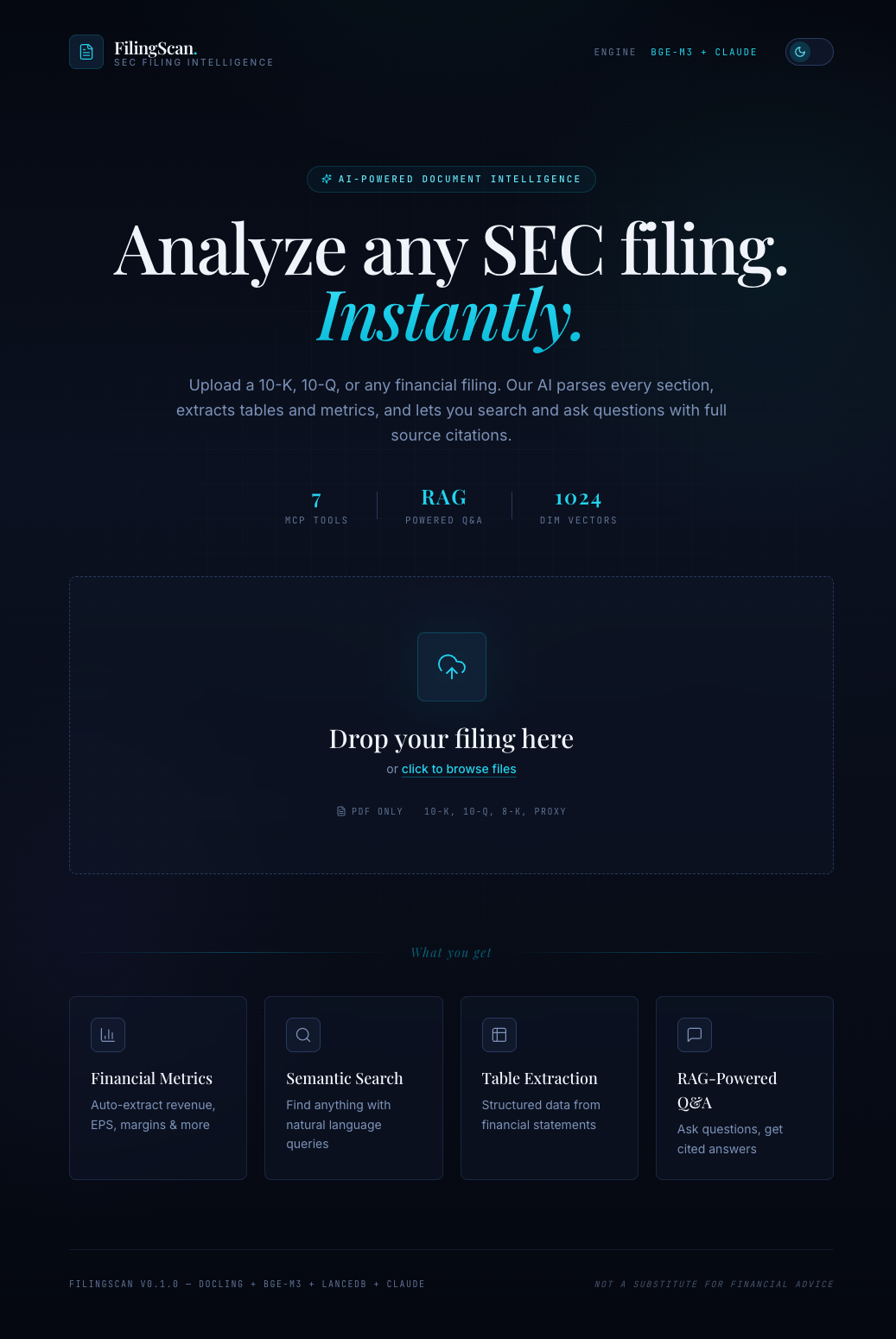 Dark theme: cyan accents on deep slate-indigo, atmospheric gradient background, Playfair Display serif for display text.
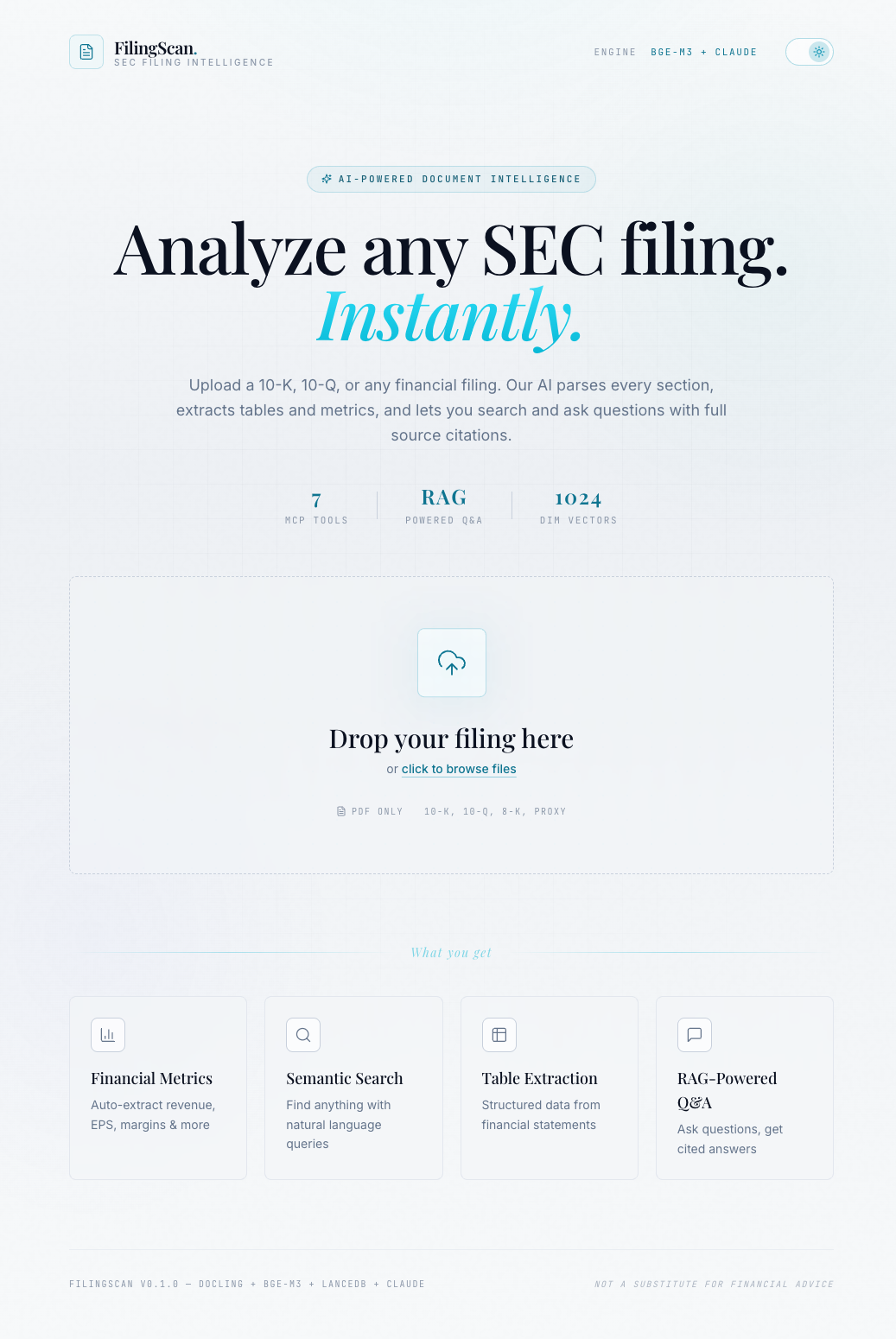 Light theme: the same design language inverted through CSS variable overrides. Notice the cyan accent darkens to maintain contrast on light surfaces.
Typography: Three Fonts, Three Jobs#
| Role | Font | Rationale |
|---|---|---|
| Display headings, brand name | Playfair Display | Editorial serif. Reads as "financial publication" -- think Barron's, Financial Times. More data-forward than Cormorant's legal elegance. |
| Body text, UI labels, buttons | Inter | The universal sans-serif. In a data-dense dashboard, readability at small sizes matters more than personality. |
| Numbers, metrics, status codes | JetBrains Mono | Terminal-grade monospace. Tabular numerals (font-variant-numeric: tabular-nums) so columns of numbers align. |
The Lexis frontend paired Cormorant (literary serif) with Outfit (geometric sans) to signal legal editorial. FilingScan pairs Playfair Display (editorial serif with higher x-height and more ink contrast) with Inter for a financial publication feel. The monospace font stays JetBrains Mono in both -- terminal-grade numerics are domain-agnostic.
One design detail I'm proud of: the brand name renders as FilingScan followed by a cyan period. That single colored dot is the entire brand identity. Playfair Display's high contrast makes the dot visually prominent at display sizes, and the cyan color ties it to the accent system. No logo SVG needed.
Glass Morphism as Information Hierarchy#
Every surface in FilingScan is one of three glass levels:
.glass { background: linear-gradient(180deg, rgba(24, 33, 60, 0.55) 0%, rgba(19, 27, 50, 0.4) 100%); backdrop-filter: blur(20px) saturate(180%); border: 1px solid rgba(188, 202, 228, 0.08); box-shadow: 0 1px 0 rgba(255, 255, 255, 0.03) inset, 0 20px 60px -20px rgba(0, 0, 0, 0.5); } .glass-subtle { background: rgba(19, 27, 50, 0.35); backdrop-filter: blur(12px); border: 1px solid rgba(188, 202, 228, 0.06); } .glass-strong { background: linear-gradient(180deg, rgba(30, 42, 74, 0.8) 0%, rgba(19, 27, 50, 0.7) 100%); backdrop-filter: blur(24px) saturate(200%); border: 1px solid rgba(6, 182, 212, 0.12); }
glass is the default card. glass-subtle is for nested elements within a card (chat message bubbles, source citations). glass-strong is for focal moments -- the processing view during upload, where the user's attention needs to be held.
The hierarchy means nested content has visual depth without competing with the parent surface. A Q&A answer in glass-subtle sits inside a container that's already a card, and the reduced blur + lower border opacity makes the nesting feel natural rather than "card inside card."
Dark/Light Theme: CSS Variable Overrides#
The theme system is the same strategy as the contract analyzer: override the semantic color variables in a :root.light selector, and every component adapts automatically.
:root.light { --color-deep-950: #f8fafb; --color-deep-900: #ffffff; --color-deep-800: #ffffff; --color-ink-50: #0b1120; --color-ink-200: #354d78; --color-cyan-400: #0e7490; --color-cyan-300: #155e75; }
The key insight: light theme cyan accents need to get darker, not lighter. #22d3ee is the dark-theme cyan (high luminance, low contrast against dark surfaces). On a white background, that same cyan washes out. So light-theme --color-cyan-400 becomes #0e7490 -- a deeper teal-cyan that maintains contrast ratios.
The useTheme hook is trivial: toggle a class on document.documentElement, persist to localStorage.
export function useTheme() { const [theme, setTheme] = useState<Theme>(() => { const stored = localStorage.getItem('filingscan-theme') return (stored as Theme) || 'dark' }) useEffect(() => { document.documentElement.classList.toggle('light', theme === 'light') localStorage.setItem('filingscan-theme', theme) }, [theme]) const toggleTheme = useCallback(() => { setTheme((t) => (t === 'dark' ? 'light' : 'dark')) }, []) return { theme, toggleTheme } }
No React context needed. The DOM class drives CSS variables, and CSS variables drive every surface and text color. The only component that needs to know the current theme is the toggle button itself.
The Upload-to-Workspace Flow#
The application is a three-view state machine: Upload -> Processing -> Workspace. The useSession hook manages the transitions.
export type View = 'upload' | 'processing' | 'workspace'
Each view is wrapped in AnimatePresence with Motion (Framer Motion), so transitions are cross-faded:
<AnimatePresence mode="wait"> {session.view === 'upload' && ( <motion.div key="upload" initial={{ opacity: 0 }} animate={{ opacity: 1 }} exit={{ opacity: 0, y: -20 }} transition={{ duration: 0.4, ease: [0.16, 1, 0.3, 1] }} > <UploadView ... /> </motion.div> )} {/* processing, workspace similarly */} </AnimatePresence>
The easing [0.16, 1, 0.3, 1] is a custom bezier that starts fast and decelerates smoothly -- more polished than ease-out, less theatrical than spring physics. The upload view exits with a slight upward drift (y: -20), the workspace enters with a downward slide (y: 20). The direction implies forward momentum.
SSE: The Manual Line Parser#
This is where the contract analyzer's Blog 4 (SSE streaming) meets a new frontend consumer. The backend sends data: {json}\n\n lines via StreamingResponse. The frontend can't use EventSource because the upload is a POST with a multipart body. So the SSE parsing is manual.
async function parseSSEStream( response: Response, onEvent: (event: StreamEvent) => void, ) { const reader = response.body!.getReader() const decoder = new TextDecoder() let buffer = '' while (true) { const { done, value } = await reader.read() if (done) break buffer += decoder.decode(value, { stream: true }) const lines = buffer.split('\n') buffer = lines.pop() || '' for (const line of lines) { const trimmed = line.trim() if (!trimmed.startsWith('data: ')) continue try { const data = JSON.parse(trimmed.slice(6)) onEvent(data as StreamEvent) } catch { // skip malformed lines } } } }
The pattern: read chunks from a ReadableStream, buffer them, split on newlines, keep the last incomplete line in the buffer for the next read. Each complete line that starts with data: gets JSON-parsed and dispatched.
The stream carries four event types:
export type StreamEvent = | { type: 'progress'; step: ProgressStep; message: string } | { type: 'result'; data: UploadResult } | { type: 'error'; message: string } | { type: 'keepalive' }
Six progress steps form three pairs: parsing/parsed, chunking/chunked, indexing/indexed. The "ing" event means the step started; the "ed" event means it completed. This lets the ProcessingView show a spinner on the active step and a checkmark on completed ones.
Keepalive events arrive every second from the backend (asyncio.sleep(1) in a background task). They prevent proxy timeouts and give the user confidence that the connection is alive, even when a step takes 30+ seconds.
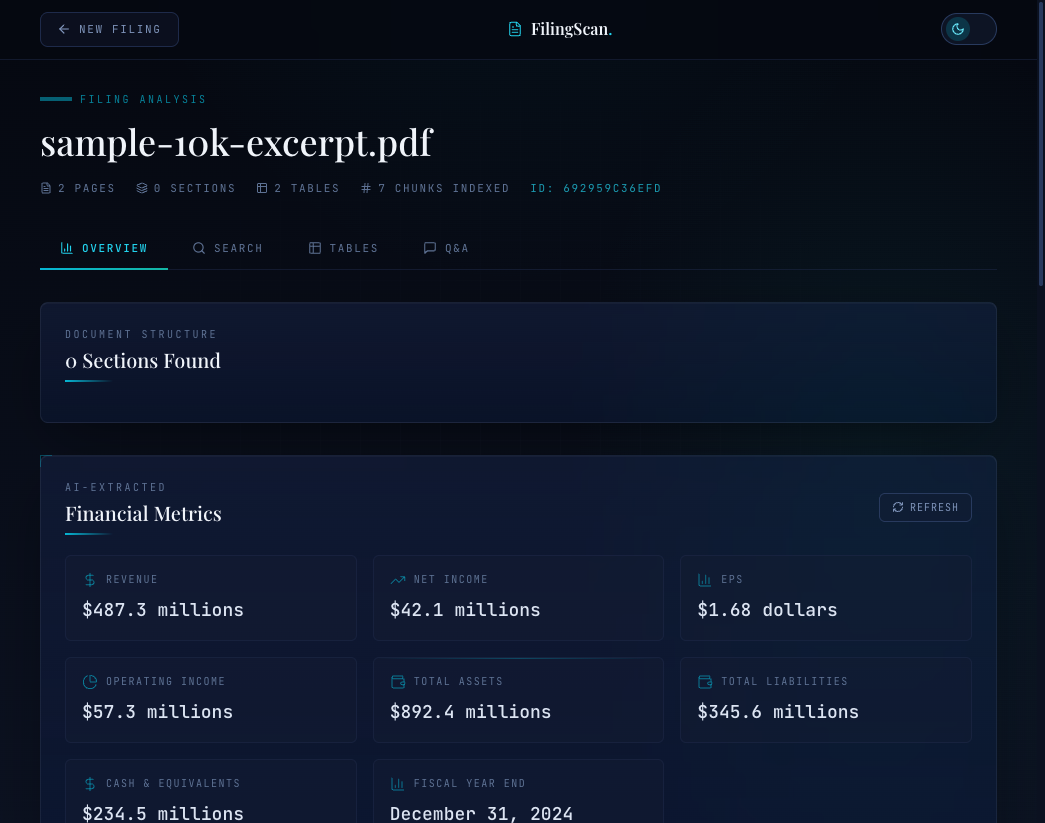 The processing view. Each step transitions from pending (dimmed dot) to active (spinning loader) to complete (spring-animated checkmark). The progress bar tracks step completion percentage.
The Processing View: Spring-Animated Checkmarks#
The ProcessingView maps progress events to a three-step display. The visual state per step is pending | active | done:
const STEPS = [ { key: 'parsing', doneKey: 'parsed', label: 'Parsing PDF with Docling', detail: 'Extracting text, tables, and layout structure' }, { key: 'chunking', doneKey: 'chunked', label: 'Chunking semantically', detail: 'Creating coherent text segments with Chonkie' }, { key: 'indexing', doneKey: 'indexed', label: 'Embedding & Indexing', detail: 'BGE-M3 vectors into LanceDB' }, ]
When a step completes, the checkmark enters with a spring animation:
<motion.div initial={{ scale: 0 }} animate={{ scale: 1 }} transition={{ type: 'spring', stiffness: 400, damping: 15 }} className="flex h-5 w-5 items-center justify-center rounded-full bg-emerald-500/20" > <Check className="h-3 w-3 text-emerald-400" strokeWidth={3} /> </motion.div>
stiffness: 400, damping: 15 gives a quick pop with a slight overshoot -- the checkmark bounces past its final size and settles back. It's a small detail, but it's the difference between "step completed" (boring) and "step completed!" (satisfying).
The progress bar maps the six steps to percentages: parsing: 10%, parsed: 30%, chunking: 45%, chunked: 60%, indexing: 75%, indexed: 100%. These aren't proportional to actual processing time -- PDF parsing takes 80% of wall-clock time. The percentages are perceptual. A bar that sits at 10% for 45 seconds feels broken. A bar that jumps to 30% after parsing feels like progress.
The Workspace: Why Tabs, Not Scrolling#
The contract analyzer used a scrolling report: risk gauge at the top, clause list below, document viewer alongside. That works for legal review because lawyers process contracts linearly -- top to bottom, clause by clause.
Financial analysis is non-linear. An analyst might check revenue, jump to risk factors, search for a specific disclosure, then ask a question about cash flow. A scrolling layout forces them to scroll past content they don't need. Tabs let them navigate directly.
Four tabs: Overview (metrics + summary), Search (semantic search), Tables (extracted financial tables), Q&A (chat interface).
The tab bar uses monospace uppercase labels with a gradient underline indicator:
.tab-active::after { content: ""; position: absolute; bottom: -1px; left: 0; right: 0; height: 2px; background: linear-gradient(90deg, var(--color-cyan-500), var(--color-teal-500)); }
The cyan-to-teal gradient on the active indicator is a subtle reinforcement of the dual-accent color system. It reads as "active" without being loud.
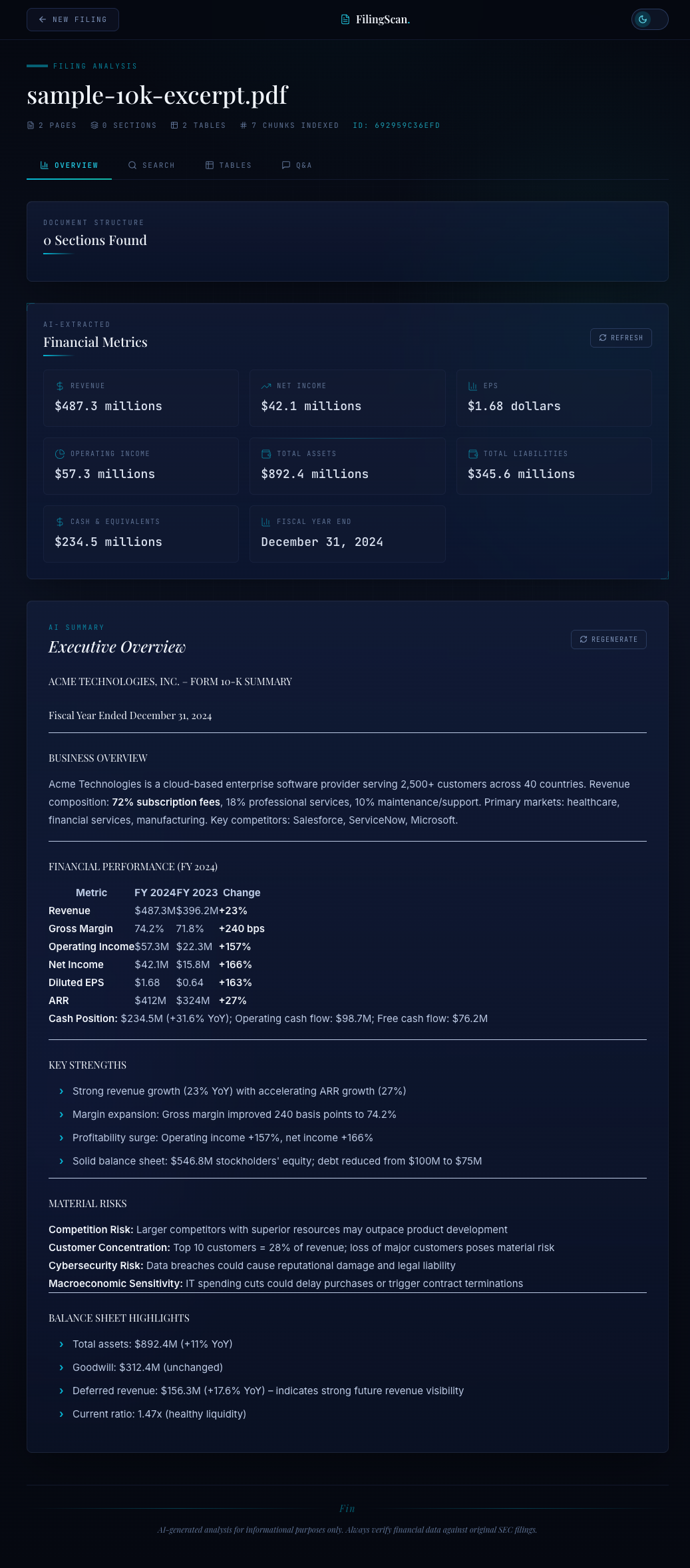 The Overview tab: document structure map, AI-extracted financial metrics in a grid, and an executive summary rendered with ReactMarkdown.
The [object Object] Bug#
The most instructive bug in this project was in the financial metrics display. The OverviewTab calls api.metrics(sessionId), which asks Claude to extract structured financial data from the filing. The metrics response type looks clean:
export interface FinancialMetrics { revenue?: string net_income?: string earnings_per_share?: string // ... all strings, right? [key: string]: unknown }
I rendered each metric value directly: {metrics[m.key]}. First test: "[object Object]" everywhere.
Claude doesn't always return flat strings. For a metric like revenue, it might return {"value": 487.3, "unit": "millions"} or {"amount": "$487.3M"}. The TypeScript types say string, but Claude's structured output is richer than that.
The fix is a formatMetricValue function that handles every shape:
function formatMetricValue(val: unknown): string { if (val == null) return '' if (typeof val === 'string') return val if (typeof val === 'number') return val.toLocaleString() if (typeof val === 'object') { const obj = val as Record<string, unknown> if ('value' in obj && obj.value != null) { const v = typeof obj.value === 'number' ? obj.value.toLocaleString() : String(obj.value) const unit = obj.unit ? ` ${obj.unit}` : '' return `$${v}${unit}` } if ('amount' in obj) return String(obj.amount) return Object.values(obj).filter(Boolean).join(' ') } return String(val) }
This is a pattern I keep encountering with LLM-structured output: the TypeScript types describe what you asked for, not what you'll get. Claude follows your schema most of the time, but "most of the time" means your UI still needs to handle the other cases gracefully. Defensive rendering isn't paranoia -- it's the integration contract.
The Q&A Chat Interface#
The Q&A tab is a chat interface with suggested questions, source citations, and section references.
The empty state shows five suggested questions as pill buttons:
const SUGGESTED_QUESTIONS = [ 'What are the main risk factors?', 'What was the total revenue?', 'How did operating expenses change?', "What is the company's business model?", 'What are the key financial highlights?', ]
Each answer from the backend includes sources with relevance scores and section names. The frontend renders these as expandable citation cards below the answer:
{msg.sources?.map((src, j) => ( <div key={j} className="rounded-md border border-deep-700/40 bg-deep-800/30 px-3 py-2"> <div className="flex items-center gap-2"> <FileText className="h-3 w-3 text-cyan-500/50" /> <span className="font-mono text-[10px] text-cyan-400/60"> {src.section} </span> <span className="ml-auto font-mono text-[10px] tabular text-ink-450"> {(src.score * 100).toFixed(0)}% match </span> </div> <p className="line-clamp-2 text-xs text-ink-400">{src.text}</p> </div> ))}
The section references appear as small cyan pills below the sources. The design principle: every AI answer should be verifiable. The user can see which sections were searched, which chunks matched, and how confident the retrieval was.
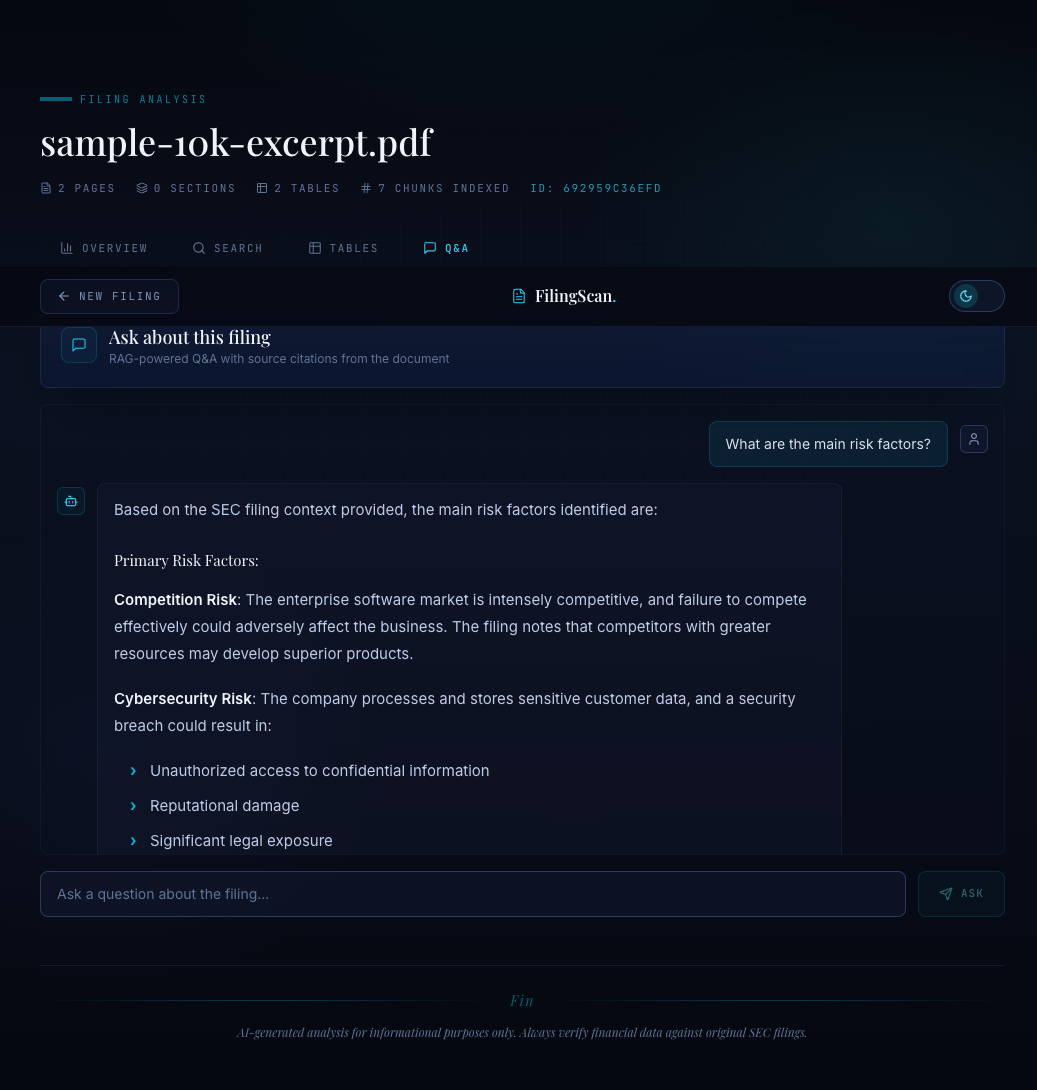 Q&A with source citations. Each answer shows the matched document sections and relevance scores, so the user can verify the AI's reasoning.
Docker Compose: One Command Development#
The development setup is two services:
services: backend: build: context: . dockerfile: Dockerfile ports: - "8000:8000" environment: - AWS_PROFILE=dev - AWS_REGION=us-east-1 volumes: - ~/.aws:/root/.aws - ./src:/app/src - ./data:/app/data healthcheck: test: ["CMD", "curl", "-f", "http://localhost:8000/api/health"] interval: 10s timeout: 5s retries: 5 start_period: 30s frontend: build: context: ./frontend dockerfile: Dockerfile.dev ports: - "5174:5174" environment: - VITE_API_URL=http://backend:8000 volumes: - ./frontend:/app - /app/node_modules depends_on: backend: condition: service_healthy
Three design decisions:
Health-gated startup. The frontend depends_on the backend with condition: service_healthy. The backend health check hits /api/health every 10 seconds with a 30-second start period (Docling model loading takes time). The frontend won't start until the backend is healthy. Without this, the Vite dev server starts immediately, the proxy tries to connect to a backend that's still loading PyTorch models, and the first upload attempt fails silently.
Volume-mounted source code. Both ./src:/app/src and ./frontend:/app are bind mounts. Code changes trigger hot reload without rebuilding containers. The /app/node_modules anonymous volume prevents the host's node_modules from overwriting the container's -- a classic Docker + Node.js gotcha.
AWS credentials via volume. ~/.aws:/root/.aws passes the host's AWS credentials into the container for Bedrock access. This is development-only. Production would use IAM roles or environment variables.
The Vite proxy configuration bridges the frontend to the backend:
export default defineConfig({ plugins: [react(), tailwindcss()], server: { port: 5174, host: true, proxy: { '/api/upload': { target: process.env.VITE_API_URL || 'http://localhost:8000', changeOrigin: true, timeout: 600000, // 10 min for large PDF uploads }, '/api': { target: process.env.VITE_API_URL || 'http://localhost:8000', changeOrigin: true, timeout: 300000, // 5 min for analysis calls }, }, }, })
The /api/upload route gets a 10-minute timeout because large SEC filings (200+ page 10-Ks) take time to parse, chunk, and index. The general /api routes get 5 minutes for Claude-powered analysis calls. The host: true flag binds to 0.0.0.0 so the Vite server is reachable from Docker's bridge network.
What I'd Change#
No WebSocket fallback. The SSE stream works, but if a corporate proxy strips streaming responses (some do), there's no fallback. A WebSocket upgrade path or a polling fallback would make this production-ready.
No optimistic tab loading. Each tab loads its data on mount. Switching to Overview fetches metrics and summary; switching to Tables fetches tables. Pre-fetching the most likely next tab (or fetching all tabs in parallel on workspace entry) would eliminate the loading spinners on tab switch.
The metrics types are a lie. FinancialMetrics declares every field as string but Claude returns objects. The honest type would use unknown for every field and let formatMetricValue be the source of truth. I kept the string declarations because they serve as documentation of intent -- what we asked Claude for -- even if the runtime reality is messier.
Series Complete#
Five posts, one system. A document analysis pipeline that takes a raw SEC filing PDF and turns it into a searchable, queryable, summarized workspace -- with real-time progress streaming and a frontend that was designed for the domain, not copied from a template.
The stack: Docling for PDF parsing, Chonkie for semantic chunking, BGE-M3 for embeddings, LanceDB for vector storage, Claude for extraction and Q&A, FastAPI for the backend, React 19 + Tailwind CSS v4 for the frontend, and MCP to wire the tools together.
The lesson across all five posts is the same one: the interesting problems in AI engineering aren't the model calls. They're the parsing that makes documents machine-readable, the chunking that preserves semantic boundaries, the streaming that keeps users engaged during 60-second processing pipelines, and the frontend that turns AI output into something a professional would actually trust.