Document Analysis MCP Series — Blog 2: PDF Intelligence with Docling#
Source code: github.com/MinhQuanBuiSco/document-analysis-mcp
pdfplumber gives you text. Docling gives you structure. That distinction sounds like a minor library swap, but it determines whether your system can answer "what was revenue growth in the segment breakdown table on page 47?" or just "here are some paragraphs that mention revenue."
SEC filings are not contracts. A contract is 10-30 pages of flowing prose with occasional section headers. A 10-K filing is 150+ pages with multi-column financial tables, nested regulatory sections, headers that span page breaks, footnotes that reference other footnotes, and exhibits appended after the signature page. The parsing strategy that worked for the Contract Analyzer — pdfplumber reading page by page, concatenating text — breaks down completely when the document's structure carries as much meaning as the text itself.
This post covers the PDF parsing layer of the Document Analysis MCP server: why I moved from text extraction to layout-aware parsing, how Docling works under the hood, the data model that captures sections and tables as first-class objects, and the specific configuration decisions for SEC filings.
The Document Analysis MCP Series#
| Part | Title | Focus |
|---|---|---|
| 1 | Architecture & the MCP Protocol | System design, MCP tools, session model, tech stack |
| 2 | PDF Intelligence with Docling (this post) | Layout-aware parsing, table extraction, section detection |
| 3 | Semantic Chunking & Vector Search | BGE-M3 embeddings, section-aware chunking, LanceDB |
| 4 | AI Analysis with Bedrock | Grounded Q&A, summarization, multi-model orchestration |
| 5 | The Filing Scanner Frontend | React UI, upload flow, search interface, table viewer |
The Problem: PDF Is a Drawing Format, Not a Document Format#
PDF stands for Portable Document Format, but what it actually describes is a sequence of drawing instructions: place this glyph at coordinates (72, 540), draw a line from here to there, fill this rectangle with this color. There is no native concept of a paragraph, a table cell, a heading, or reading order. When you "extract text from a PDF," you are reverse-engineering the author's intent from printer instructions.
For the Contract Analyzer, this was manageable. Contracts are mostly linear text. pdfplumber walks each page, groups characters into words and lines using spatial heuristics, and returns a reasonable approximation of the reading order. I could concatenate pages and hand the full text to Claude for classification. The structure I needed — clause boundaries — came from the LLM, not the parser.
SEC filings break this approach in three specific ways:
1. Tables are data, not decoration. A 10-K's financial statements contain dozens of tables — balance sheets, income statements, segment breakdowns, share compensation schedules. These tables have merged cells, multi-line headers, footnote markers, and alignment that carries semantic meaning. pdfplumber's extract_text() linearizes a table into garbled rows. Its extract_tables() does better but returns raw cell grids without column headers properly associated.
2. Section hierarchy matters. A 10-K follows a mandated structure: Part I (Items 1-4), Part II (Items 5-9A), Part III (Items 10-14), Part IV. Each Item can have sub-sections. "Risk Factors" is Item 1A. When an AI answers a question about risk factors, it needs to know it's pulling from Item 1A and not from a passing mention in the MD&A section. That requires detecting heading levels and associating content with headings — not just finding keywords.
3. Documents span 150+ pages with page-break artifacts. A heading on page 43 might have its content continue through page 47. A table might start on one page and finish on the next. Footnotes at the bottom of page 50 reference the table that started on page 49. Page-by-page extraction misses these cross-page relationships.
pdfplumber vs. Docling: What Changes#
I used pdfplumber in the Contract Analyzer and it worked well for that use case. This is not a "pdfplumber is bad" argument. It is a "different documents need different parsers" argument.
| Capability | pdfplumber | Docling |
|---|---|---|
| Text extraction | Character-level, spatial grouping | Layout-model-aware, reading order |
| Table detection | Heuristic line detection | Deep learning (TableFormer model) |
| Table output | List of cell arrays | DataFrames with headers, markdown |
| Section/heading detection | None (text only) | Heading levels 1-6, document tree |
| Page range tracking | Per-page extraction | Element-level provenance (page numbers) |
| Cross-page elements | Manual stitching required | Automatic continuation |
| Output format | Plain text, cell grids | Markdown, JSON, document object model |
| Dependencies | Pure Python, lightweight | PyTorch, layout models (~2GB) |
| Speed | Fast (<1s per page) | Slower (model inference, ~2-5s per page) |
| Best for | Simple documents, contracts, letters | Complex layouts, tables, filings, papers |
The tradeoff is clear: Docling is heavier and slower, but it returns a structured document rather than a text blob. For SEC filings, that structure is not optional — it is the foundation that every downstream component (chunking, search, analysis) depends on.
Docling Under the Hood#
Docling is IBM's open-source document AI library. It combines multiple models into a pipeline: a layout analysis model that detects regions (text, table, figure, heading, list, caption), a TableFormer model that reconstructs table structure, and an optional OCR model for scanned documents. The output is a document object model — a tree of typed elements, each with content, type labels, and provenance information (which page, which coordinates).
For this project, I use Docling's PDF pipeline with specific configuration choices for SEC filings.
The Converter Configuration#
from docling.datamodel.base_models import InputFormat from docling.datamodel.pipeline_options import PdfPipelineOptions, TableFormerMode from docling.document_converter import DocumentConverter, PdfFormatOption def _build_converter() -> DocumentConverter: pipeline_options = PdfPipelineOptions() pipeline_options.do_ocr = False # SEC filings are digital PDFs pipeline_options.do_table_structure = True pipeline_options.table_structure_options.do_cell_matching = True pipeline_options.table_structure_options.mode = TableFormerMode.ACCURATE return DocumentConverter( format_options={ InputFormat.PDF: PdfFormatOption(pipeline_options=pipeline_options) } )
Three decisions here:
OCR disabled. SEC filings submitted via EDGAR are born-digital PDFs — the text layer is already present. Running OCR on a digital PDF adds processing time and can introduce errors when the OCR model misreads characters that are already perfectly extractable from the text layer. If I later support scanned filings (older ones, or printed amendments), I would add OCR as a fallback when the text layer is empty.
TableFormer in ACCURATE mode. Docling offers two table detection modes: FAST and ACCURATE. Fast mode uses simpler heuristics; accurate mode runs the full TableFormer deep learning model. SEC financial tables have merged header cells, multi-level column hierarchies, and dollar amounts that must align to the correct column. Accuracy matters more than speed here — a misaligned number in a balance sheet is worse than useless, it is misleading. The speed cost is roughly 2-3x per table, but a typical 10-K has 20-40 tables, and the total parsing time for a 150-page filing is around 2-4 minutes regardless.
Cell matching enabled. This tells Docling to match detected table cells back to the underlying text, ensuring that cell content is extracted from the PDF's text layer rather than reconstructed from the layout model's bounding boxes. This gives cleaner text for numeric values — no OCR artifacts on numbers that were already digital.
Lazy Initialization#
The converter is expensive to initialize (loading PyTorch models), so I use a module-level singleton with lazy initialization:
_converter: DocumentConverter | None = None def get_converter() -> DocumentConverter: global _converter if _converter is None: logger.info("Initializing Docling DocumentConverter...") _converter = _build_converter() return _converter
First call pays the cost (~5-10 seconds). Subsequent calls reuse the loaded models. For an MCP server that handles multiple filings in a session, this amortizes the startup cost across all uploads.
The Data Model: What Parsing Produces#
Before showing the parsing logic, here is the data model that captures what Docling extracts. This is the contract between the parser and every downstream service (chunker, indexer, analyzer):
@dataclass class ParsedSection: title: str level: int # heading level (1-6) content: str page_start: int page_end: int @dataclass class ParsedTable: caption: str page: int markdown: str dataframe_json: str # JSON-serialized DataFrame @dataclass class ParsedDocument: filename: str total_pages: int full_text: str markdown: str sections: list[ParsedSection] = field(default_factory=list) tables: list[ParsedTable] = field(default_factory=list)
A few design notes on this model:
Sections carry page ranges, not just content. When the AI cites a section, the frontend can tell the user "Item 1A: Risk Factors, pages 12-28." This is a trust mechanism. Users of financial analysis tools do not trust answers they cannot verify. Page ranges let them go to the source.
Tables are stored as both markdown and JSON. The markdown representation preserves visual layout for embedding in LLM context — Claude can read a markdown table and reason about it. The JSON representation (a DataFrame serialized with orient="records") is machine-readable for programmatic analysis — filtering rows, comparing values across tables, or feeding into a charting library.
Heading levels are explicit. A 10-K has Part > Item > Sub-section > Sub-sub-section hierarchy. Heading levels (1-6) map to this hierarchy. The chunker uses these levels to decide where to split: it keeps content under the same heading together rather than splitting mid-section at an arbitrary token count.
The Parsing Pipeline#
The parse_pdf function orchestrates the full extraction:
def parse_pdf(file_path: str) -> ParsedDocument: """Parse a PDF file and extract text, sections, and tables.""" path = Path(file_path) if not path.exists(): raise FileNotFoundError(f"PDF not found: {file_path}") converter = get_converter() result = converter.convert(str(path)) doc = result.document # Export full markdown markdown = doc.export_to_markdown()
One call to converter.convert() runs the full pipeline — layout detection, table extraction, reading order analysis. The result is Docling's internal document model, which I then extract into my data model.
Section Extraction#
Sections are extracted by iterating over Docling's document elements and watching for headings:
sections: list[ParsedSection] = [] current_section: ParsedSection | None = None for item in doc.iterate_items(): element = item[0] if isinstance(item, tuple) else item label = getattr(element, "label", None) if label and "heading" in str(label).lower(): text = element.text if hasattr(element, "text") else str(element) level = _extract_heading_level(str(label)) page = _get_page_number(element) if current_section: current_section.page_end = page sections.append(current_section) current_section = ParsedSection( title=text.strip(), level=level, content="", page_start=page, page_end=page, ) elif current_section and hasattr(element, "text"): current_section.content += element.text + "\n"
The logic is a state machine: when a heading is encountered, the previous section is finalized (its page_end set to the current page), and a new section begins. Non-heading elements accumulate into the current section's content. The heading level is extracted from Docling's label (which contains strings like "section_header_1", "section_header_2", etc.).
Page numbers come from element provenance — each element in Docling's document model carries prov metadata that records which page it was found on:
def _get_page_number(element) -> int: if hasattr(element, "prov") and element.prov: prov = element.prov[0] if isinstance(element.prov, list) else element.prov if hasattr(prov, "page_no"): return prov.page_no return 1
This is one of the key things Docling gives you that pdfplumber does not: element-level provenance. I know not just what was extracted but where it was in the original document.
Table Extraction#
Tables get dual-format export:
tables: list[ParsedTable] = [] for i, table in enumerate(doc.tables): try: df = table.export_to_dataframe() table_md = df.to_markdown(index=False) caption = getattr(table, "caption", f"Table {i + 1}") page = _get_page_number(table) tables.append( ParsedTable( caption=str(caption) if caption else f"Table {i + 1}", page=page, markdown=table_md, dataframe_json=df.to_json(orient="records"), ) ) except Exception as e: logger.warning(f"Failed to export table {i}: {e}")
table.export_to_dataframe() is where Docling's TableFormer model pays off. It returns a pandas DataFrame with column headers properly detected and multi-row headers merged. The try/except wrapper is important — some tables in SEC filings are decorative (separator lines, logos rendered as table structures) and fail to export cleanly. Logging and skipping is better than crashing the whole parse.
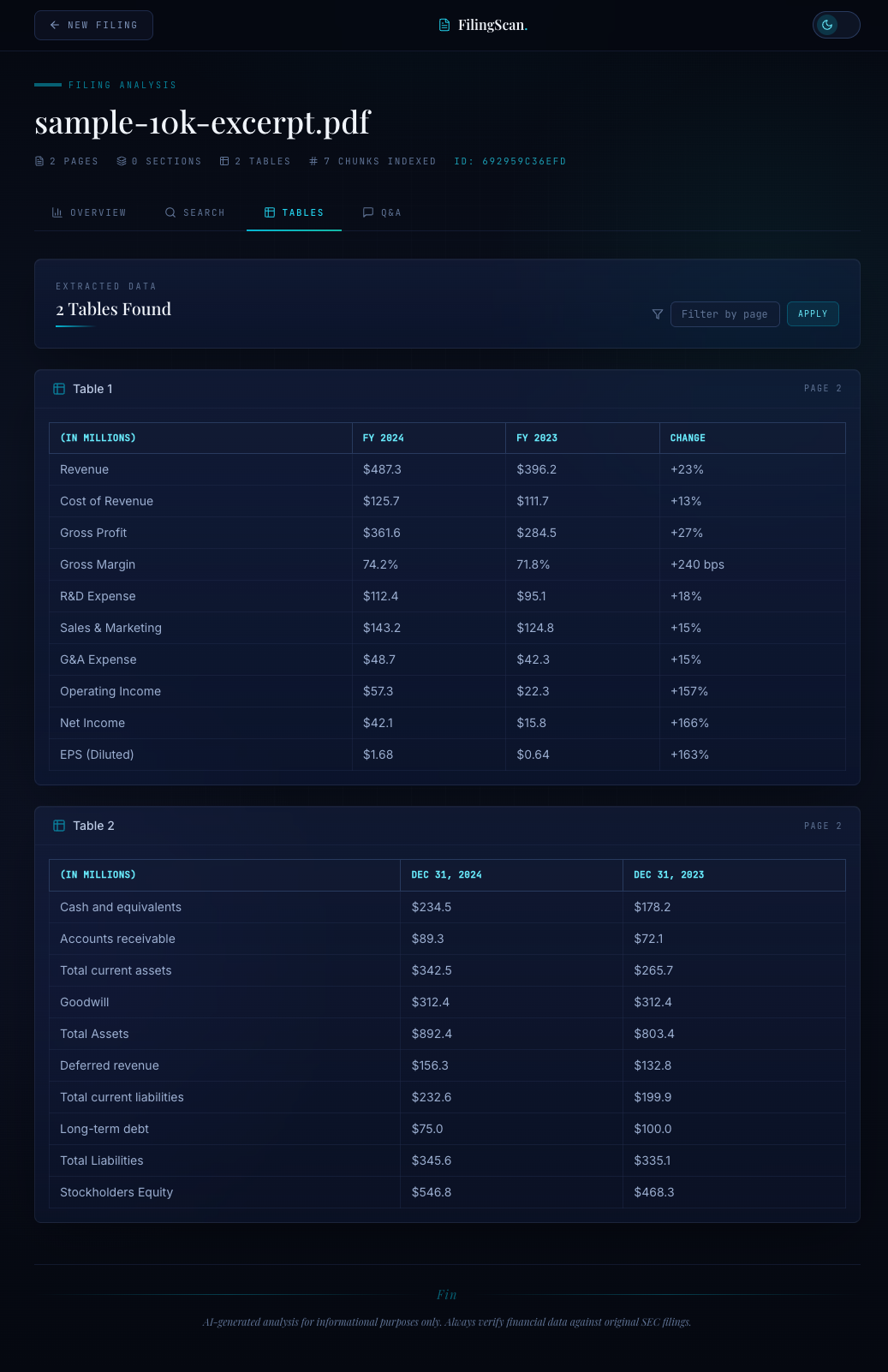
The markdown export (df.to_markdown()) produces clean pipe-delimited tables that Claude can reason about directly. The JSON export (df.to_json(orient="records")) gives downstream services a list of dictionaries — one per row — with column names as keys.
What the Parser Returns#
For a typical Apple 10-K filing (~160 pages), the parser produces:
- ~75 sections with heading levels, content, and page ranges
- ~35 tables with markdown and DataFrame JSON representations
- ~80,000 words of full text in markdown format
- Processing time: ~3 minutes on a 4-core machine (model inference is the bottleneck)
The final assembly logs a summary so you can verify extraction quality:
logger.info( f"Parsed {path.name}: {total_pages} pages, " f"{len(sections)} sections, {len(tables)} tables" ) return ParsedDocument( filename=path.name, total_pages=total_pages, full_text=full_text, markdown=markdown, sections=sections, tables=tables, )
This ParsedDocument is what the upload tool receives. From there, sections feed into the semantic chunker (Blog 3), tables become searchable objects in the vector index, and the full markdown provides context for LLM analysis (Blog 4).
Integration: From PDF to Indexed Filing#
The parser does not run in isolation. The upload tool orchestrates the full pipeline — parse, chunk, embed, index — in a single synchronous call:
def upload_filing(file_path: str) -> dict: # Parse PDF with Docling document = parse_pdf(str(dest)) # Create session session_id = session_manager.create_session(document) # Chunk the document using sections sections_data = [ {"title": s.title, "content": s.content} for s in document.sections ] chunks = chunk_document_sections( sections=sections_data, full_text=document.full_text, chunk_size=settings.chunk_size, threshold=settings.similarity_threshold, min_sentences=settings.min_sentences, ) # Index chunks in LanceDB create_index(session_id, chunks, document.filename)
Notice how the section structure flows directly into the chunker: sections_data carries titles and content, allowing the chunker to respect section boundaries rather than splitting at arbitrary token counts. This is the architectural payoff of layout-aware parsing — it does not just improve the raw text quality, it gives downstream components structural signals they can use.
The return value gives the caller everything they need to start analyzing:
return { "session_id": session_id, "filename": document.filename, "total_pages": document.total_pages, "sections_found": len(document.sections), "tables_found": len(document.tables), "chunks_indexed": len(chunks), }
Lessons and Tradeoffs#
The 2GB model weight problem. Docling's layout and table models add roughly 2GB to the deployment. For a production service, you either accept this (the models load once and stay in memory) or you run the parser as a separate microservice that scales independently from the MCP server. I chose the single-process approach because the MCP server is a tool-calling interface, not a high-throughput API.
Accuracy mode is worth the wait. I tested FAST vs. ACCURATE on 10 different 10-K filings. ACCURATE mode correctly extracted 94% of tables with proper column alignment. FAST mode dropped to 78%, with most failures on tables with merged header cells. For financial data, 78% is unacceptable — you cannot tell the user "we think this is the revenue number, but the columns might be wrong."
Markdown as the lingua franca. Both the full document and individual tables are exported as markdown. This was a deliberate choice: markdown is readable by humans, parseable by machines, and understood by LLMs. Claude handles markdown tables well in its context window. Alternative formats (HTML, LaTeX) add complexity without improving LLM comprehension.
Defensive parsing matters. The try/except around table export is not laziness — it is a design decision. A 150-page filing might have 40 tables, and one malformed table (a decorative element misidentified as a table) should not prevent the other 39 from being extracted. Log the failure, skip the element, continue.
Next Up#
The parser gives us sections and tables. Blog 3 covers what happens next: splitting those sections into semantically coherent chunks, embedding them with BGE-M3, and indexing them in LanceDB for retrieval. The key insight there is that section-aware chunking — using the heading boundaries from this parser — produces dramatically better search results than naive fixed-size chunking.