Context Engine Series — Blog 1: Architecture & Vision#
Your AI agent costs $0.04 per query. Context engineering cuts it to $0.015 — and gets better answers. Here's how.
The Deep Research Agent I built in the previous series works. It decomposes questions, dispatches parallel researchers, critiques results, and produces cited reports. But it's wasteful. Every query — whether "What is Python?" or "Compare the top 5 LLM frameworks for production deployment" — gets the same treatment: 4 sub-queries, 5 search results each, full content passed verbatim to the LLM. That's 19,600 tokens of context for a question that needs 300.
In this 6-part series, I'll show you how to build a Context Engine — a middleware layer that sits between the user's query and the research pipeline, engineering the context window to use only what the LLM actually needs. The result: 34%+ token reduction, faster responses, and — counterintuitively — better answers because the model isn't drowning in irrelevant search results.
The Context Engine Series#
| Part | Title | Focus |
|---|---|---|
| 1 | Architecture & Vision (this post) | System design, 6 techniques, pipeline overview |
| 2 | Query Complexity & Result Compression | Rule-based classifier, key sentence extraction |
| 3 | Semantic Memory & Research Caching | Jaccard similarity, local JSON cache |
| 4 | Dynamic Tool Selection | Intent classification, tool loadout |
| 5 | Source & Findings Deduplication | URL dedup, paragraph-level content hashing |
| 6 | Context X-ray Visualization | Real-time token tracking, WebSocket events |
What Is Context Engineering?#
Prompt engineering is about what you say to the LLM. Context engineering is about what you put in the context window before the LLM even starts thinking.
The distinction matters. A well-crafted prompt inside a bloated context window still wastes tokens and degrades quality. The LLM has to sift through thousands of tokens of irrelevant search results to find the 200 tokens that actually answer the question. Research backs this up — models perform worse with longer contexts when the relevant information is buried in noise (the "lost in the middle" effect).
Context engineering asks different questions:
- How many search results does this query actually need?
- Which sentences in each result are relevant to the query?
- Have we seen a similar question before? Can we reuse cached findings?
- Which tools does this query require? Does a factual lookup need credibility scoring?
- Are there duplicates across parallel researchers' findings?
The Context Engine answers all five — without a single extra LLM call.
The 6 Techniques#
Here's every technique the Context Engine applies, in pipeline order:
1. Complexity Classification#
A rule-based classifier scores the query on length, keyword presence, question count, and conjunctions. "What is Python?" scores -1 (SIMPLE, 1 sub-query). "Compare React, Vue, and Angular for enterprise apps in 2026" scores 4 (COMPLEX, 4 sub-queries). No LLM call needed — the heuristic runs in microseconds.
2. Result Compression#
Tavily returns 5 results per search, each with 500+ tokens of raw content. The compressor limits result count (3/4/5 based on complexity), extracts only key sentences matching query keywords, and truncates to character limits (300/400/500). A SIMPLE query goes from 5 results x 500 tokens to 3 results x 100 tokens — 94% reduction in search tokens.
3. Semantic Memory#
After every research run, findings are cached in a local JSON file with extracted keywords. On the next query, Jaccard similarity on keyword sets finds matches above a 0.5 threshold. If someone asks about "AI agents" and then "multi-agent systems," the second query gets cached context injected — skipping redundant web searches entirely.
4. Dynamic Tool Selection#
Not every query needs every tool. A factual lookup needs tavily_search but not score_credibility. A simple conceptual question ("What is a neural network?") might not need search at all. The tool selector classifies intent (FACTUAL, COMPARATIVE, CONCEPTUAL, CURRENT_EVENTS) and only includes relevant tool descriptions in the agent's context — saving 100-220 tokens per agent instance.
5. Findings Deduplication#
When 4 parallel researchers investigate related sub-queries, they often find the same information. The deduplicator hashes each paragraph (normalized, lowercased, whitespace-collapsed) and removes duplicates across all findings. Sources are deduplicated by URL, keeping the one with the highest credibility score.
6. Context X-ray Visualization#
Every technique above emits WebSocket events that power a real-time visualization panel. You can watch the context window being assembled stage by stage — complexity classification, memory lookup, tool selection, compression, deduplication — with exact token counts and savings percentages at each step.
Architecture Overview#
The Context Engine wraps the existing Deep Research Agent pipeline, adding a pre-processing layer and per-stage tracking:
                         ┌─────────────────────────────────┐
                         │        CONTEXT ENGINE            │
                         │                                  │
  User Query ───────────►│  1. Classify Complexity          │
                         │  2. Check Semantic Memory        │
                         │  3. Select Tools                 │
                         │  4. Allocate Token Budget        │
                         │                                  │
                         └──────────┬────────────────────────┘
                                    │
                                    ▼
                         ┌──────────────────────────────────┐
                         │        ORCHESTRATOR               │
                         │                                   │
                         │  5. Decompose (N sub-queries)     │
                         │                                   │
                         │  6. Parallel Research              │
                         │     ┌──────┬──────┬──────┐        │
                         │     │ R1   │ R2   │ R3   │        │
                         │     │(comp)│(comp)│(comp)│        │
                         │     └──┬───┴──┬───┴──┬───┘        │
                         │        │      │      │            │
                         │  7. Deduplicate findings           │
                         │  8. Critique                       │
                         │  9. Synthesize (+ memory context)  │
                         │                                   │
                         └──────────┬────────────────────────┘
                                    │
                         ┌──────────▼────────────────────────┐
                         │  10. Store in memory               │
                         │  11. Emit context_ready event      │
                         │  12. Stream report to client       │
                         └───────────────────────────────────┘
Each researcher (R1, R2, R3) gets compressed search results — the compressor runs inside the capturing_tavily_search tool wrapper so compression happens before the agent even sees the data.
Live Demo#
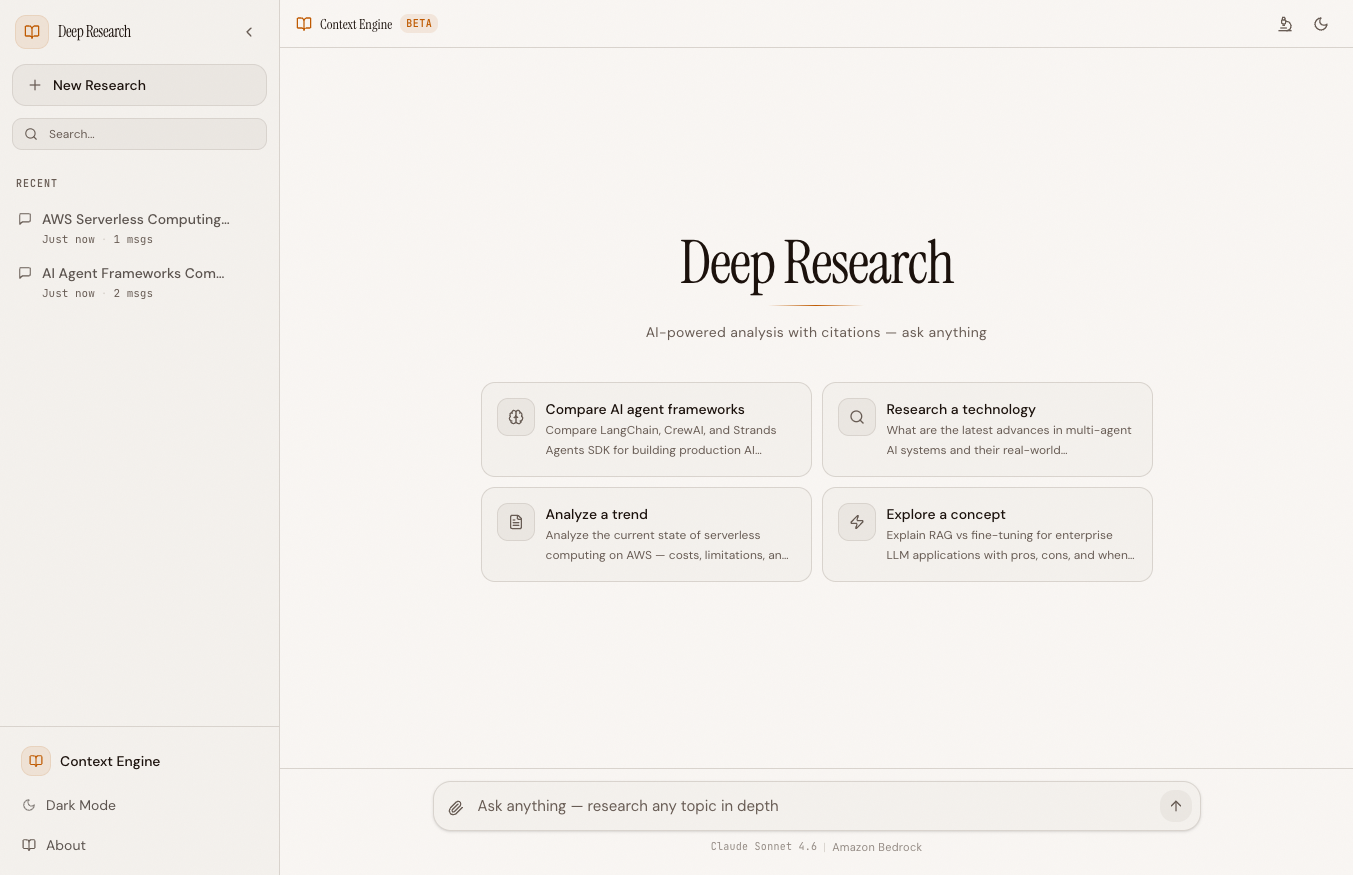 The Context Engine interface — same editorial design, new X-ray panel on the right
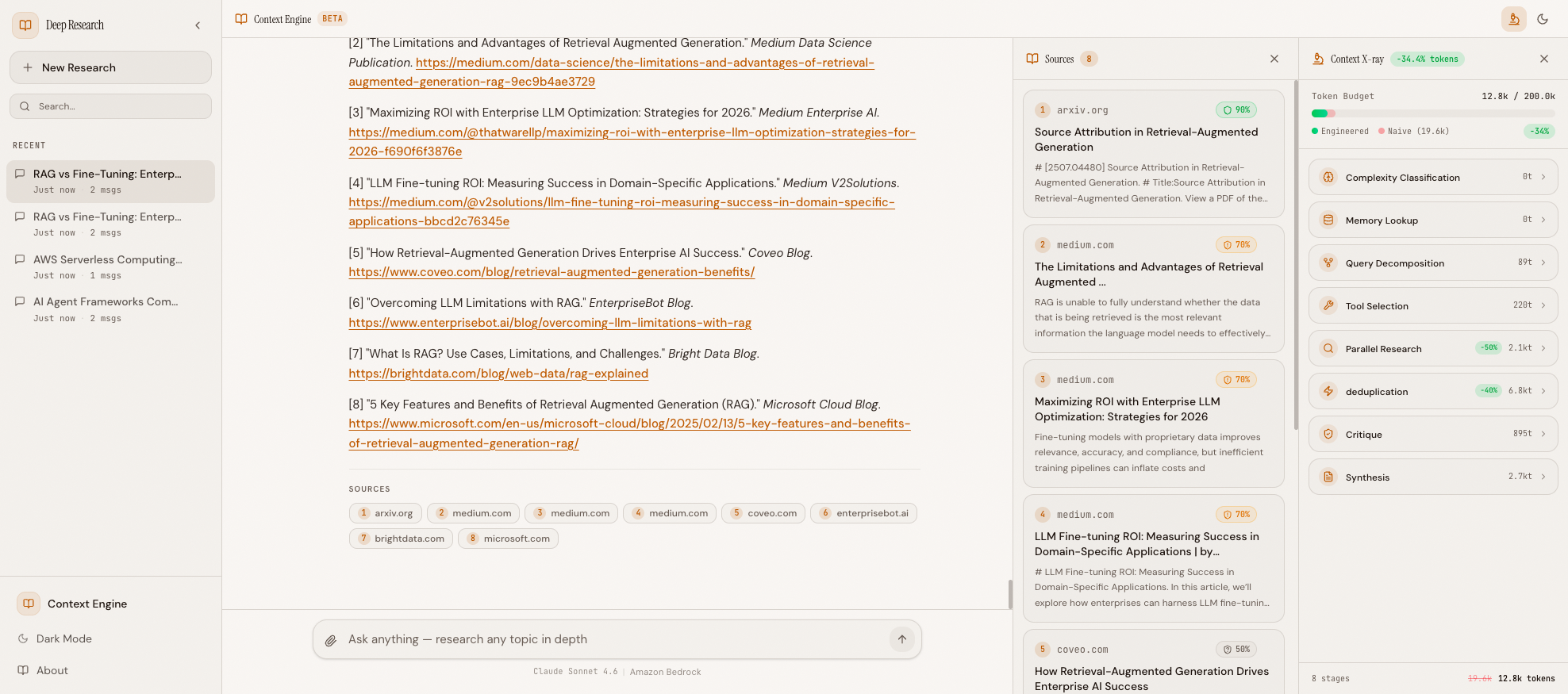 The Context X-ray panel showing all stages: complexity classification, memory lookup, tool selection, compression, deduplication, and final savings
Tech Stack#
| Layer | Technology | Why |
|---|---|---|
| AI Model | Claude Haiku 4.5 via Amazon Bedrock | Fast, cost-effective for parallel agents |
| Agent SDK | Strands Agents SDK | Clean @tool decorators, async support, Bedrock native |
| Backend | Python 3.12 + FastAPI | Async-first, WebSocket support |
| Frontend | React 19 + TypeScript + Vite | Modern, fast HMR |
| Search | Tavily API | Purpose-built for AI search |
| Token Counting | tiktoken (cl100k_base) | Fast, accurate token estimates |
| Memory Storage | Local JSON file | No external DB needed |
| Dev Environment | Docker Compose | Backend + frontend with hot reload |
The key addition versus the Deep Research Agent is the context/ package — 6 Python modules totaling ~500 lines that implement all the techniques above. No new infrastructure. No vector database. No embedding model. Just smart Python code that runs in microseconds before each LLM call.
The ContextEngine Class#
The central orchestrator is ContextEngine in backend/context/engine.py. It coordinates all techniques and emits X-ray events:
class ContextEngine: """Orchestrates context engineering techniques to reduce token usage. Emits WebSocket events for the Context X-ray panel as it processes. """ def __init__(self, budget_total: int | None = None): self.budget_total = budget_total or settings.token_budget_default self.complexity: ComplexityResult | None = None self.budget: TokenBudget | None = None self.stages: list[ContextAssemblyStage] = [] self._naive_total = 0 self._engineered_total = 0 self.memory = _memory self.memory_hits: list[dict] = [] async def pre_process(self, query: str) -> AsyncIterator[dict]: """Run context engineering pre-processing before research. Yields context_assembly events for the X-ray panel. """ # Stage 1: Classify complexity self.complexity = classify_complexity(query) self.budget = create_budget(self.budget_total, self.complexity.level) # Stage 2: Memory lookup matches = self.memory.search(query, threshold=0.5) # ... def record_stage(self, name, tokens, naive_tokens, items) -> dict | None: """Record a context engineering stage and return X-ray event.""" # Tracks cumulative engineered vs naive totals def get_context_ready_event(self) -> dict: """Return the final context_ready event with totals.""" return { "type": "context_ready", "total_tokens": self._engineered_total, "budget": self.budget_total, "naive_tokens": self._naive_total, "savings_percent": round( (1 - self._engineered_total / max(self._naive_total, 1)) * 100, 1 ), "stages": [...] }
Each stage in the pipeline calls record_stage() with both the engineered token count and the naive (unoptimized) count. At the end, get_context_ready_event() computes the total savings and sends it to the frontend for the X-ray summary.
Token Savings Math#
Here's a real example. Query: "Compare the top 3 Python web frameworks for building APIs in 2026."
Naive pipeline (Deep Research Agent):
| Stage | Tokens |
|---|---|
| Decomposition (4 sub-queries) | 850 |
| Research (4 agents x ~3,500 each) | 14,000 |
| All tool descriptions (per agent) | 880 |
| Critique | 1,200 |
| Synthesis | 2,700 |
| Total | 19,630 |
Engineered pipeline (Context Engine):
| Stage | Tokens | Savings |
|---|---|---|
| Complexity: COMPLEX (4 sub-queries) | 850 | 0% |
| Memory: no cache hit | 0 | — |
| Tool selection: all tools (comparative) | 880 | 0% |
| Research (4 agents, compressed results) | 8,200 | 41% |
| Deduplication | -600 | — |
| Critique | 1,200 | 0% |
| Synthesis (+ deduped findings) | 2,300 | 15% |
| Total | 12,830 | 34.6% |
The biggest win comes from result compression inside each researcher — instead of 5 full search results with 500+ tokens of content each, the agent gets 5 results with ~200 tokens of key sentences. The deduplicator catches the overlap that always happens when parallel researchers investigate related sub-queries.
For SIMPLE queries, the savings are even larger — 1 sub-query instead of 4, 3 results instead of 5, and potentially a full memory cache hit that skips web search entirely.
Project Structure#
The Context Engine is a fork of the Deep Research Agent with a new context/ package:
context_engine/
├── backend/
│   ├── context/                  # NEW — Context engineering layer
│   │   ├── engine.py             # Main pipeline coordinator
│   │   ├── complexity.py         # Query complexity classifier
│   │   ├── compressor.py         # Result compression
│   │   ├── memory.py             # Semantic memory (local JSON)
│   │   ├── budget.py             # Token budget management
│   │   ├── tool_selector.py      # Dynamic tool selection
│   │   └── deduplicator.py       # Source/finding dedup
│   ├── agents/
│   │   ├── orchestrator.py       # Research pipeline (enhanced)
│   │   └── prompts.py            # System prompts
│   ├── tools/
│   │   ├── tavily_search.py      # Web search
│   │   └── credibility_scorer.py # Source credibility
│   ├── app.py                    # FastAPI + WebSocket
│   └── config.py                 # Settings
├── frontend/
│   ├── src/
│   │   ├── components/
│   │   │   ├── ContextXray.tsx   # NEW — X-ray visualization
│   │   │   ├── TokenBudget.tsx   # NEW — Token meter
│   │   │   ├── ChatMessage.tsx
│   │   │   ├── ResearchProgress.tsx
│   │   │   └── SourcePanel.tsx
│   │   └── hooks/
│   │       ├── useChat.ts
│   │       └── useWebSocket.ts
├── data/
│   └── memory.json               # Persistent memory cache
└── docker-compose.yml
The key design principle: the context/ modules are pure functions and simple classes — no LLM calls, no network requests, no async complexity. They run in microseconds and can be unit tested trivially. The orchestrator calls into them at the right moments and passes results through.
Running It Yourself#
Prerequisites#
- Python 3.12+ and Node.js 22+
- Docker (for local dev)
- AWS CLI with a named profile that has Bedrock access
- Tavily API key — Free at tavily.com
AWS Profile Setup#
The project uses Amazon Bedrock for LLM calls. You need an AWS CLI profile with Bedrock access configured:
# Option 1: SSO (recommended for organizations) aws configure sso --profile your-profile-name # Option 2: IAM credentials aws configure --profile your-profile-name # Verify it works aws sts get-caller-identity --profile your-profile-name
Important: The
docker-compose.ymlusesAWS_PROFILE=devby default. Replacedevwith your own profile name, or set the environment variable before running:AWS_PROFILE=your-profile-name docker compose up --build
Quick Start#
git clone https://github.com/MinhQuanBuiSco/context-engine.git cd context-engine # Create .env with your Tavily key echo "TAVILY_API_KEY=tvly-your-key" > .env # Start both services docker compose up --build # Open http://localhost:5173
No login required — the app is open access. Type a query and watch the Context X-ray panel show token savings in real-time.
What's Next#
In Blog 2: Query Complexity & Result Compression, we'll dive into the first two techniques — how the complexity classifier scores queries with keyword detection and length heuristics, and how the result compressor uses key sentence extraction to cut search tokens by 60-80%. We'll walk through the full code for classify_complexity() and compress_tavily_results(), with before-and-after token counts.
This project is a fork of the Deep Research Agent — read that series first for the base pipeline.
All code is open source: github.com/MinhQuanBuiSco/context-engine