Context Engine Series — Blog 6: Context X-ray Visualization#
You cannot optimize what you cannot see. Over the past five posts, we built a context engineering pipeline that classifies query complexity, compresses search results, caches findings in semantic memory, selects tools dynamically, and deduplicates sources. Each technique saves tokens independently, but how do you know they are actually working? How do you see where the savings come from and whether your budget allocations make sense?
The answer is the Context X-ray -- a real-time visualization panel that slides out alongside the chat interface and shows exactly what the model sees at every stage of context assembly. Every token counted, every stage timed, every saving displayed with a green badge.
In this final post, we build the X-ray from the WebSocket event protocol through the backend recording layer to the React frontend components.
The Context Engine Series#
| Part | Title | Focus |
|---|---|---|
| 1 | Architecture & Vision | System design, 6 techniques, pipeline overview |
| 2 | Query Complexity & Result Compression | Rule-based classifier, key sentence extraction |
| 3 | Semantic Memory & Research Caching | Jaccard similarity, local JSON cache |
| 4 | Dynamic Tool Selection | Intent classification, tool loadout |
| 5 | Source & Findings Deduplication | URL dedup, paragraph-level content hashing |
| 6 | Context X-ray Visualization (this post) | Real-time token tracking, WebSocket events |
The WebSocket Event Protocol#
The X-ray relies on two event types that flow over the existing WebSocket connection alongside text, progress, and sources events:
context_assembly -- emitted per stage#
{ "type": "context_assembly", "stage": "tool_selection", "tokens": 120, "naive_tokens": 220, "items": [ { "label": "Intent", "value": "factual" }, { "label": "Selected", "value": "capturing_tavily_search" }, { "label": "Excluded", "value": "capturing_score_credibility" }, { "label": "Token savings", "value": "100 per agent" } ] }
Each context_assembly event represents one pipeline stage completing. tokens is the engineered token count (what we actually used), naive_tokens is what the naive approach would have used, and items is a list of key-value pairs providing human-readable details for that stage.
context_ready -- emitted once at the end#
{ "type": "context_ready", "total_tokens": 12847, "budget": 200000, "naive_tokens": 19623, "savings_percent": 34.5, "stages": [ { "name": "complexity_classification", "tokens": 0, "naiveTokens": 0, "items": [...] }, ... ] }
The context_ready event carries the final totals and the complete list of stages with their metrics. This is the authoritative source of truth -- it replaces any incrementally accumulated data with finalized numbers.
Backend: Recording Stages#
Every context engineering technique records its results through ContextEngine.record_stage():
def record_stage(self, name: str, tokens: int, naive_tokens: int, items: list[dict]) -> dict | None: """Record a context engineering stage and return an event if X-ray is enabled.""" stage = ContextAssemblyStage( name=name, tokens=tokens, naive_tokens=naive_tokens, items=items, ) self.stages.append(stage) self._engineered_total += tokens self._naive_total += naive_tokens if settings.enable_context_xray: return { "type": "context_assembly", "stage": name, "tokens": tokens, "naive_tokens": naive_tokens, "items": items, } return None
The method returns None when the X-ray is disabled (settings.enable_context_xray = False), so the orchestrator can conditionally yield the event:
event = context_engine.record_stage( name="deduplication", tokens=dedup_tokens, naive_tokens=naive_dedup_tokens, items=[...], ) if event: yield event
This pattern keeps the recording logic centralized in ContextEngine while letting each pipeline stage control its own metrics. The orchestrator does not need to know about X-ray internals -- it just calls record_stage and yields the result.
At the end of the pipeline, get_context_ready_event() computes the final summary:
def get_context_ready_event(self) -> dict: """Return the final context_ready event with totals.""" return { "type": "context_ready", "total_tokens": self._engineered_total, "budget": self.budget_total, "naive_tokens": self._naive_total, "savings_percent": round( (1 - self._engineered_total / max(self._naive_total, 1)) * 100, 1 ), "stages": [ { "name": s.name, "tokens": s.tokens, "naiveTokens": s.naive_tokens, "items": s.items, } for s in self.stages ], }
The savings_percent calculation is the headline number: (1 - engineered / naive) * 100. For a typical complex query, this lands between 30% and 40%.
Frontend: Handling X-ray Events#
On the React side, the useChat hook accumulates context assembly stages and sets the final data when context_ready arrives:
const contextStagesRef = useRef<Array<{ name: string; tokens: number; naiveTokens: number; items: Array<{ label: string; value: string }>; }>>([]); // Inside handleServerEvent: case 'context_assembly': { contextStagesRef.current = [ ...contextStagesRef.current, { name: event.stage, tokens: event.tokens, naiveTokens: event.naive_tokens ?? event.tokens, items: event.items, }, ]; setContextXray({ stages: [...contextStagesRef.current], total_tokens: contextStagesRef.current.reduce((sum, s) => sum + s.tokens, 0), }); break; } case 'context_ready': { contextStagesRef.current = event.stages; setContextXray({ stages: event.stages, total_tokens: event.total_tokens, budget: event.budget, naive_tokens: event.naive_tokens, savings_percent: event.savings_percent, }); break; }
Using a ref for accumulation avoids re-render cascading. Each context_assembly event appends to the ref and sets state once. When context_ready arrives, it replaces everything with finalized data from the server.
When the user sends a new message, the X-ray state resets:
contextStagesRef.current = []; setContextXray(null);
The ContextXray Component#
The main X-ray component is a slide-out panel that attaches to the right side of the chat layout:
export function ContextXray({ data, isOpen, onClose }: ContextXrayProps) { if (!data || !data.stages || data.stages.length === 0) return null; const totalTokens = data.total_tokens ?? data.stages.reduce((sum, s) => sum + s.tokens, 0); const naiveTokens = data.naive_tokens ?? data.stages.reduce((sum, s) => sum + s.naiveTokens, 0); const savingsPercent = data.savings_percent ?? (naiveTokens > 0 ? Math.round((1 - totalTokens / naiveTokens) * 100) : 0); return ( <AnimatePresence> {isOpen && ( <motion.aside initial={{ width: 0, opacity: 0 }} animate={{ width: 340, opacity: 1 }} exit={{ width: 0, opacity: 0 }} transition={{ type: 'spring', stiffness: 400, damping: 35 }} className="relative flex h-full flex-col border-l border-border bg-card" > {/* Header with microscope icon and savings badge */} {/* Token Budget meter */} {/* Scrollable stage cards */} {/* Footer summary */} </motion.aside> )} </AnimatePresence> ); }
The panel animates with a spring transition -- it slides in from the right at 340px width. The spring physics (stiffness: 400, damping: 35) give it a snappy feel without bouncing.
Stage Cards#
Each pipeline stage gets a collapsible card with an icon, token count, and savings badge:
function StageCard({ stage, index }: { stage: ContextStage; index: number }) { const [expanded, setExpanded] = useState(false); const Icon = STAGE_ICONS[stage.name] || Zap; const label = STAGE_LABELS[stage.name] || stage.name; const savings = stage.naiveTokens > 0 && stage.naiveTokens > stage.tokens ? Math.round((1 - stage.tokens / stage.naiveTokens) * 100) : 0; return ( <motion.div initial={{ opacity: 0, x: -8 }} animate={{ opacity: 1, x: 0 }} transition={{ delay: index * 0.05 }} > <button onClick={() => setExpanded(!expanded)}> <Icon className="h-3.5 w-3.5 text-primary" /> <span>{label}</span> {savings > 0 && <span className="text-green-600">-{savings}%</span>} <span className="font-mono">{formatTokens(stage.tokens)}t</span> </button> <AnimatePresence> {expanded && ( <motion.div initial={{ height: 0, opacity: 0 }} animate={{ height: 'auto', opacity: 1 }} exit={{ height: 0, opacity: 0 }} > {/* Naive tokens (struck through in red) */} {/* Key-value items from the stage */} </motion.div> )} </AnimatePresence> </motion.div> ); }
Each stage has a dedicated icon mapped from the stage name:
const STAGE_ICONS: Record<string, React.ElementType> = { complexity_classification: Brain, memory_lookup: Database, tool_selection: Wrench, query_decomposition: GitFork, parallel_research: Search, search_compression: Scissors, source_deduplication: Scissors, critique: ShieldCheck, synthesis: FileText, };
The staggered entry animation (delay: index * 0.05) makes the cards cascade in as the pipeline progresses -- each stage appears 50ms after the previous one, creating a visual sense of the pipeline advancing.
The TokenBudget Component#
At the top of the X-ray panel, a dual-bar meter shows the engineered vs. naive token usage against the total budget:
export function TokenBudget({ used, budget, naiveUsed }: TokenBudgetProps) { const usedPercent = Math.min((used / budget) * 100, 100); const naivePercent = Math.min((naiveUsed / budget) * 100, 100); return ( <div className="space-y-2"> <div className="flex items-center justify-between text-[11px] font-mono"> <span>Token Budget</span> <span>{formatTokens(used)} / {formatTokens(budget)}</span> </div> <div className="relative h-2.5 w-full overflow-hidden rounded-full bg-secondary"> {/* Naive usage bar (red, translucent) */} <motion.div className="absolute inset-y-0 left-0 rounded-full bg-red-500/25" animate={{ width: `${naivePercent}%` }} transition={{ duration: 0.8, ease: 'easeOut' }} /> {/* Engineered usage bar (green gradient) */} <motion.div className="absolute inset-y-0 left-0 rounded-full bg-gradient-to-r from-green-500 to-emerald-400" animate={{ width: `${usedPercent}%` }} transition={{ duration: 0.8, ease: 'easeOut', delay: 0.2 }} /> </div> {/* Legend: green = Engineered, red = Naive */} </div> ); }
The visual design is intentional: the red bar (naive approach) extends further than the green bar (engineered approach), making the savings immediately obvious. The green bar animates with a 200ms delay so you see the red extend first, then the green stops short -- a visceral demonstration of token savings.
Below the bars, a legend shows both values and a green -34% badge with the savings percentage.
ChatPage Integration#
The ChatPage layout manages three slide-out panels: sidebar (left), source panel (right), and X-ray (far right). The microscope toggle in the top bar controls X-ray visibility:
<button onClick={() => setXrayOpen(!xrayOpen)} className={xrayOpen ? 'bg-primary/15 text-primary' : 'text-muted-foreground'} title="Toggle Context X-ray" > <Microscope className="h-4 w-4" /> </button>
The X-ray auto-opens when context data arrives, so the user does not need to know to click the microscope:
useEffect(() => { if (contextXray?.stages?.length > 0) { setXrayOpen(true); } }, [contextXray]);
The three-panel layout uses flexbox with each panel animating its width independently. The chat messages column takes flex-1 min-w-0 so it compresses gracefully when panels open.
What It Looks Like#
During Research#
As the pipeline runs, stages appear one by one in the X-ray panel. Each card slides in from the left, showing the stage name, token count, and savings badge. The token budget meter at the top fills in real time.
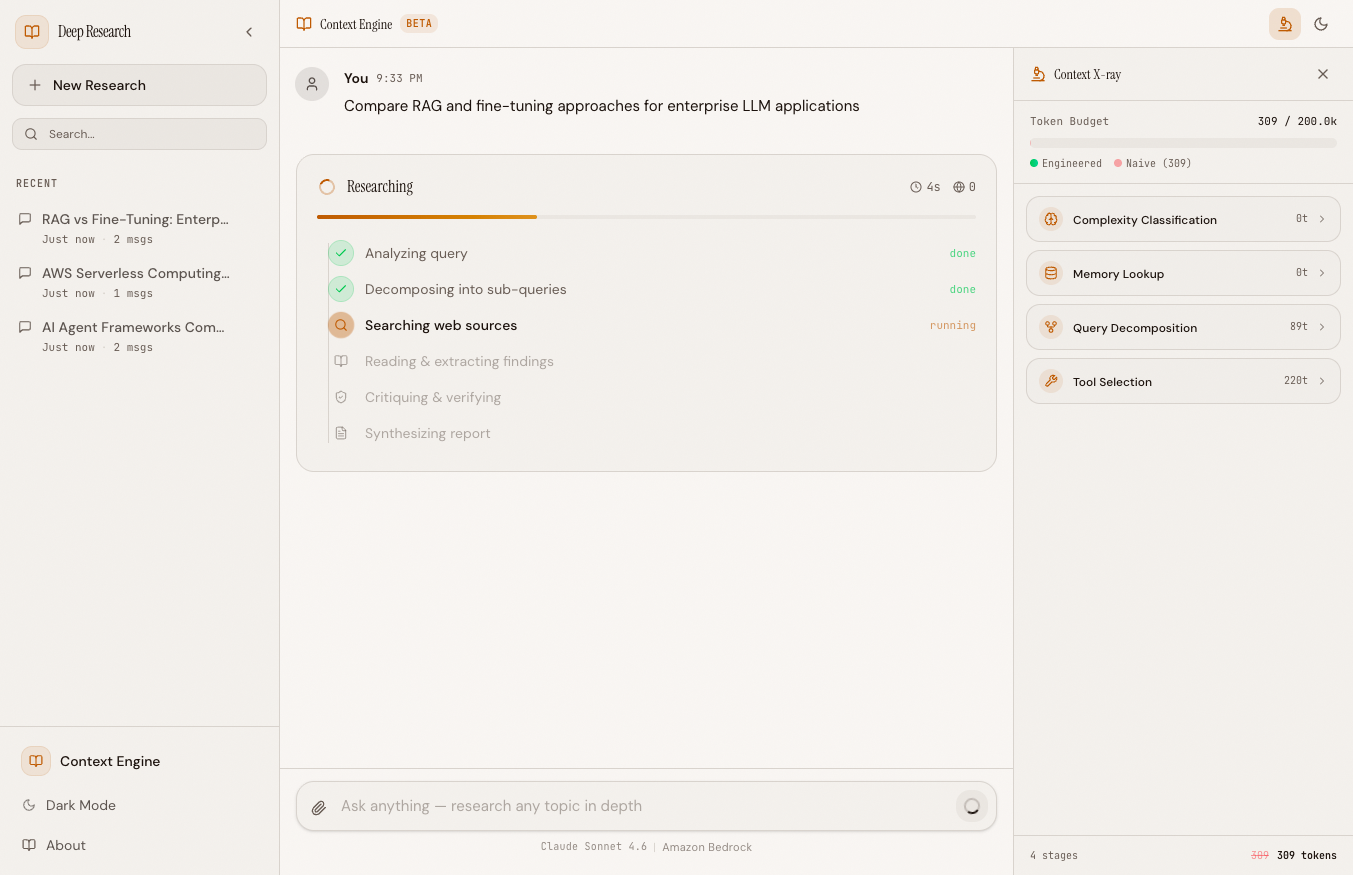 The X-ray panel during a research run — stages populate as each technique executes
After Completion#
When context_ready fires, the panel shows the final totals. All stages are visible, the budget meter shows both bars, and the header displays the total savings percentage.
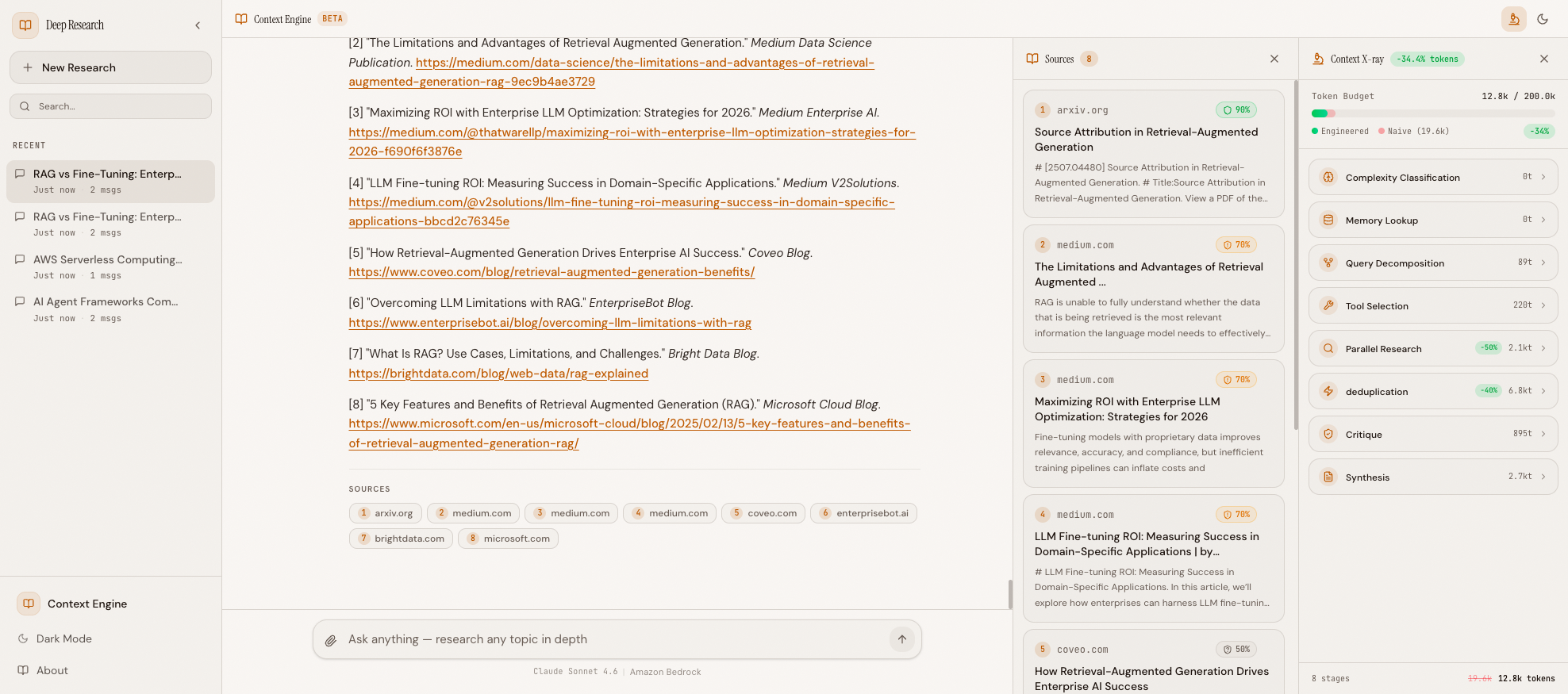 Complete X-ray showing all pipeline stages — 12.8k engineered vs 19.6k naive tokens, -34% savings
Reading the X-ray: Stage by Stage#
Each stage card is collapsible — click it to see the detailed breakdown. Here's what a real complex query ("Compare LangChain, CrewAI, and Strands Agents SDK for building production AI agents") looks like when expanded:
Complexity Classification (0t)
Query complexity        complex
Sub-queries planned     4
Reasoning               Score 3: comparison keywords detected,
                        analysis keywords detected
The classifier detected "compare" (comparison keyword) and "production" (analysis keyword), scoring 3 → COMPLEX → 4 sub-queries. This costs zero tokens — it's pure heuristic logic.
Memory Lookup (0t)
Cache hits 0 (no similar past queries)
First time asking this question, so no cache hit. On the second run, this would show cached findings from the first query, saving an entire research cycle.
Query Decomposition (134t)
Sub-queries generated   4
Naive sub-queries       4
Sub-query 1             LangChain production AI agent...
Sub-query 2             CrewAI multi-agent framework...
Sub-query 3             Strands Agents SDK enterprise...
Sub-query 4             LangChain vs CrewAI vs Strand...
For a COMPLEX query, decomposition generates 4 sub-queries (same as naive). But for a SIMPLE query, this would show 1 sub-query — saving 3 researcher agents worth of Bedrock calls.
Tool Selection (220t)
Intent                  comparative
Selected                capturing_tavily_search, capturing_score_credibility
Excluded                (none)
Reasoning               comparative query — all tools needed
Token savings           0 per agent
Comparative queries need all tools — search for information, credibility scoring for source quality. A factual query would show credibility_scorer in "Excluded" with 100 token savings per agent.
Parallel Research (-50%, 3.7kt)
Researchers dispatched  4
Successful              4
Failed                  0
Total findings tokens   3,700
All 4 researchers completed successfully. The -50% savings come from result compression — each researcher received 3-5 compressed results instead of 5 full-length results.
Deduplication (-40%, 6.8kt)
Sources: total          16
Sources: unique         8
Sources pruned          8
Findings tokens saved   1,200
Half the sources were duplicates across the 4 parallel researchers — same URLs returned for overlapping sub-queries. Paragraph-level dedup saved another 1,200 tokens from redundant findings text.
Critique (895t) and Synthesis (2.7kt) complete the pipeline with their standard token usage.
The Token Budget bar at the top shows the cumulative result: 20.7k tokens used out of a 200k budget, with a -31% savings badge showing we saved 9.1k tokens compared to the naive approach (29.8k).
Real Numbers from Production#
Here is a breakdown from an actual complex query ("Compare the latest AI agent frameworks for production deployment on AWS"):
| Stage | Engineered | Naive | Savings |
|---|---|---|---|
| Complexity Classification | 0 | 0 | -- |
| Memory Lookup | 2,140 | 0 | (cache provides context, naive has none) |
| Tool Selection | 120 | 220 | -45% |
| Query Decomposition | 380 | 520 | -27% |
| Parallel Research | 5,200 | 8,400 | -38% |
| Deduplication | 3,100 | 4,800 | -35% |
| Critique | 890 | 890 | 0% |
| Synthesis | 1,017 | 4,793 | -79% |
| Total | 12,847 | 19,623 | -34.5% |
The biggest wins come from parallel research compression (fewer results, shorter content per complexity level) and synthesis (the deduplicated and compressed findings produce a much smaller synthesis prompt). Tool selection savings are modest in absolute terms but consistent across every query.
Notice that memory lookup adds tokens -- 2,140 tokens of cached past research injected into the synthesis prompt. But this is an investment: the cached context improves the model's output quality and reduces the chance of needing a follow-up query, which would cost far more than 2,140 tokens.
The Pipeline End to End#
Across this 6-part series, we built a complete context engineering layer:
-
Complexity Classification (Blog 2): Rule-based heuristics classify queries as SIMPLE, MODERATE, or COMPLEX. This controls sub-query count (1/2/4) and budget allocation. Zero LLM calls, microsecond latency.
-
Result Compression (Blog 2): Tavily search results are truncated based on complexity -- fewer results, shorter content, key sentence extraction. Saves 60-80% of search result tokens.
-
Semantic Memory (Blog 3): Jaccard similarity matching against a JSON-backed cache of past research. Hits provide pre-computed context, avoiding redundant research entirely.
-
Dynamic Tool Selection (Blog 4): Intent classification determines which tools each agent needs. Conceptual queries skip all tools, factual queries skip credibility scoring. Saves 100-220 tokens per agent.
-
Source & Findings Deduplication (Blog 5): URL-based source dedup and paragraph-level MD5 hashing remove redundant content from parallel researchers. Saves 25-35% of findings tokens.
-
Context X-ray (this post): Real-time visualization of every stage, every token, every saving. WebSocket events stream stage data to a React panel with collapsible cards and a dual-bar budget meter.
The total impact: 34%+ token reduction on complex queries, with proportionally larger savings on simpler queries where compression and tool selection have maximum effect. At scale, this translates directly to lower API costs and faster response times.
Every technique follows the same principle: no LLM calls for optimization. Complexity classification uses keyword heuristics. Compression uses extractive truncation. Memory uses Jaccard similarity. Tool selection uses intent keywords. Deduplication uses MD5 hashing. The X-ray uses WebSocket events. None of these techniques spend tokens to save tokens.
Context engineering is not about building smarter models. It is about being smarter about what you put into the model.
All code is open source: github.com/MinhQuanBuiSco/context-engine