Deep Research Agent Series — Blog 4: Real-Time Streaming with WebSocket#
A research pipeline that takes 20 seconds to run is useless if the user stares at a blank screen. The orchestrator can decompose queries, the researchers can search in parallel, and the critic can review findings — but none of it matters if the experience feels like submitting a form and waiting. In this post, we build the real-time streaming layer — a FastAPI WebSocket endpoint that streams text chunks, progress steps, and source metadata as the research happens. Plus: CloudFront keepalive tricks that took days to debug, lazy conversation creation, and DynamoDB-backed chat history.
Series Navigation#
| Part | Topic | Status |
|---|---|---|
| Blog 1 | Architecture & Vision | Published |
| Blog 2 | Multi-Agent Orchestration | Published |
| Blog 3 | Smart Search & Source Intelligence | Published |
| Blog 4 | Real-Time Streaming with WebSocket | You are here |
| Blog 5 | Cloud-Native Infrastructure on AWS | Published |
| Blog 6 | Security & Production Hardening | Published |
What It Looks Like#
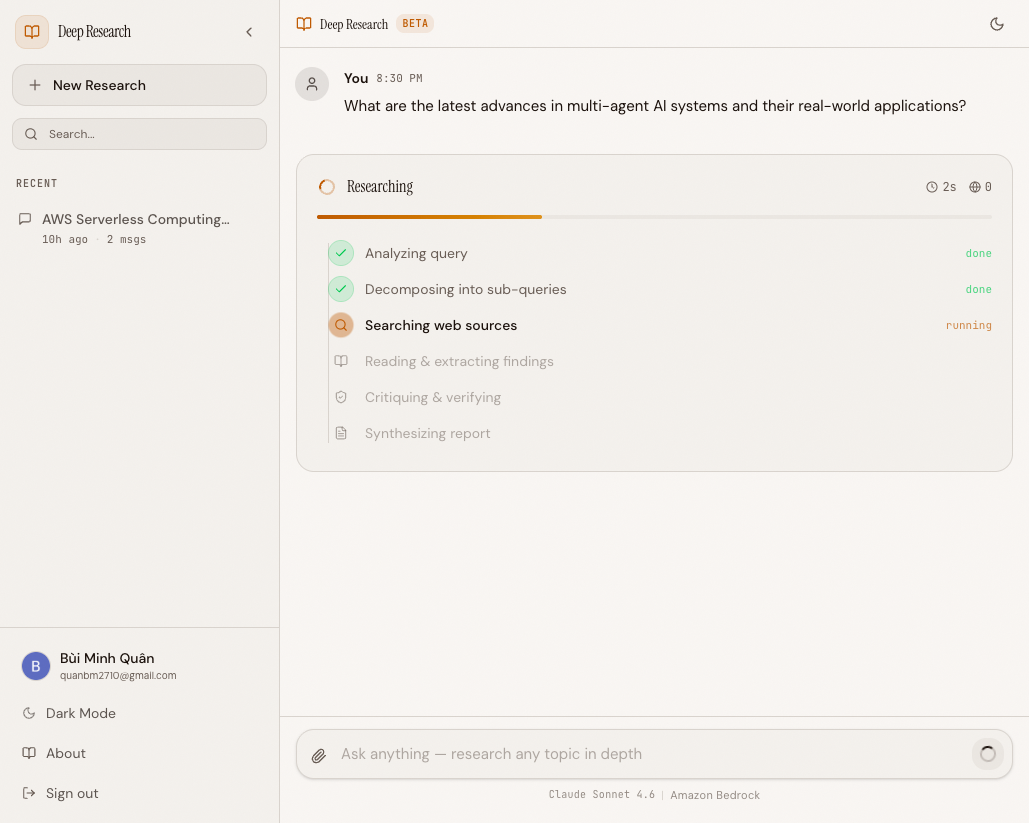 The research pipeline in action — progress steps stream in real-time as agents work in parallel
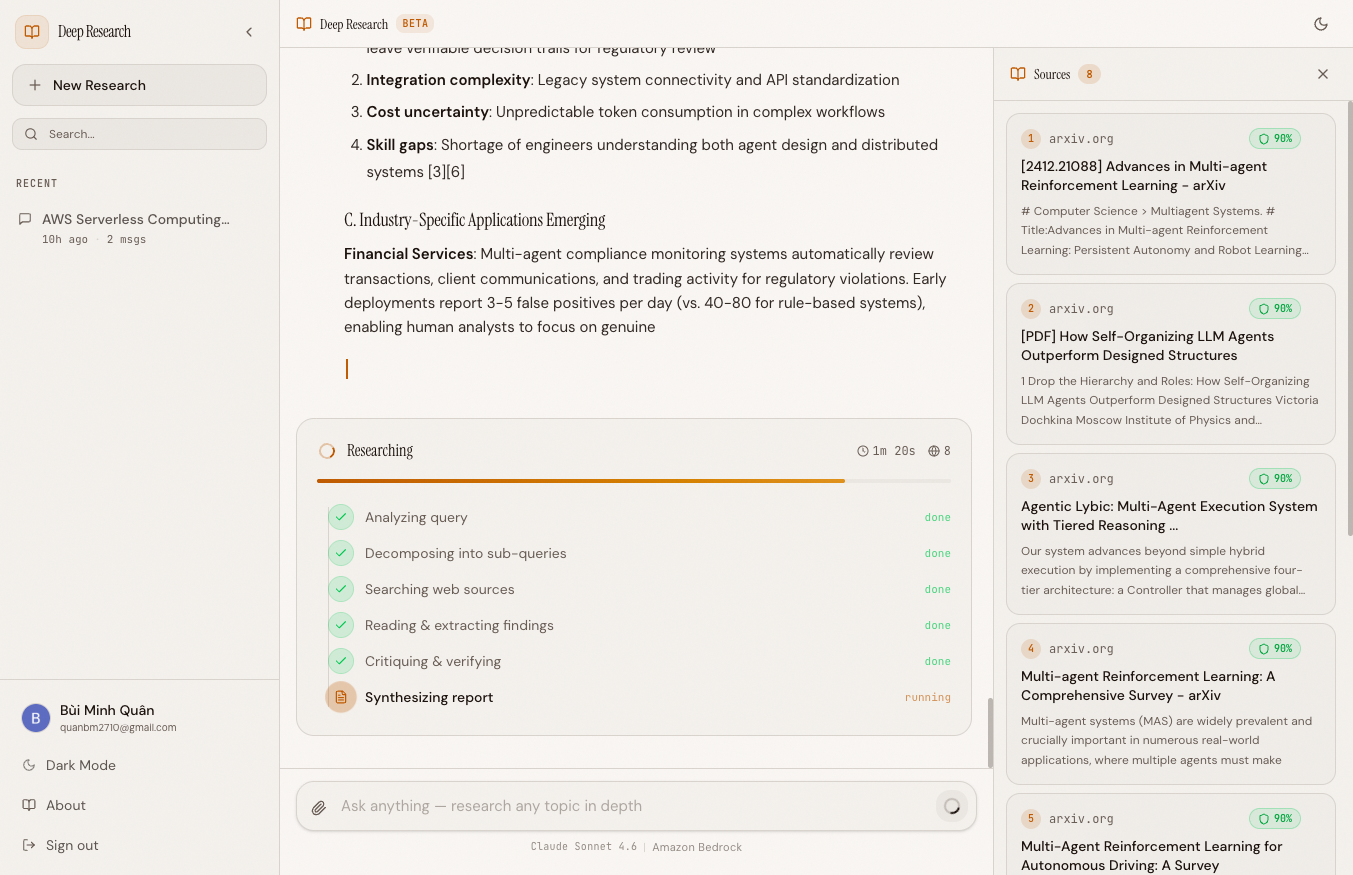 Sources with credibility scores appear alongside the streaming report, with the full pipeline visible
The WebSocket Protocol#
Before writing any code, we need a protocol. The client sends one message type; the server responds with eight. Every event is a JSON object with a type field that tells the frontend exactly what to render.
Client → Server:
  {"message": "...", "mode": "auto|chat|research", "conversation_id": "..."}

Server → Client:
  {"type": "text", "data": "..."}                              # Streamed text chunk
  {"type": "progress", "step": "...", "status": "active|complete"}  # Pipeline step update
  {"type": "sources", "sources": [...]}                        # Research sources with metadata
  {"type": "tool_use", "name": "..."}                          # Tool invocation notification
  {"type": "conversation_created", "conversation_id": "..."}   # Lazy-created conversation ID
  {"type": "keepalive"}                                        # CloudFront idle prevention
  {"type": "pong", "ts": 0}                                    # Server-side keepalive
  {"type": "result", "stop_reason": "..."}                     # Stream complete
  {"type": "error", "message": "..."}                          # Error with detail
Each event type serves a specific purpose. text events carry the actual streamed response — the frontend appends them to build the answer incrementally. progress events drive the step indicator ("Decomposing query...", "Researching sub-queries...", "Critiquing findings..."). sources events arrive once research completes, carrying structured metadata that the frontend renders as citation cards. The distinction between keepalive and pong will become clear when we discuss CloudFront.
The WebSocket Endpoint#
The WebSocket handler is the single entry point for all client-server communication during a chat session. Here's the actual code:
@app.websocket("/ws/chat/{session_id}") async def websocket_chat( websocket: WebSocket, session_id: str, token: str = Query(default=""), ): # Verify JWT before accepting the connection try: claims = await verify_token(token) user_id = claims.get("sub", "anonymous") except Exception as e: if settings.cognito_user_pool_id: await websocket.close(code=4001) return user_id = "dev-user" await websocket.accept() # One agent per user (not per session/conversation) if user_id not in _agents: _agents[user_id] = create_orchestrator() agent = _agents[user_id]
Three design decisions are baked into these 20 lines:
JWT verification happens before accept(). The WebSocket handshake is an HTTP upgrade request. If the token is invalid and Cognito is configured, we close with custom code 4001 before the connection is established. The client never gets a WebSocket — it gets a rejection. This prevents unauthenticated users from consuming server resources.
One orchestrator per user, not per session. The _agents dictionary maps user_id to an Agent instance. If a user opens multiple tabs or reconnects, they share the same orchestrator. This means conversation context persists across sessions without re-loading history into the agent's memory. The trade-off is memory usage — each agent holds its conversation buffer — but for a research tool with hundreds of users, not thousands of concurrent ones, this is a reasonable trade.
Dev mode fallback. When cognito_user_pool_id is not configured (local development), auth failures are silently ignored and the user gets a dev-user identity. No Cognito setup required to run locally.
Three Research Modes#
Not every message deserves the full research pipeline. The system supports four modes, three of which are interactive:
mode = data.get("mode", "auto") if mode == "auto": use_research = _should_research(message) elif mode == "research": use_research = True elif mode == "chat": use_research = False elif mode == "async_research": # Enqueue to SQS for background processing await enqueue_research(user_id, conv_id, message) await websocket.send_json({"type": "result", "stop_reason": "enqueued"}) continue
Auto mode uses the heuristic from Blog 1 — keyword matching, message length, question count. It runs in microseconds and gets the right answer 90% of the time. Chat mode skips research entirely and streams a direct conversational response. Research mode always triggers the full pipeline. Async research enqueues the query to SQS for background processing — useful for very long-running research that exceeds WebSocket timeout limits.
The mode is sent by the client, so the frontend can expose a toggle button that lets users force research or chat mode regardless of the heuristic.
Lazy Conversation Creation#
Most chat applications require you to create a conversation before sending a message. We flip that: conversations are created on the first message, with server-generated IDs.
if not conv_id: conv_id = str(uuid4()) conv = create_conversation(user_id, conv_id=conv_id) await websocket.send_json({ "type": "conversation_created", "conversation_id": conv_id, })
The frontend starts with no conversation_id. When the user sends their first message, the server generates a UUID, creates the conversation in DynamoDB, and sends the ID back via a conversation_created event. The frontend stores it and includes it in all subsequent messages.
This avoids the "create conversation before you can send a message" UX problem. The user types and hits enter. The conversation materializes behind the scenes. No loading spinners, no extra round trips, no blank conversation list entries that the user never used.
CloudFront Keepalive#
This was the hardest production bug to solve. Everything worked perfectly in local development. In production, behind CloudFront, WebSocket connections would die silently after 60 seconds of inactivity during research.
The root cause: CloudFront has a 60-second idle timeout on WebSocket connections. If no data flows in either direction for 60 seconds, CloudFront terminates the connection. Research queries can take 20+ seconds for the parallel research phase, during which no text is streaming to the client — just internal API calls happening on the server.
The fix is a two-pronged keepalive strategy:
Server-Side Keepalive Task#
A background asyncio task sends a pong event every 15 seconds for the entire lifetime of the WebSocket connection:
async def _server_keepalive(ws: WebSocket): """Send periodic pong to prevent CloudFront idle timeout.""" try: while True: await asyncio.sleep(15) await ws.send_json({"type": "pong", "ts": 0}) except Exception: pass
This task is spawned when the connection is accepted and cancelled when it closes. The pong events keep the connection alive during any idle period — between messages, while the user is typing, or during long research phases.
Keepalive During asyncio.gather#
The server-side keepalive handles general idle time, but the research gather phase needs special treatment. When four researchers are running in parallel, we need to yield keepalive events without cancelling the research:
gather_future = asyncio.ensure_future( asyncio.gather(*research_tasks, return_exceptions=True) ) while not gather_future.done(): try: research_results = await asyncio.wait_for( asyncio.shield(gather_future), timeout=10.0 ) break except asyncio.TimeoutError: yield {"type": "keepalive"}
The key insight is asyncio.shield. Without it, the TimeoutError from wait_for would cancel the gather future — killing all four researchers mid-flight. shield protects the inner future from cancellation. The outer loop simply checks every 10 seconds: "Are we done yet?" If not, it yields a keepalive event and checks again.
The frontend ignores both keepalive and pong events — they exist purely to keep CloudFront happy.
Auto-Generated Titles#
When a conversation is created, it has no title. We generate one asynchronously after the first message:
asyncio.create_task(_generate_title(user_id, conv_id, message))
The title generation uses a separate Claude Haiku call with a minimal prompt:
async def _generate_title(user_id: str, conv_id: str, message: str): """Generate a conversation title from the first message.""" try: title_agent = Agent( model=_create_model(), system_prompt="Generate a concise 4-8 word title for a conversation " "that starts with this message. Return only the title, " "no quotes, no punctuation at the end.", ) result = title_agent(message) title = str(result).strip().strip('"').strip("'") update_conversation_title(user_id, conv_id, title) except Exception: pass # Title is cosmetic — failure is acceptable
This is fire-and-forget. The user never waits for the title. It appears in the sidebar the next time the conversation list refreshes. If it fails, the conversation just shows a default "New Conversation" label. Non-critical features should never block critical paths.
DynamoDB Chat History#
Chat history uses a single-table design with composite keys. Two entity types — conversations and messages — share one DynamoDB table:
| PK | SK | Purpose |
|---|---|---|
USER#{user_id} | CONV#{conv_id} | Conversation metadata (title, created_at, message_count) |
CONV#{conv_id} | MSG#{timestamp}#{msg_id} | Individual messages (role, content, sources) |
This design supports the two primary access patterns efficiently:
- List all conversations for a user — Query where
PK = USER#{user_id}andSK begins_with CONV#, sorted by creation time. - Get all messages in a conversation — Query where
PK = CONV#{conv_id}andSK begins_with MSG#, sorted by timestamp.
Conversation creation uses a conditional put for idempotency:
table.put_item( Item=item, ConditionExpression="attribute_not_exists(PK) AND attribute_not_exists(SK)", )
If two concurrent requests try to create the same conversation (race condition during reconnection), only one succeeds. The other gets a ConditionalCheckFailedException, which we catch and ignore — the conversation already exists.
Messages use cursor-based pagination for the chat history endpoint:
def get_messages(conv_id: str, limit: int = 50, cursor: str = None) -> dict: """Retrieve messages with cursor-based pagination.""" kwargs = { "KeyConditionExpression": Key("PK").eq(f"CONV#{conv_id}") & Key("SK").begins_with("MSG#"), "Limit": limit, "ScanIndexForward": True, # Oldest first } if cursor: kwargs["ExclusiveStartKey"] = json.loads(base64.b64decode(cursor)) response = table.query(**kwargs) next_cursor = None if "LastEvaluatedKey" in response: next_cursor = base64.b64encode( json.dumps(response["LastEvaluatedKey"]).encode() ).decode() return {"messages": response["Items"], "cursor": next_cursor}
Message Persistence#
Both user and assistant messages are saved after the streaming completes. The assistant message includes source metadata when research was performed:
# Save user message immediately save_message(conv_id, "user", message) # ... stream the response, collecting text chunks and sources ... # Save assistant message after streaming completes save_message( conv_id, "assistant", assistant_response, sources=assistant_sources or None, ) # Update conversation metadata increment_message_count(user_id, conv_id, count=2)
The increment_message_count call uses a DynamoDB atomic counter (SET message_count = message_count + :inc) to keep the conversation metadata in sync without read-modify-write races.
Putting It All Together#
Here's the complete flow when a user sends a research query:
- Client sends
{"message": "Compare React and Vue...", "mode": "auto"}over WebSocket - Server verifies JWT, accepts connection, looks up or creates orchestrator agent
- No
conversation_id— server generates UUID, creates DynamoDB entry, sendsconversation_createdevent - Heuristic detects "compare" keyword — triggers research mode
- Server sends
{"type": "progress", "step": "Decomposing query", "status": "active"} - Orchestrator decomposes into 4 sub-queries
- Server sends
{"type": "progress", "step": "Researching", "status": "active"} - Four researcher agents run via
asyncio.gather, withshield-based keepalive every 10 seconds - Critique agent reviews findings
- Synthesizer streams the final report — each text chunk sent as
{"type": "text", "data": "..."} - Sources sent as
{"type": "sources", "sources": [...]} - Both messages saved to DynamoDB, title generated asynchronously
{"type": "result", "stop_reason": "end_turn"}signals completion
The user sees the research happening in real-time: progress indicators update, text appears chunk by chunk, and sources materialize at the end. The entire experience takes 15-25 seconds, but it never feels like waiting because something is always happening on screen.
What's Next#
The streaming layer connects the multi-agent backend to the user's screen. But all of this runs on infrastructure that needs to be provisioned, secured, and maintained. In Blog 5: Cloud-Native Infrastructure on AWS, we'll walk through the 9 CDK stacks that power the production deployment — VPC with private subnets, ECS Fargate services, DynamoDB tables, S3 buckets, SQS queues, WAF rules, CloudFront distributions, and the glue that holds them together.