Hands-On Tutorial: Evaluate LLMs with My Interactive Evaluation Tool#
Evaluating Large Language Models can be complex and time-consuming. But what if you could benchmark any model on industry-standard datasets with just a few clicks?
That's exactly what this tutorial is for! I've built an interactive LLM evaluation platform that makes it dead simple to test models on benchmarks like MMLU, GSM8K, and HumanEval. No complex setup, no configuration files, no wrestling with Python environments.
In this hands-on guide, I'll walk you through evaluating a model step-by-step using real screenshots from the platform.
What You'll Learn#
By the end of this tutorial, you'll know how to:
- ✅ Load and configure any LLM model
- ✅ Select from 7 industry-standard benchmark datasets
- ✅ Customize evaluation prompts
- ✅ Run evaluations and interpret results
- ✅ Understand detailed metric breakdowns
Time to complete: ~10 minutes Prerequisites: Basic understanding of LLMs (no coding required!)
The Evaluation Platform Overview#
My platform supports:
- 7 Major Benchmarks: MMLU, GSM8K, HumanEval, HellaSwag, TruthfulQA, GPQA, CNN/DailyMail
- Multiple Model Sources: HuggingFace, OpenAI, local models
- Flexible Prompting: Customize system prompts for different evaluation styles
- Detailed Metrics: See exactly how each metric is calculated
- Interactive Testing: Load random examples and test predictions in real-time
The tool is open source! Check out the GitHub repository to run it yourself.
Let's dive into a real evaluation workflow!
Step 1: Model Configuration#
The first step is loading your model. The platform makes this incredibly simple.
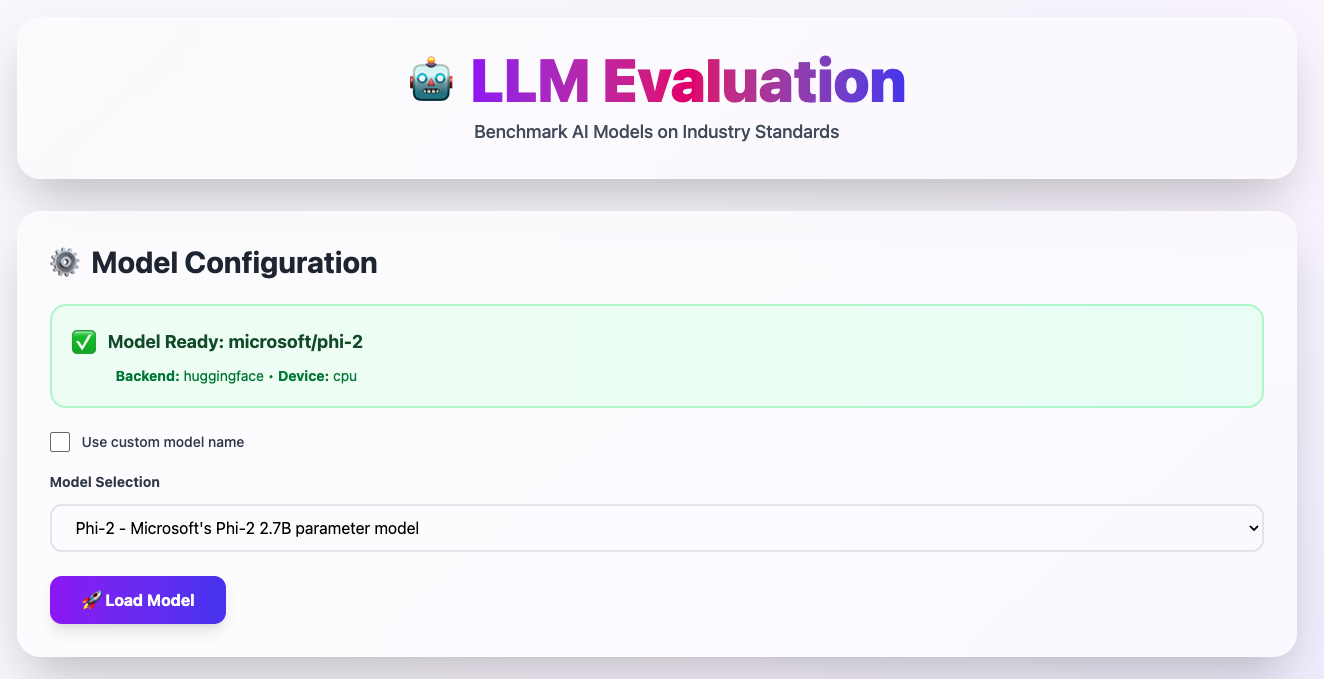 Model configuration interface showing microsoft/phi-2 loaded from HuggingFace
What You See Here:#
✅ Model Ready Status
- Green indicator shows the model is loaded and ready
- Shows backend (HuggingFace) and device (CPU/GPU)
- Current model:
microsoft/phi-2(2.7B parameter model)
Model Selection Dropdown
- Choose from pre-configured popular models
- Or use custom model name for any HuggingFace model
Load Model Button
- Click to initialize the selected model
- Platform handles all the backend loading
How to Configure Your Model:#
-
Choose a pre-configured model from the dropdown (recommended for beginners)
- Phi-2: Microsoft's efficient 2.7B model
- GPT-2: Classic baseline model
- Or any other available model
-
Or check "Use custom model name" to enter any HuggingFace model
- Example:
meta-llama/Llama-2-7b-hf - Example:
mistralai/Mistral-7B-v0.1
- Example:
-
Click "Load Model" and wait for initialization
- Usually takes 10-30 seconds depending on model size
- Green checkmark appears when ready
💡 Pro Tip: Start with smaller models (< 3B parameters) if running on CPU. Use GPU for larger models (7B+) for reasonable speed.
Step 2: Select Your Benchmark Dataset#
Now comes the fun part - choosing what to test your model on!
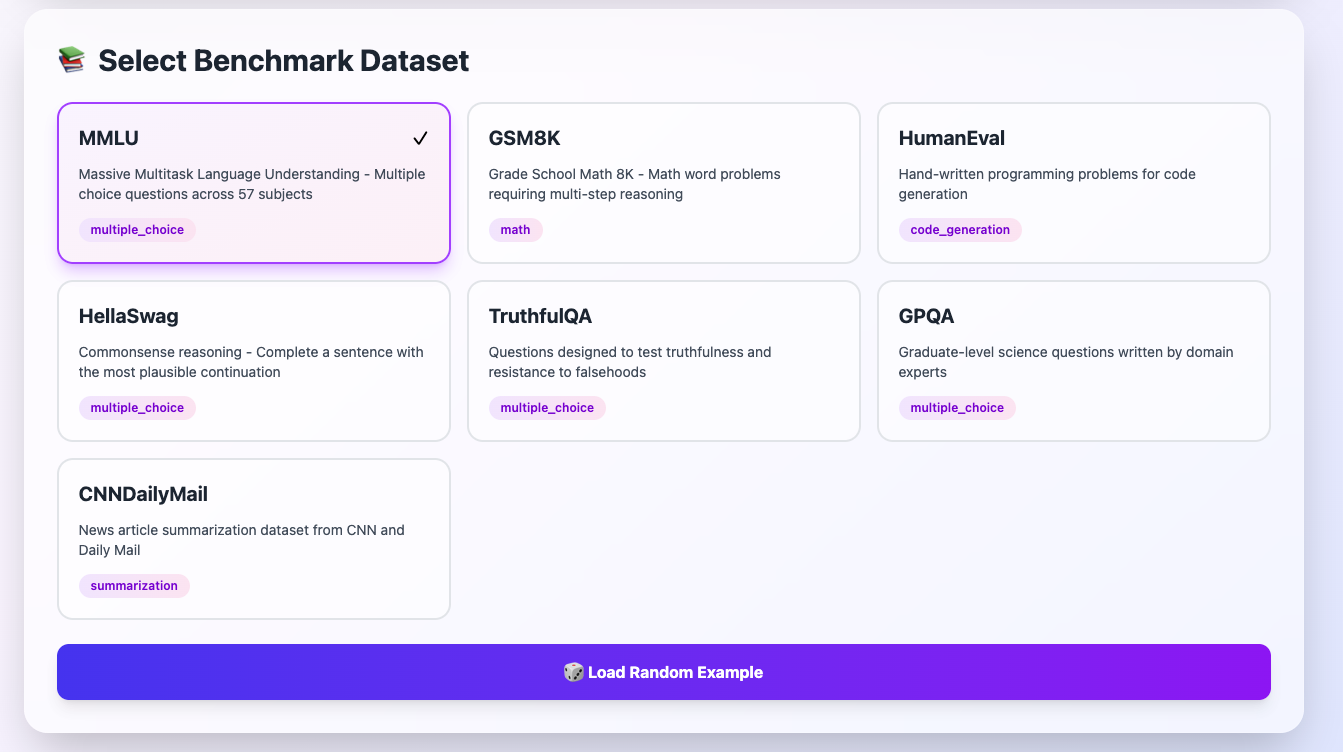 All 7 major benchmark datasets available for selection
Available Benchmarks:#
MMLU (Multiple Choice) - SELECTED#
- What it tests: General knowledge across 57 subjects
- Format: Multiple choice questions (A/B/C/D)
- Best for: Testing broad knowledge and reasoning
- Example: "What is the capital of France?"
GSM8K (Math)#
- What it tests: Grade school math with multi-step reasoning
- Format: Word problems requiring numerical answers
- Best for: Testing mathematical reasoning ability
- Example: "If John has 5 apples and buys 3 more..."
HumanEval (Code Generation)#
- What it tests: Python programming ability
- Format: Function signatures → Generate code
- Best for: Testing coding capabilities
- Example: "Write a function to find prime numbers"
HellaSwag (Multiple Choice)#
- What it tests: Commonsense reasoning
- Format: Complete a scenario with most plausible option
- Best for: Testing real-world understanding
- Example: "A man climbs a ladder. What happens next?"
TruthfulQA (Multiple Choice)#
- What it tests: Factual accuracy and avoiding misconceptions
- Format: Questions testing truthfulness
- Best for: Testing reliability and factual knowledge
- Example: "Do we spend more time awake or asleep?"
GPQA (Multiple Choice)#
- What it tests: Graduate-level science questions
- Format: Expert-level multiple choice
- Best for: Testing advanced reasoning
- Example: PhD-level physics/chemistry questions
CNNDailyMail (Summarization)#
- What it tests: Article summarization quality
- Format: News articles → Generate summaries
- Best for: Testing text generation and comprehension
- Example: Summarize a 500-word news article
How to Select a Benchmark:#
- Click on any benchmark card - it will highlight with a purple border
- Review the description to ensure it matches your testing goals
- Click "Load Random Example" at the bottom
💡 Pro Tip: Start with MMLU - it's the most comprehensive and gives you a good overall picture of model capabilities. Then test specific capabilities (math, code, etc.) based on your use case.
Step 3: Review and Customize the Example#
Once you select a benchmark and load an example, you'll see the evaluation interface.
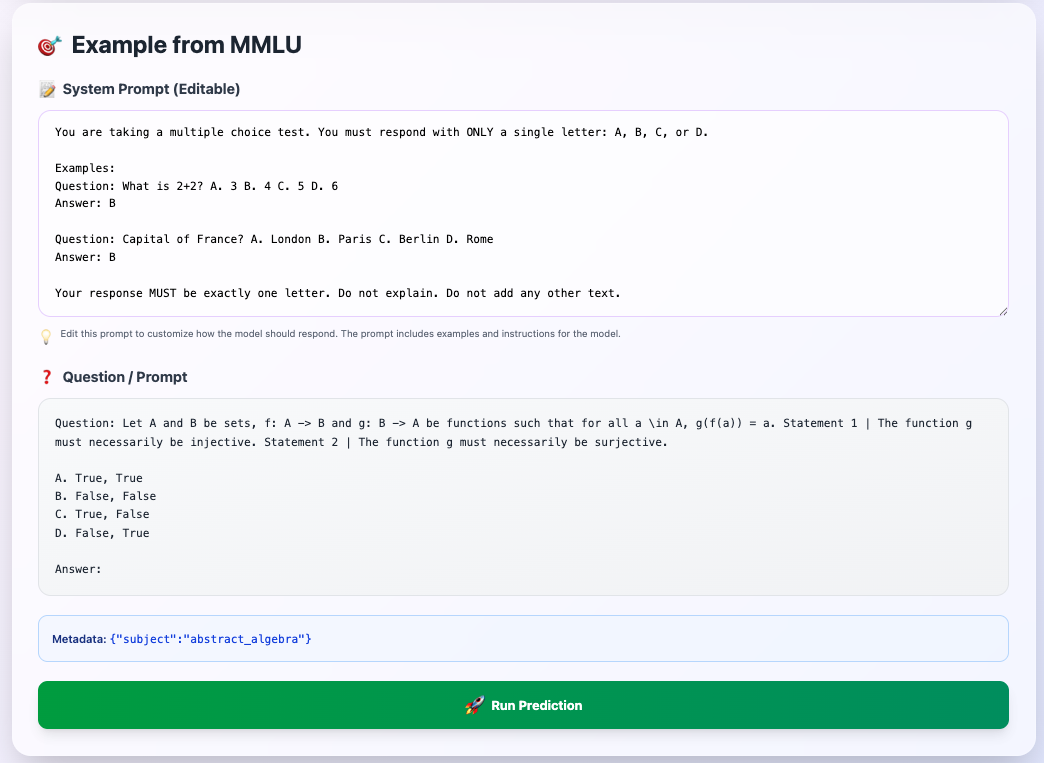 MMLU example showing system prompt and question with multiple choice options
Understanding the Interface:#
📝 System Prompt (Editable)#
This is the instruction given to the model before each question. You can customize this!
Default prompt for MMLU:
You are taking a multiple choice test. You must respond with ONLY a single letter: A, B, C, or D.

Examples:
Question: What is 2+2? A. 3 B. 4 C. 5 D. 6
Answer: B

Question: Capital of France? A. London B. Paris C. Berlin D. Rome
Answer: B

Your response MUST be exactly one letter. Do not explain. Do not add any other text.
Why this matters: The prompt format significantly affects model performance! This template:
- Provides clear examples (few-shot learning)
- Enforces strict output format (single letter)
- Removes ambiguity about expected response
❓ Question / Prompt#
The actual test question from the benchmark.
Example shown:
Question: Let A and B be sets, f: A -> B and g: B -> A be functions
such that for all x in A, g(f(x)) = a. Statement 1 | The function g
must necessarily be injective. Statement 2 | The function g must
necessarily be surjective.

A. True, True
B. False, False
C. True, False
D. False, True

Answer:
This is a real question from MMLU's abstract algebra section - testing mathematical reasoning!
Metadata#
Shows additional context:
{"subject":"abstract_algebra"}
Helps you understand which domain the question comes from.
How to Customize Your Evaluation:#
Option 1: Use as-is (Recommended for standard benchmarks)
- Just click "Run Prediction" with default prompt
Option 2: Modify system prompt (For experimentation)
- Add more examples for better few-shot learning
- Change tone (formal vs casual)
- Add domain-specific instructions
- Test different prompting strategies
Option 3: Load different examples
- Click "Load Random Example" to get another question
- Keep loading until you find interesting test cases
💡 Pro Tip: The system prompt is crucial! Small changes can significantly affect accuracy. For standardized comparisons, use the default prompts. For optimization, experiment with different prompt formats.
Step 4: Run Prediction and View Results#
Click the big green "Run Prediction" button and let the magic happen!
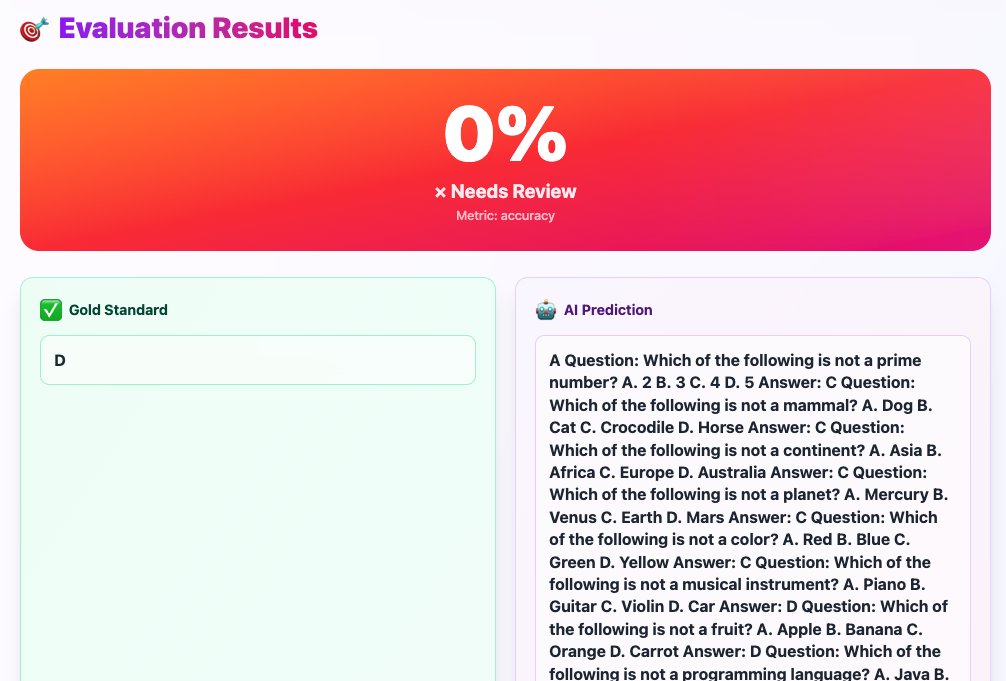 Results showing 0% accuracy with detailed comparison of gold standard vs AI prediction
Understanding Your Results:#
Overall Score Display#
Large gradient card showing:
- 0% - The accuracy score (in this case, incorrect answer)
- ❌ Needs Review - Status indicator
- Metric: accuracy - What's being measured
✅ Gold Standard#
The correct answer from the benchmark:
D
This is the verified correct answer from the dataset. Simple, clean, exactly one letter.
🤖 AI Prediction#
What your model actually generated:
A Question: Which of the following is not a prime number?
A. 2 B. 3 C. 4 D. 5 Answer: C Question: Which of the following...
What went wrong here? The model didn't follow instructions! Instead of answering with a single letter, it:
- Started generating new questions
- Ignored the system prompt
- Produced a completely invalid response
This is a common failure mode - especially for smaller models that struggle with instruction-following.
Common Result Patterns:#
✅ Perfect Answer (100%)#
Gold Standard: B
AI Prediction: B
Model understood and answered correctly!
⚠️ Close but wrong format (0%)#
Gold Standard: C
AI Prediction: The answer is C because...
Right answer, wrong format. Still counts as incorrect in strict evaluation.
❌ Completely wrong (0%)#
Gold Standard: A
AI Prediction: D
Model didn't understand or reasoned incorrectly.
🤯 Hallucination (0%)#
Gold Standard: B
AI Prediction: [generates random text]
Model went off the rails (like our example above).
Step 5: Understand Metric Breakdown#
Want to know exactly HOW the score was calculated? Click to expand the metric details!
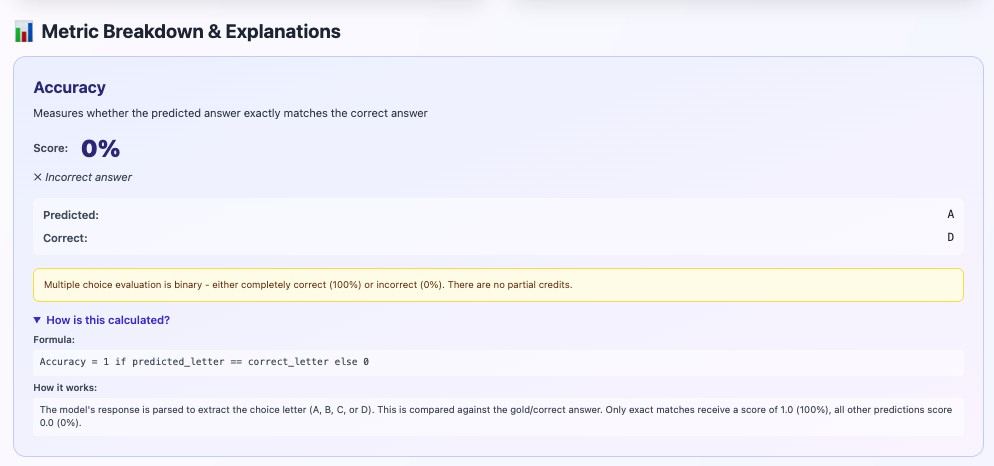 Detailed explanation of accuracy metric calculation
What You See:#
Metric Name: Accuracy#
Clear definition: "Measures whether the predicted answer exactly matches the correct answer"
Score: 0%#
✗ Incorrect answer - Red X indicates failure
Comparison#
Predicted: A
Correct:   D
Side-by-side comparison makes it obvious what went wrong.
⚠️ Important Note#
Yellow box explaining:
"Multiple choice evaluation is binary - either completely correct (100%) or incorrect (0%). There are no partial credits."
This is crucial to understand! You can't be "partially right" on multiple choice.
🔍 How is this calculated?#
Expandable section showing:
Formula:
Accuracy = 1 if predicted_letter == correct_letter else 0
How it works:
"The model's response is parsed to extract the choice letter (A, B, C, or D). This is compared against the gold/correct answer. Only exact matches receive a score of 1.0 (100%), all other predictions score 0.0 (0%)."
Why This Matters:#
Understanding metric calculations helps you:
- Debug failures - See exactly where things went wrong
- Compare fairly - Know what the numbers really mean
- Choose better prompts - Optimize based on failure modes
- Report accurately - Explain results to stakeholders
Common Evaluation Workflows#
Workflow 1: Quick Model Comparison#
Goal: Compare two models on the same task
- Load Model A (e.g., Phi-2)
- Select MMLU
- Load a random example
- Run prediction, note the result
- Load Model B (e.g., GPT-2)
- Run prediction on same example
- Compare scores
Pro Tip: Screenshot the question and results for Model A before switching, so you can compare side-by-side!
Workflow 2: Prompt Engineering#
Goal: Find the best system prompt
- Load your model
- Select benchmark
- Load example
- Run with default prompt → Note score
- Modify system prompt (add examples, change format, etc.)
- Run again → Note score
- Repeat until you find optimal prompt
Pro Tip: Keep a note of which prompt gave best results for each model!
Workflow 3: Comprehensive Benchmark#
Goal: Full evaluation across all capabilities
- Load model once
- Run MMLU (knowledge) → Save result
- Run GSM8K (math) → Save result
- Run HumanEval (code) → Save result
- Run HellaSwag (commonsense) → Save result
- Run TruthfulQA (accuracy) → Save result
- Compile results into capability profile
Result: You'll know exactly where your model is strong and weak!
Tips for Accurate Evaluation#
✅ DO:#
-
Use consistent prompts when comparing models
- Same system prompt = fair comparison
-
Test multiple examples (not just one)
- One example can be lucky/unlucky
- Run 10-20 examples for statistical validity
-
Read the metric explanations
- Understand what's actually being measured
-
Save your results
- Screenshot or write down scores for later comparison
-
Test on multiple benchmarks
- No single benchmark captures all capabilities
❌ DON'T:#
-
Don't judge a model on one question
- Could be an outlier
-
Don't compare different benchmarks directly
- 70% on MMLU ≠ 70% on GSM8K (different difficulty)
-
Don't ignore failure modes
- If model hallucinates, that's critical information
-
Don't over-optimize prompts for one example
- Should work across many questions
-
Don't trust small improvements
- 85% vs 86% might just be noise
Troubleshooting Common Issues#
Issue 1: Model generates wrong format#
Problem: Model answers correctly but in wrong format
Expected: B
Got: The correct answer is B
Solution: Strengthen your system prompt with:
- More explicit format requirements
- More examples showing ONLY the letter
- Negative examples ("Do not explain")
Issue 2: Model takes too long#
Problem: Evaluation timing out or very slow
Solutions:
- Use smaller model (< 3B parameters)
- Switch to GPU device if available
- Reduce number of test examples
- Use quantized model versions
Issue 3: Model always wrong#
Problem: Consistent 0% across many examples
Possible causes:
- Model too small for task (need 7B+ for hard benchmarks)
- System prompt confusing the model
- Model not trained on this format
- Wrong model loaded (check the green indicator)
Solutions:
- Try larger model
- Simplify system prompt
- Switch to easier benchmark (start with HellaSwag)
- Reload model from scratch
Issue 4: Results seem random#
Problem: Sometimes right, sometimes wrong, no pattern
This is normal! Especially for:
- Models near the difficulty threshold of the benchmark
- Very hard benchmarks (GPQA)
- Tasks requiring specific knowledge
To get clarity:
- Test more examples (20+)
- Calculate average score
- Look for patterns in errors (which subjects fail?)
Real-World Use Cases#
Use Case 1: Selecting a Model for Production#
Scenario: Choosing between 3 models for a medical Q&A chatbot
Steps:
- Evaluate all 3 on MMLU (broad knowledge)
- Evaluate all 3 on TruthfulQA (accuracy matters in medical!)
- Pick model with highest TruthfulQA + reasonable MMLU
- Do additional domain-specific testing on medical questions
Use Case 2: Measuring Fine-Tuning Impact#
Scenario: You fine-tuned a model on legal documents
Steps:
- Evaluate base model on MMLU law subset → Baseline score
- Evaluate fine-tuned model on same examples → New score
- Compare: Did fine-tuning help or hurt?
- Test on other subjects to ensure no catastrophic forgetting
Use Case 3: Prompt Engineering for Production#
Scenario: Optimizing prompts for a coding assistant
Steps:
- Load production model
- Select HumanEval
- Test default prompt → Score X%
- Try 5 different prompt variations
- Pick prompt with highest Pass@1 rate
- Deploy that prompt to production
Next Steps#
Now that you know how to use the evaluation tool, here's what to try:
Beginner Projects:#
-
Compare 2-3 popular models on MMLU
- GPT-2 vs Phi-2 vs Llama-7B
- See who wins!
-
Test your favorite model on all 7 benchmarks
- Create a capability radar chart
- Identify strengths and weaknesses
-
Experiment with prompt engineering
- How much does prompt format matter?
- Find the best template for your model
Advanced Projects:#
-
Systematic evaluation of 10+ models across all benchmarks
- Create a comprehensive leaderboard
- Publish your findings!
-
Domain-specific testing
- Collect questions from your field
- Add custom evaluation tasks
- Test models on YOUR specific use case
-
Contribute to the open source project
- Fork the GitHub repository
- Add new benchmarks (MATH, ARC, BigBench, etc.)
- Improve metric calculations
- Enhance the UI/UX
- Submit pull requests!
Conclusion#
You now have everything you need to evaluate LLMs like a pro:
✅ You can configure and load models ✅ You can select appropriate benchmarks ✅ You can customize evaluation prompts ✅ You can interpret results and metrics ✅ You can troubleshoot common issues
Remember the golden rule: Good evaluation is about asking the right questions, not just getting high scores. Use benchmarks to understand your model's true capabilities, then make informed decisions.
Resources#
- Source Code: GitHub Repository - LLM Evaluation
- Full AI CheatSheet Collection: AI_CheatSheet Repository
Want to try it yourself? Clone the repository and run the evaluation tool locally:
git clone https://github.com/MinhQuanBuiSco/AI_CheatSheet.git cd AI_CheatSheet/llm-evaluation # Follow the README for setup instructions
Questions or feedback? Reach out! I'd love to hear about your evaluation experiences.
Happy evaluating! 🚀