Building a Multi-Agent Finance Research Pipeline with LangGraph and Azure#
What if you could generate institutional-quality financial research reports in minutes instead of hours? Using LangGraph's multi-agent orchestration, we can build a system where specialized AI agents collaborate to research, analyze, and write comprehensive investment reports.
In this tutorial, I'll show you how to build a production-ready finance research pipeline that:
- 🤖 Orchestrates 7 specialized AI agents working together
- 📊 Gathers real-time financial data from Yahoo Finance
- 📰 Analyzes news sentiment from NewsAPI
- 🌐 Performs web research using Tavily
- ✍️ Generates professional investment reports
- 📡 Streams real-time progress via WebSocket
- 📄 Exports reports as downloadable PDFs
- ☁️ Deploys on Azure Container Apps with Cosmos DB persistence
By the end, you'll have a fully functional research automation system that demonstrates the power of multi-agent AI architectures.
Live Demo#
Here's what the final application looks like:
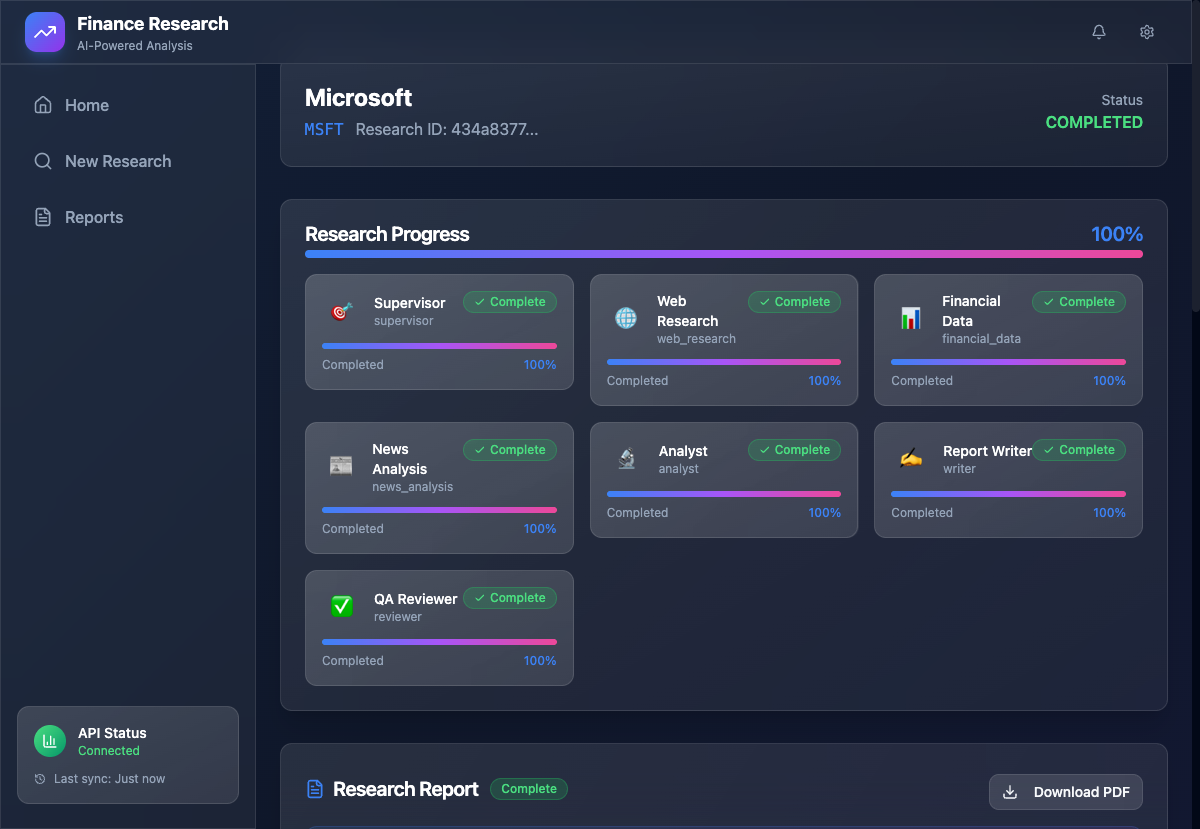
The application features real-time agent progress tracking, streaming report generation, and a beautiful glass-morphism UI.
Why Multi-Agent Architecture?#
The Challenge with Single-Agent Systems#
Traditional LLM applications use a single agent for everything. But complex tasks like financial research require:
- Specialized expertise (data collection, analysis, writing)
- Parallel processing (research multiple sources simultaneously)
- Quality control (review and revision cycles)
- State management (track progress across long-running tasks)
The Multi-Agent Solution#
| Single Agent | Multi-Agent Pipeline |
|---|---|
| One prompt does everything | Specialized agents for each task |
| Sequential processing | Parallel data gathering |
| No quality checks | Built-in review & revision |
| Hard to debug | Clear agent responsibilities |
| Limited scalability | Add agents as needed |
LangGraph enables us to build sophisticated agent workflows with:
- ✅ StateGraph: Define agent interactions as a graph
- ✅ Conditional Routing: Dynamic agent selection
- ✅ State Persistence: Track progress across agents
- ✅ Human-in-the-loop: Optional approval gates
System Architecture#
High-Level Overview#
┌─────────────────────────────────────────────────────────────┐
│                    React Frontend (Tailwind)                 │
│  ┌─────────────┐  ┌─────────────┐  ┌─────────────────────┐  │
│  │ ResearchForm│  │AgentProgress│  │  StreamingReport    │  │
│  └──────┬──────┘  └──────┬──────┘  └──────────┬──────────┘  │
└─────────┼────────────────┼─────────────────────┼────────────┘
          │ REST           │ WebSocket           │ REST
          ▼                ▼                     ▼
┌─────────────────────────────────────────────────────────────┐
│                    FastAPI Backend                           │
│  ┌──────────────────────────────────────────────────────┐   │
│  │              LangGraph Multi-Agent System             │   │
│  │                                                       │   │
│  │  ┌──────────┐                                        │   │
│  │  │Supervisor│ ─── Orchestrates all agents            │   │
│  │  └────┬─────┘                                        │   │
│  │       │                                              │   │
│  │       ├──► 🌐 Web Research (Tavily)                  │   │
│  │       ├──► 📊 Financial Data (yfinance)              │   │
│  │       ├──► 📰 News Analysis (NewsAPI)                │   │
│  │       │                                              │   │
│  │       ▼                                              │   │
│  │  ┌─────────┐  ┌─────────┐  ┌─────────┐              │   │
│  │  │ Analyst │─►│ Writer  │─►│Reviewer │──┐           │   │
│  │  └─────────┘  └─────────┘  └────┬────┘  │           │   │
│  │                                 │       │ Revision   │   │
│  │                                 └───────┘ Loop       │   │
│  └──────────────────────────────────────────────────────┘   │
└───────────────────────────┬─────────────────────────────────┘
                            │
    ┌───────────────────────┼───────────────────┐
    ▼                       ▼                   ▼
┌─────────┐          ┌───────────┐       ┌───────────┐
│  Redis  │          │ Cosmos DB │       │ Container │
│ (Cache) │          │(Sessions) │       │   Apps    │
└─────────┘          └───────────┘       └───────────┘
The 7 Specialized Agents#
| Agent | Role | Tools |
|---|---|---|
| 🎯 Supervisor | Orchestrates workflow, routes to agents | LLM reasoning |
| 🌐 Web Research | Company background, market research | Tavily Search API |
| 📊 Financial Data | Stock prices, metrics, fundamentals | Yahoo Finance |
| 📰 News Analysis | News gathering, sentiment analysis | NewsAPI |
| 🔬 Analyst | Market analysis, risk assessment | LLM reasoning |
| ✍️ Writer | Report generation, formatting | LLM generation |
| ✅ Reviewer | Quality assurance, revision requests | LLM evaluation |
Technology Stack#
Backend:
- FastAPI (async Python web framework)
- LangGraph (multi-agent orchestration)
- LangChain (LLM integration)
- Azure OpenAI (GPT-4o for reasoning)
- yfinance (financial data)
- Tavily (web search)
- NewsAPI (news data)
- Redis (caching)
- Cosmos DB (session persistence)
- WeasyPrint (PDF generation)
Frontend:
- React 19 + TypeScript
- TanStack Query (data fetching)
- Framer Motion (animations)
- Tailwind CSS (styling)
- WebSocket (real-time updates)
Infrastructure:
- Azure Container Apps
- Azure Container Registry
- Azure Cache for Redis
- Azure Cosmos DB
- Terraform (IaC)
Part 1: Defining the Research State#
The foundation of LangGraph is the state that flows through agents. Let's define our research state:
ResearchState TypedDict#
# backend/src/backend/agents/state.py from typing import Annotated, Any, TypedDict from langgraph.graph.message import add_messages from langchain_core.messages import BaseMessage from backend.schemas.agent import AgentProgress, AgentType from backend.schemas.research import ResearchStatus, ResearchType def merge_dict(left: dict, right: dict) -> dict: """Merge two dictionaries, with right taking precedence.""" result = left.copy() result.update(right) return result class ResearchState(TypedDict, total=False): """State for the research pipeline.""" # Identity research_id: str company_name: str ticker_symbol: str | None research_type: ResearchType # Status tracking status: ResearchStatus current_agent: AgentType | None overall_progress: float # Agent progress tracking agent_progress: Annotated[dict[str, AgentProgress], update_agent_progress] # Messages for agent communication messages: Annotated[list[BaseMessage], add_messages] # Research data collected by agents web_research_data: Annotated[dict[str, Any], merge_dict] financial_data: Annotated[dict[str, Any], merge_dict] news_data: Annotated[dict[str, Any], merge_dict] # Analysis outputs market_analysis: str | None risk_assessment: str | None # Final outputs executive_summary: str | None full_report: str | None recommendations: list[str] # Review feedback (for revision loop) review_feedback: str | None revision_needed: bool revision_count: int # Prevent infinite loops
Key Design Decisions:
- Annotated Types:
Annotated[dict, merge_dict]tells LangGraph how to merge state updates - Progress Tracking: Each agent updates its own progress in
agent_progress - Revision Loop:
revision_neededandrevision_countenable quality control - Messages: Built-in message history for agent communication
Part 2: Building Specialized Agents#
The Supervisor Agent#
The supervisor orchestrates the entire pipeline, deciding which agent to invoke next:
# backend/src/backend/agents/supervisor.py from langchain_core.messages import HumanMessage, SystemMessage from langchain_core.language_models import BaseChatModel SUPERVISOR_SYSTEM_PROMPT = """You are a research supervisor coordinating a financial research pipeline. Based on the current state, determine the next agent to invoke: - web_research: For company background and market research - financial_data: For stock data and financial metrics - news_analysis: For news and sentiment analysis - analyst: For synthesizing research into analysis - writer: For generating the final report - reviewer: For quality assurance review - FINISH: When research is complete Consider what data has been collected and what's still needed.""" def create_supervisor_agent(llm: BaseChatModel): """Create the supervisor agent function.""" async def supervisor_node(state: ResearchState) -> dict[str, Any]: """Supervisor decides next agent based on state.""" # Build context for decision context_parts = [ f"Company: {state['company_name']}", f"Research Type: {state['research_type'].value}", ] # Check what data has been collected collected = [] if state.get("financial_data"): collected.append("financial_data") if state.get("web_research_data"): collected.append("web_research") if state.get("news_data"): collected.append("news_analysis") if state.get("market_analysis"): collected.append("analyst") if state.get("full_report"): collected.append("writer") context_parts.append(f"Data collected: {', '.join(collected) or 'None'}") # Get routing decision from LLM messages = [ SystemMessage(content=SUPERVISOR_SYSTEM_PROMPT), HumanMessage(content=f"Current state:\n{chr(10).join(context_parts)}\n\nNext step?"), ] response = await llm.ainvoke(messages) next_agent = _parse_routing_decision(response.content, state) return {"next": next_agent} return supervisor_node
The Financial Data Agent#
This agent fetches real financial data using Yahoo Finance:
# backend/src/backend/agents/financial_data.py import yfinance as yf from datetime import datetime, UTC def create_financial_data_agent(llm: BaseChatModel): """Create the financial data collection agent.""" async def financial_data_node(state: ResearchState) -> dict[str, Any]: """Collect financial data for the company.""" company_name = state["company_name"] ticker = state.get("ticker_symbol") # Auto-detect ticker if not provided if not ticker: ticker = await _lookup_ticker(company_name, llm) # Fetch stock data stock = yf.Ticker(ticker) # Get current price and history hist = stock.history(period="1mo") info = stock.info financial_data = { "ticker": ticker, "stock_info": { "price": { "current": info.get("currentPrice"), "fifty_two_week_high": info.get("fiftyTwoWeekHigh"), "fifty_two_week_low": info.get("fiftyTwoWeekLow"), }, "market_cap": info.get("marketCap"), "volume": info.get("volume"), }, "metrics": { "valuation": { "pe_ratio": info.get("trailingPE"), "forward_pe": info.get("forwardPE"), "peg_ratio": info.get("pegRatio"), "price_to_book": info.get("priceToBook"), }, "profitability": { "profit_margin": info.get("profitMargins"), "return_on_equity": info.get("returnOnEquity"), "return_on_assets": info.get("returnOnAssets"), }, }, "analyst_ratings": { "recommendation": info.get("recommendationKey"), "target_price": info.get("targetMeanPrice"), "number_of_analysts": info.get("numberOfAnalystOpinions"), }, } # Generate analysis summary using LLM analysis_summary = await _generate_analysis_summary(financial_data, llm) financial_data["analysis_summary"] = analysis_summary return { "financial_data": financial_data, "ticker_symbol": ticker, } return financial_data_node
The Writer Agent#
The writer generates the final research report:
# backend/src/backend/agents/writer.py WRITER_SYSTEM_PROMPT = """You are an expert financial report writer. Your reports should be: - Professional and well-structured - Data-driven with clear citations - Balanced, presenting opportunities and risks - Actionable, with clear recommendations Follow this structure: 1. Executive Summary (3-5 bullet points) 2. Company Overview 3. Financial Analysis 4. Market & Competitive Analysis 5. News & Sentiment Overview 6. Risk Assessment 7. Investment Thesis 8. Recommendations 9. Key Metrics Summary""" def create_writer_agent(llm: BaseChatModel): """Create the writer agent for report generation.""" async def writer_node(state: ResearchState) -> dict[str, Any]: """Generate the final research report.""" company_name = state["company_name"] ticker = state.get("ticker_symbol", "N/A") revision_needed = state.get("revision_needed", False) if revision_needed: # Revise existing report based on feedback existing_report = state.get("full_report", "") feedback = state.get("review_feedback", "") prompt = f"""Revise this report based on feedback: Report: {existing_report} Feedback: {feedback} Improve clarity, accuracy, and completeness.""" else: # Generate new report prompt = f"""Generate a research report for {company_name} ({ticker}). Market Analysis: {state.get('market_analysis', 'N/A')} Risk Assessment: {state.get('risk_assessment', 'N/A')} Financial Data: {state.get('financial_data', {}).get('analysis_summary', 'N/A')} News Sentiment: {state.get('news_data', {}).get('analysis_summary', 'N/A')}""" messages = [ SystemMessage(content=WRITER_SYSTEM_PROMPT), HumanMessage(content=prompt), ] response = await llm.ainvoke(messages) full_report = response.content # Generate executive summary summary = await _generate_executive_summary(full_report, company_name, llm) # Increment revision count revision_count = state.get("revision_count", 0) if revision_needed: revision_count += 1 return { "full_report": full_report, "executive_summary": summary, "revision_needed": False, "revision_count": revision_count, } return writer_node
Part 3: Building the LangGraph StateGraph#
Now we connect all agents into a graph:
# backend/src/backend/graph/research_graph.py from langgraph.graph import StateGraph, END from backend.agents.state import ResearchState, create_initial_state from backend.agents.supervisor import create_supervisor_agent, get_next_node from backend.agents.web_research import create_web_research_agent from backend.agents.financial_data import create_financial_data_agent from backend.agents.news_analysis import create_news_analysis_agent from backend.agents.analyst import create_analyst_agent from backend.agents.writer import create_writer_agent from backend.agents.reviewer import create_reviewer_agent def build_research_graph(llm): """Build the LangGraph research pipeline.""" # Create all agent nodes supervisor = create_supervisor_agent(llm) web_research = create_web_research_agent(llm) financial_data = create_financial_data_agent(llm) news_analysis = create_news_analysis_agent(llm) analyst = create_analyst_agent(llm) writer = create_writer_agent(llm) reviewer = create_reviewer_agent(llm) # Build the graph graph = StateGraph(ResearchState) # Add nodes graph.add_node("supervisor", supervisor) graph.add_node("web_research", web_research) graph.add_node("financial_data", financial_data) graph.add_node("news_analysis", news_analysis) graph.add_node("analyst", analyst) graph.add_node("writer", writer) graph.add_node("reviewer", reviewer) # Set entry point graph.set_entry_point("supervisor") # Add conditional edges from supervisor graph.add_conditional_edges( "supervisor", get_next_node, { "web_research": "web_research", "financial_data": "financial_data", "news_analysis": "news_analysis", "analyst": "analyst", "writer": "writer", "reviewer": "reviewer", "finish": END, } ) # All agents return to supervisor for next decision for agent in ["web_research", "financial_data", "news_analysis", "analyst", "writer", "reviewer"]: graph.add_edge(agent, "supervisor") return graph.compile()
The Graph Visualization#
                    ┌─────────────┐
                    │   START     │
                    └──────┬──────┘
                           │
                           ▼
              ┌────────────────────────┐
              │      SUPERVISOR        │◄─────────────────┐
              │  (Orchestrator Agent)  │                  │
              └───────────┬────────────┘                  │
                          │                               │
        ┌─────────────────┼─────────────────┐            │
        │                 │                 │            │
        ▼                 ▼                 ▼            │
┌───────────────┐ ┌───────────────┐ ┌───────────────┐   │
│ Web Research  │ │Financial Data │ │ News Analysis │   │
│   (Tavily)    │ │  (yfinance)   │ │  (NewsAPI)    │   │
└───────┬───────┘ └───────┬───────┘ └───────┬───────┘   │
        │                 │                 │            │
        └─────────────────┴─────────────────┘            │
                          │                              │
                          ▼                              │
                ┌───────────────────┐                    │
                │     ANALYST       │                    │
                │ (Market Analysis) │                    │
                └─────────┬─────────┘                    │
                          │                              │
                          ▼                              │
                ┌───────────────────┐                    │
                │      WRITER       │◄──── Revision ────┐│
                │ (Report Generation)│                   ││
                └─────────┬─────────┘                   ││
                          │                             ││
                          ▼                             ││
                ┌───────────────────┐                   ││
                │     REVIEWER      │───────────────────┘│
                │ (Quality Check)   │                    │
                └─────────┬─────────┘                    │
                          │                              │
                          ▼                              │
                    ┌───────────┐                        │
                    │   FINISH  │────────────────────────┘
                    └───────────┘
Part 4: Real-Time Progress with WebSocket#
WebSocket Manager#
# backend/src/backend/services/websocket_manager.py import json from fastapi import WebSocket from typing import Any class WebSocketManager: """Manage WebSocket connections for real-time updates.""" def __init__(self): self.active_connections: dict[str, list[WebSocket]] = {} async def connect(self, websocket: WebSocket, research_id: str): """Accept and track WebSocket connection.""" await websocket.accept() if research_id not in self.active_connections: self.active_connections[research_id] = [] self.active_connections[research_id].append(websocket) async def send_agent_progress( self, research_id: str, agent_type: str, progress: dict[str, Any], ): """Broadcast agent progress to all connected clients.""" message = { "type": "agent_progress", "payload": { "agent_type": agent_type, "progress": progress, } } await self._broadcast(research_id, message) async def send_overall_progress( self, research_id: str, progress: float, status: str, ): """Broadcast overall research progress.""" message = { "type": "progress", "payload": { "progress": progress, "status": status, } } await self._broadcast(research_id, message) async def _broadcast(self, research_id: str, message: dict): """Send message to all connections for a research session.""" if research_id not in self.active_connections: return dead_connections = [] for ws in self.active_connections[research_id]: try: await ws.send_json(message) except Exception: dead_connections.append(ws) # Clean up dead connections for ws in dead_connections: self.active_connections[research_id].remove(ws)
Frontend WebSocket Hook#
// frontend/src/hooks/useWebSocket.ts import { useEffect, useRef, useCallback } from 'react' import type { AgentProgress } from '../types/research' interface UseWebSocketOptions { researchId: string onAgentProgress?: (progress: AgentProgress) => void onOverallProgress?: (progress: number, status: string) => void onComplete?: () => void onError?: (error: string) => void } export function useWebSocket({ researchId, onAgentProgress, onOverallProgress, onComplete, onError, }: UseWebSocketOptions) { const wsRef = useRef<WebSocket | null>(null) useEffect(() => { const wsUrl = `${import.meta.env.VITE_WS_URL}/api/v1/ws/research/${researchId}` const ws = new WebSocket(wsUrl) ws.onmessage = (event) => { const message = JSON.parse(event.data) switch (message.type) { case 'agent_progress': // Extract the progress object from payload const agentPayload = message.payload if (agentPayload.progress) { onAgentProgress?.(agentPayload.progress) } break case 'progress': onOverallProgress?.( message.payload.progress, message.payload.status ) break case 'complete': onComplete?.() break case 'error': onError?.(message.payload.message) break } } wsRef.current = ws return () => { ws.close() } }, [researchId]) return wsRef.current }
Part 5: REST API Endpoints#
# backend/src/backend/api/v1/research.py from fastapi import APIRouter, BackgroundTasks, HTTPException from uuid import uuid4 router = APIRouter(prefix="/research", tags=["research"]) @router.post("/start", response_model=ResearchResponse, status_code=202) async def start_research( request: ResearchRequest, background_tasks: BackgroundTasks, settings: SettingsDep, llm_factory: LLMFactoryDep, ws_manager: WebSocketManagerDep, cache_service: CacheServiceDep, cosmos_service: CosmosServiceDep, ) -> ResearchResponse: """Start a new research session.""" research_id = str(uuid4()) # Create session in Cosmos DB if cosmos_service: await cosmos_service.create_session( research_id=research_id, company_name=request.company_name, research_type=request.research_type, ticker_symbol=request.ticker_symbol, ) # Cache the session await cache_service.set_research_state(research_id, session) # Run pipeline in background background_tasks.add_task( _run_research_background, research_id=research_id, request=request, llm=llm_factory.get_llm(), ws_manager=ws_manager, cache_service=cache_service, cosmos_service=cosmos_service, ) return ResearchResponse( research_id=research_id, status=ResearchStatus.PENDING, company_name=request.company_name, ) @router.get("/{research_id}", response_model=ResearchResponse) async def get_research_status( research_id: str, cache_service: CacheServiceDep, cosmos_service: CosmosServiceDep, ) -> ResearchResponse: """Get the status of a research session.""" # Try cache first cached = await cache_service.get_research_state(research_id) if cached: return ResearchResponse(**cached) # Try Cosmos DB if cosmos_service: session = await cosmos_service.get_session(research_id) if session: return ResearchResponse(**session) raise HTTPException(status_code=404, detail="Research not found") @router.get("/{research_id}/report/pdf") async def download_pdf_report( research_id: str, cache_service: CacheServiceDep, cosmos_service: CosmosServiceDep, ) -> Response: """Download research report as PDF.""" session = await _get_completed_session(research_id, cache_service, cosmos_service) # Generate PDF using WeasyPrint generator = ReportGenerator() pdf_bytes = generator.generate_pdf( research_id=research_id, company_name=session["company_name"], report_data=session["result"], ) return Response( content=pdf_bytes, media_type="application/pdf", headers={"Content-Disposition": f"attachment; filename=report_{research_id}.pdf"}, )
Part 6: Frontend Agent Progress Component#
// frontend/src/components/research/AgentProgress.tsx import { motion } from 'framer-motion' import AgentCard from './AgentCard' import type { AgentProgress, AgentType } from '../../types/research' const AGENTS: { type: AgentType; label: string; icon: string }[] = [ { type: 'supervisor', label: 'Supervisor', icon: '🎯' }, { type: 'web_research', label: 'Web Research', icon: '🌐' }, { type: 'financial_data', label: 'Financial Data', icon: '📊' }, { type: 'news_analysis', label: 'News Analysis', icon: '📰' }, { type: 'analyst', label: 'Analyst', icon: '🔬' }, { type: 'writer', label: 'Report Writer', icon: '✍️' }, { type: 'reviewer', label: 'QA Reviewer', icon: '✅' }, ] interface AgentProgressProps { agentProgress: Record<string, AgentProgress> currentAgent?: AgentType overallProgress: number } export default function AgentProgressPanel({ agentProgress, currentAgent, overallProgress, }: AgentProgressProps) { return ( <div className="glass-card p-6"> <div className="flex justify-between items-center mb-6"> <h3 className="text-lg font-semibold">Research Progress</h3> <span className="text-2xl font-bold text-primary"> {Math.round(overallProgress)}% </span> </div> <div className="w-full bg-white/5 rounded-full h-2 mb-6"> <motion.div className="bg-gradient-to-r from-blue-500 to-purple-500 h-2 rounded-full" initial={{ width: 0 }} animate={{ width: `${overallProgress}%` }} transition={{ duration: 0.5 }} /> </div> <div className="grid grid-cols-1 md:grid-cols-2 lg:grid-cols-3 gap-4"> {AGENTS.map((agent) => { const progress = agentProgress[agent.type] return ( <AgentCard key={agent.type} agentType={agent.type} label={agent.label} icon={agent.icon} status={progress?.status || 'idle'} progress={progress?.progress || 0} message={progress?.message} isActive={currentAgent === agent.type} /> ) })} </div> </div> ) }
Part 7: Azure Deployment with Terraform#
Container Apps Configuration#
# cloud_infra/terraform/modules/container_apps/main.tf resource "azurerm_container_app" "backend" { name = "${var.project_name}-backend-${var.environment}" container_app_environment_id = azurerm_container_app_environment.main.id resource_group_name = var.resource_group_name revision_mode = "Single" template { container { name = "${var.project_name}-backend" image = "${var.acr_login_server}/finance-research-backend:latest" cpu = 1.0 memory = "2Gi" env { name = "AZURE_OPENAI_ENDPOINT" value = var.azure_openai_endpoint } env { name = "AZURE_OPENAI_API_KEY" secret_name = "azure-openai-key" } env { name = "REDIS_HOST" value = var.redis_host } env { name = "COSMOS_ENDPOINT" value = var.cosmos_endpoint } } min_replicas = 1 max_replicas = 10 } ingress { external_enabled = true target_port = 8000 traffic_weight { percentage = 100 latest_revision = true } } }
Cosmos DB for Session Persistence#
# cloud_infra/terraform/modules/cosmos_db/main.tf resource "azurerm_cosmosdb_account" "main" { name = "${var.project_name}-cosmos-${var.environment}" location = var.location resource_group_name = var.resource_group_name offer_type = "Standard" kind = "GlobalDocumentDB" consistency_policy { consistency_level = "Session" } geo_location { location = var.location failover_priority = 0 } } resource "azurerm_cosmosdb_sql_database" "main" { name = "finance_research" resource_group_name = var.resource_group_name account_name = azurerm_cosmosdb_account.main.name } resource "azurerm_cosmosdb_sql_container" "sessions" { name = "sessions" resource_group_name = var.resource_group_name account_name = azurerm_cosmosdb_account.main.name database_name = azurerm_cosmosdb_sql_database.main.name partition_key_path = "/research_id" throughput = 400 }
Handling the Revision Loop#
One important feature is the quality control loop where the Reviewer can request revisions:
# backend/src/backend/agents/reviewer.py def create_reviewer_agent(llm: BaseChatModel): """Create the quality assurance reviewer agent.""" async def reviewer_node(state: ResearchState) -> dict[str, Any]: """Review report and request revisions if needed.""" full_report = state.get("full_report", "") revision_count = state.get("revision_count", 0) # Prevent infinite revision loops if revision_count >= 2: return { "revision_needed": False, "review_feedback": "Report approved (max revisions reached)", } # Review the report review_prompt = f"""Review this financial research report: {full_report} Evaluate for: 1. Accuracy of data citations 2. Logical consistency 3. Completeness of analysis 4. Professional tone 5. Actionable recommendations Respond with either: - APPROVED: [brief comment] - REVISION NEEDED: [specific feedback]""" messages = [ SystemMessage(content="You are a senior research analyst reviewing reports."), HumanMessage(content=review_prompt), ] response = await llm.ainvoke(messages) review_result = response.content if "REVISION NEEDED" in review_result.upper(): return { "revision_needed": True, "review_feedback": review_result, } else: return { "revision_needed": False, "review_feedback": review_result, } return reviewer_node
Production Considerations#
1. Rate Limiting & Caching#
# Cache expensive API calls class CacheService: async def get_financial_data(self, ticker: str) -> dict | None: """Get cached financial data (15 min TTL).""" return await self.get(f"finance:{ticker}:data") async def set_financial_data(self, ticker: str, data: dict): """Cache financial data with 15 min TTL.""" await self.set(f"finance:{ticker}:data", data, ttl=900)
2. Error Handling & Retries#
from tenacity import retry, stop_after_attempt, wait_exponential @retry(stop=stop_after_attempt(3), wait=wait_exponential(multiplier=1, min=2, max=10)) async def fetch_financial_data(ticker: str) -> dict: """Fetch with automatic retry on failure.""" stock = yf.Ticker(ticker) return stock.info
3. Monitoring with Azure Application Insights#
from opencensus.ext.azure.log_exporter import AzureLogHandler logger.addHandler(AzureLogHandler( connection_string=settings.app_insights_connection_string ))
Common Use Cases#
This multi-agent pattern works for many domains:
1. Legal Document Analysis#
agents = [supervisor, document_parser, citation_finder, legal_analyst, summary_writer, compliance_reviewer]
2. Medical Research Assistant#
agents = [supervisor, pubmed_search, clinical_trial_finder, drug_interaction_checker, evidence_synthesizer, report_writer]
3. Competitive Intelligence#
agents = [supervisor, company_profiler, patent_searcher, market_analyzer, threat_assessor, strategy_writer]
Next Steps#
Beginner Projects#
- Add more data sources: SEC filings, earnings transcripts
- Implement caching: Reduce API calls with Redis caching
- Add user authentication: Secure the API with JWT tokens
Advanced Projects#
- Multi-company comparison: Research multiple companies in parallel
- Custom agent creation: Let users define their own research agents
- Real-time market alerts: WebSocket notifications for price changes
- ML-based predictions: Add predictive models for price forecasting
Conclusion#
You've learned how to build a sophisticated multi-agent finance research system with LangGraph! Key takeaways:
✅ Design agent workflows as StateGraphs ✅ Orchestrate specialized agents with a supervisor pattern ✅ Stream real-time progress via WebSocket ✅ Handle revision loops for quality control ✅ Deploy on Azure with Container Apps and Cosmos DB ✅ Scale production systems with caching and monitoring
The power of multi-agent AI: By breaking complex tasks into specialized agents, you can build systems that are more reliable, debuggable, and scalable than monolithic LLM applications.
Resources#
- Source Code: GitHub - Finance Research Pipeline
- LangGraph Docs: Official Documentation
- Azure Container Apps: Microsoft Docs
git clone https://github.com/MinhQuanBuiSco/Azure.git cd Azure/finance_research_pipeline # Follow setup instructions in README
Questions? The code is open source - issues and PRs welcome!
Happy building! 🚀📊