Building an AI-Powered Travel Planner with MCP and Azure OpenAI#
Imagine telling an AI "I want to travel from San Francisco to Japan next month" and getting back a complete travel plan with flights, hotels, attractions, weather forecasts, and budget estimates. That's exactly what we'll build in this tutorial.
In this guide, I'll walk you through building a conversational AI travel assistant that:
- 🗣️ Understands natural language travel requests
- 🔄 Asks intelligent follow-up questions to gather trip details
- ✈️ Searches real flight data via SerpAPI
- 🏨 Finds hotels with prices and amenities
- 🌤️ Provides weather forecasts for your travel dates
- 💰 Calculates detailed budget breakdowns
By the end, you'll have a production-ready travel planning application deployed on Azure.
What We're Building#
The AI Travel Assistant Architecture#
User: "I want to go to Japan from San Francisco"
                    ↓
            [Conversational AI Agent]
                    ↓
         Extracts: destination=Japan, departure=SF
                    ↓
         Asks: "When would you like to travel?"
                    ↓
User: "March 15 to March 22"
                    ↓
         Asks: "How many travelers?"
                    ↓
User: "2 people"
                    ↓
            [All params collected!]
                    ↓
    ┌───────────┬───────────┬───────────┬───────────┐
    ↓           ↓           ↓           ↓           ↓
 Flights     Hotels     Weather   Attractions   Budget
    ↓           ↓           ↓           ↓           ↓
    └───────────┴───────────┴───────────┴───────────┘
                    ↓
            Complete Trip Plan
Live Demo#
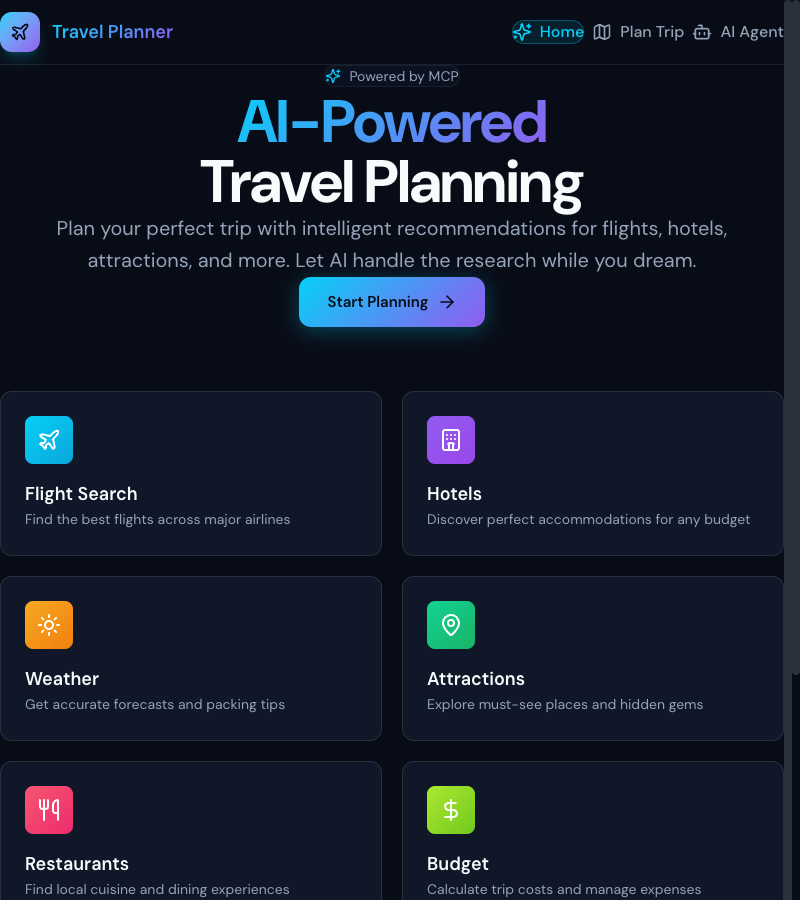 The Travel Planner landing page with modern glass-morphism design
Key Technologies#
| Component | Technology | Purpose |
|---|---|---|
| Frontend | React 19 + Tailwind CSS v4 | Modern, responsive UI |
| Backend | FastAPI + Python | REST API + async processing |
| AI | Azure OpenAI (GPT-4o-mini) | Natural language understanding |
| Flight Data | SerpAPI Google Flights | Real flight prices |
| Hotel Data | SerpAPI Google Hotels | Hotel listings & prices |
| Weather | Open-Meteo API | Weather forecasts |
| Places | Google Places API | Attractions & ratings |
| Infrastructure | Azure Container Apps | Serverless deployment |
| Protocol | MCP (Model Context Protocol) | Tool orchestration |
The Conversational AI Agent#
The heart of this application is a conversational AI that intelligently extracts travel parameters through natural dialogue.
How It Works#
Instead of a traditional form where users fill in every field, users simply describe their trip:
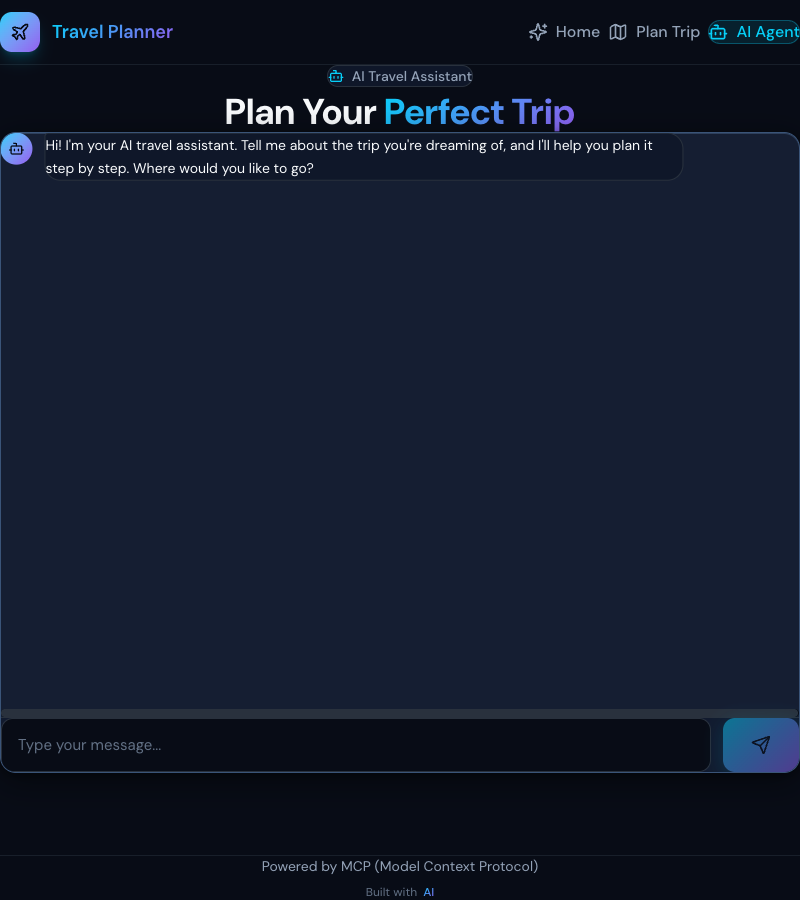 The AI Agent interface with large input area and suggestion chips
Multi-Turn Conversation Flow#
The agent maintains context across multiple messages:
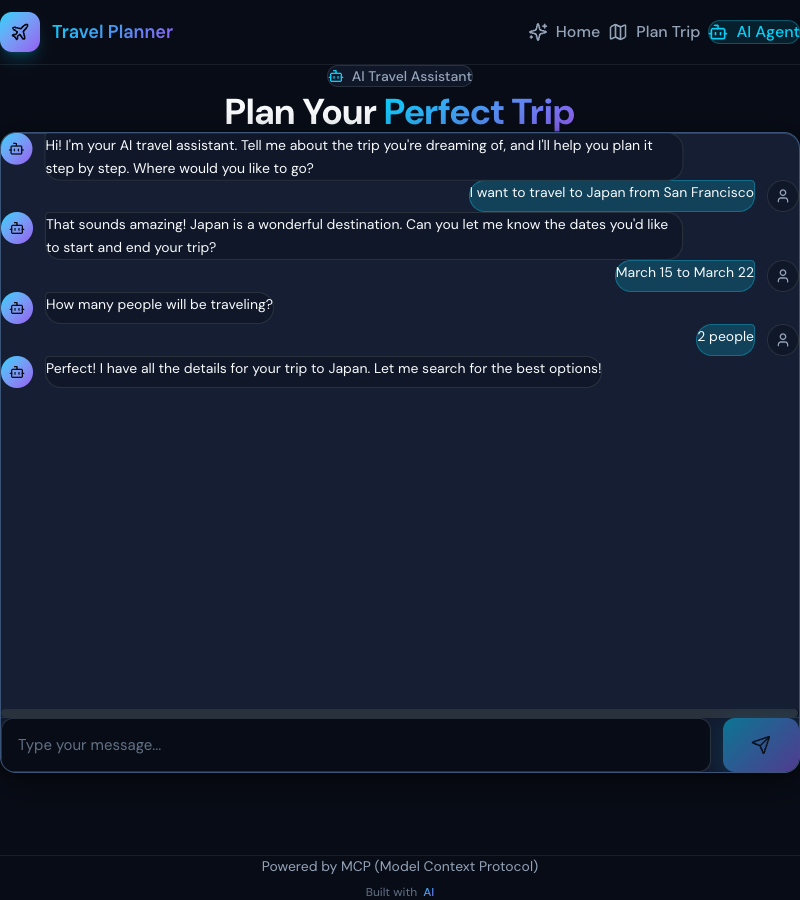 Multi-turn conversation showing how the AI gathers trip details
Key Features:
- Progressive extraction: Parameters are extracted and displayed in real-time
- Smart follow-ups: Only asks for missing information
- Natural date parsing: Understands "next month", "February 10 to 15", "5 days"
- Context awareness: Remembers what was already said
Step 1: Backend Setup#
Project Structure#
backend/
├── src/travel_mcp/
│   ├── api.py          # FastAPI endpoints
│   ├── server.py       # MCP server definition
│   ├── tools/          # Individual tool implementations
│   │   ├── flights.py
│   │   ├── hotels.py
│   │   ├── weather.py
│   │   └── places.py
│   └── config.py       # Settings & API keys
├── pyproject.toml
└── Dockerfile
Install Dependencies#
# Using uv (recommended) uv venv --python 3.11 uv sync # Or pip pip install fastapi uvicorn httpx pydantic openai redis
Core Dependencies (pyproject.toml)#
[project] name = "travel-mcp-server" version = "0.1.0" requires-python = ">=3.11" dependencies = [ "fastmcp>=2.0.0", "fastapi>=0.115.0", "uvicorn[standard]>=0.34.0", "httpx>=0.28.0", "pydantic>=2.10.0", "azure-identity>=1.19.0", "openai>=1.0.0", "redis>=5.2.0", ]
Step 2: Building the Conversational AI Endpoint#
The AI Agent Endpoint#
File: api.py
from fastapi import FastAPI from pydantic import BaseModel from openai import AzureOpenAI app = FastAPI() class AIAgentRequest(BaseModel): query: str conversation_history: list[dict] collected_params: dict class AIAgentResponse(BaseModel): type: str # 'conversation' or 'complete' message: str collected_params: dict missing_fields: list[str] is_complete: bool trip_plan: dict | None @app.post("/api/ai-agent") async def process_ai_agent(request: AIAgentRequest) -> AIAgentResponse: """ Process conversational AI agent requests. 1. Use Azure OpenAI to extract travel parameters 2. Ask follow-up questions for missing info 3. When complete, fetch full trip plan """ result = await conversational_ai_agent( request.query, request.conversation_history, request.collected_params ) return AIAgentResponse(**result)
The Conversational Agent Logic#
async def conversational_ai_agent( user_message: str, conversation_history: list[dict], collected_params: dict ) -> dict: """ Multi-turn conversational agent for travel planning. """ client = AzureOpenAI( azure_endpoint=settings.AZURE_OPENAI_ENDPOINT, api_version="2024-02-15-preview", azure_ad_token_provider=get_token_provider() ) # Build conversation context messages = [ {"role": "system", "content": SYSTEM_PROMPT}, *conversation_history, {"role": "user", "content": user_message} ] # Get LLM response response = client.chat.completions.create( model="gpt-4o-mini", messages=messages, temperature=0.3 ) # Parse extracted parameters extracted = parse_llm_response(response.choices[0].message.content) # Merge with existing params updated_params = merge_params(collected_params, extracted) # Check what's missing missing = get_missing_fields(updated_params) if not missing: # All params collected - fetch trip plan! trip_plan = await fetch_complete_trip_plan(updated_params) return { "type": "complete", "message": "I have all the details! Here's your trip plan.", "collected_params": updated_params, "missing_fields": [], "is_complete": True, "trip_plan": trip_plan } # Ask for next missing field follow_up = generate_follow_up_question(missing[0]) return { "type": "conversation", "message": follow_up, "collected_params": updated_params, "missing_fields": missing, "is_complete": False, "trip_plan": None }
System Prompt for Parameter Extraction#
SYSTEM_PROMPT = """You are a friendly travel assistant. Extract travel parameters from conversations and respond naturally. Required parameters: - destination: Where they want to go - departure_city: Where they're traveling from - start_date: Trip start date (YYYY-MM-DD) - end_date: Trip end date (YYYY-MM-DD) - travelers: Number of people (default: 2) Respond with JSON: { "destination": "extracted value or null", "departure_city": "extracted value or null", "start_date": "YYYY-MM-DD or null", "end_date": "YYYY-MM-DD or null", "travelers": number or null, "message": "Your friendly response" } Parse natural language dates: - "next month" → first week of next month - "February 10-15" → 2026-02-10 to 2026-02-15 - "5 days" → calculate end date from start date """
Smart Date Parsing with Regex Fallback#
When LLM fails to parse dates correctly, use regex fallback:
import re from datetime import datetime, timedelta def extract_dates_with_regex(text: str) -> tuple[str | None, str | None]: """ Extract dates from natural language using regex patterns. """ today = datetime.now() # Pattern: "February 10 to February 15" month_day_range = re.search( r'(\w+)\s+(\d{1,2})\s+(?:to|through|-)\s+(\w+)\s+(\d{1,2})', text, re.IGNORECASE ) if month_day_range: start_month, start_day, end_month, end_day = month_day_range.groups() start = parse_month_day(start_month, int(start_day), today.year) end = parse_month_day(end_month, int(end_day), today.year) return start.strftime('%Y-%m-%d'), end.strftime('%Y-%m-%d') # Pattern: "for 5 days" or "5 days" duration_match = re.search(r'(\d+)\s*days?', text, re.IGNORECASE) if duration_match: days = int(duration_match.group(1)) # Look for start date elsewhere in text start_date = extract_start_date(text) or today end_date = start_date + timedelta(days=days) return start_date.strftime('%Y-%m-%d'), end_date.strftime('%Y-%m-%d') return None, None
Step 3: Building MCP Tools#
What is MCP?#
Model Context Protocol (MCP) is a standardized way to define tools that AI models can use. Each tool has:
- A clear description the LLM reads
- Parameters with types and validation
- An async implementation that fetches real data
Flight Search Tool#
from fastmcp import FastMCP mcp = FastMCP("travel-planner") @mcp.tool() async def search_flights( departure_city: str, destination: str, departure_date: str, return_date: str, passengers: int = 1 ) -> dict: """ Search for flights between two cities. Args: departure_city: IATA code or city name destination: IATA code or city name departure_date: YYYY-MM-DD format return_date: YYYY-MM-DD format passengers: Number of passengers Returns: List of flight options with prices """ params = { "engine": "google_flights", "departure_id": get_airport_code(departure_city), "arrival_id": get_airport_code(destination), "outbound_date": departure_date, "return_date": return_date, "adults": passengers, "api_key": settings.SERPAPI_KEY } async with httpx.AsyncClient() as client: response = await client.get( "https://serpapi.com/search", params=params ) data = response.json() return format_flight_results(data)
Hotel Search Tool#
@mcp.tool() async def search_hotels( location: str, check_in_date: str, check_out_date: str, guests: int = 2 ) -> dict: """ Search for hotels in a location. """ params = { "engine": "google_hotels", "q": f"hotels in {location}", "check_in_date": check_in_date, "check_out_date": check_out_date, "adults": guests, "api_key": settings.SERPAPI_KEY } async with httpx.AsyncClient() as client: response = await client.get( "https://serpapi.com/search", params=params ) data = response.json() hotels = [] for property in data.get("properties", [])[:6]: hotels.append({ "name": property.get("name"), "type": property.get("type"), "price_per_night": property.get("rate_per_night", {}).get("lowest"), "rating": property.get("overall_rating"), "reviews_count": property.get("reviews"), "amenities": property.get("amenities", []), "images": property.get("images", []), }) return {"hotels": hotels, "total_results": len(hotels)}
Weather Forecast Tool#
@mcp.tool() async def get_weather_forecast( location: str, start_date: str, end_date: str ) -> dict: """ Get weather forecast for travel dates. Uses Open-Meteo API (free, no key required). """ # Get coordinates for location coords = await geocode_location(location) params = { "latitude": coords["lat"], "longitude": coords["lon"], "daily": "temperature_2m_max,temperature_2m_min,precipitation_sum", "start_date": start_date, "end_date": end_date, "timezone": "auto" } async with httpx.AsyncClient() as client: response = await client.get( "https://api.open-meteo.com/v1/forecast", params=params ) data = response.json() return format_weather_data(data)
Step 4: Frontend Implementation#
React Component Structure#
frontend/src/
├── pages/
│   ├── AIAgent.tsx      # Conversational AI page
│   ├── TripPlanner.tsx  # Form-based planner
│   └── Results.tsx      # Trip results display
├── components/
│   ├── layout/
│   │   └── Header.tsx
│   └── results/
│       ├── FlightCard.tsx
│       ├── HotelCard.tsx
│       └── BudgetCard.tsx
└── services/
    └── api.ts           # API client
AI Agent Page State Management#
// AIAgent.tsx const [messages, setMessages] = useState<Message[]>([ { role: 'assistant', content: "Hi! I'm your AI travel assistant. Where would you like to go?" } ]) const [collectedParams, setCollectedParams] = useState<CollectedParams>({ destination: null, departure_city: null, start_date: null, end_date: null, travelers: null, }) const [results, setResults] = useState<TripPlanResponse | null>(null) const [isLoading, setIsLoading] = useState(false) async function handleSendMessage(userMessage: string) { // Add user message to chat setMessages(prev => [...prev, { role: 'user', content: userMessage }]) setIsLoading(true) try { const response = await processAIAgentQuery({ query: userMessage, conversation_history: messages.map(m => ({ role: m.role, content: m.content })), collected_params: collectedParams }) // Update collected params setCollectedParams(response.collected_params) // Add assistant response setMessages(prev => [...prev, { role: 'assistant', content: response.message }]) // If complete, show results if (response.is_complete && response.trip_plan) { setResults(response.trip_plan) } } catch (error) { console.error('AI Agent error:', error) } finally { setIsLoading(false) } }
Trip Details Sidebar#
function TripDetailsSidebar({ params }: { params: CollectedParams }) { return ( <div className="glass-card p-6 space-y-4"> <h3 className="text-lg font-semibold flex items-center gap-2"> <MapPin className="w-5 h-5 text-accent" /> Trip Details </h3> <div className="space-y-3"> <DetailRow icon={<Globe />} label="Destination" value={params.destination || 'Not set'} /> <DetailRow icon={<Plane />} label="From" value={params.departure_city || 'Not set'} /> <DetailRow icon={<Calendar />} label="Dates" value={params.start_date ? `${params.start_date} → ${params.end_date}` : 'Not set' } /> <DetailRow icon={<Users />} label="Travelers" value={params.travelers ? `${params.travelers} people` : 'Not set' } /> </div> </div> ) }
Step 5: Results Display#
When all parameters are collected, the AI fetches and displays comprehensive results:
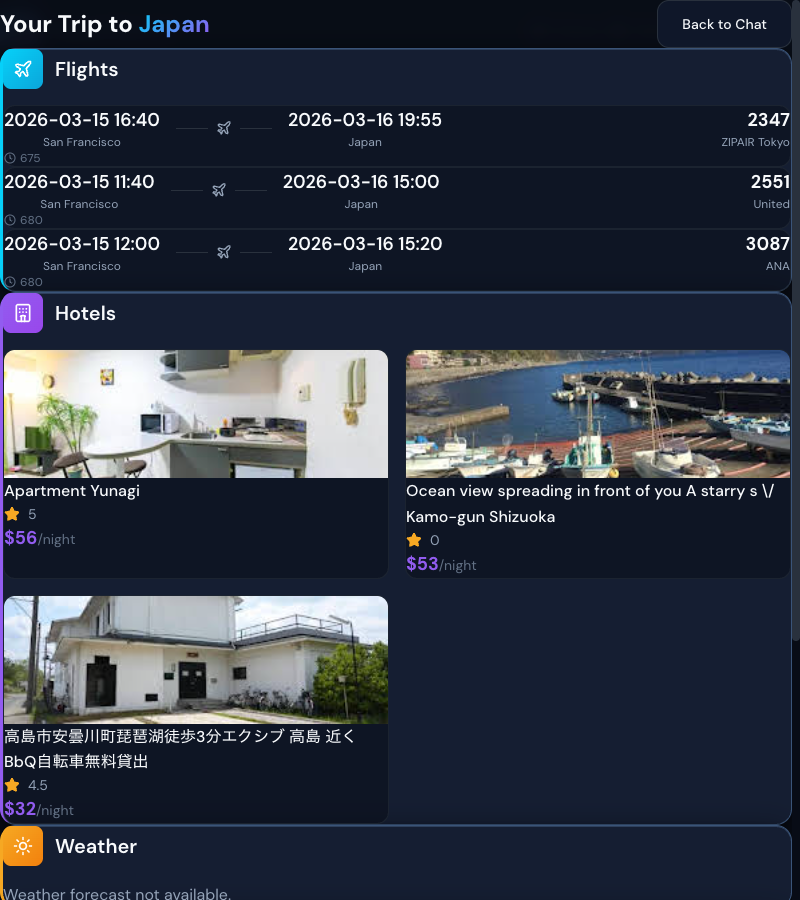 Complete trip plan with flights, hotels, and attractions
Budget Breakdown#
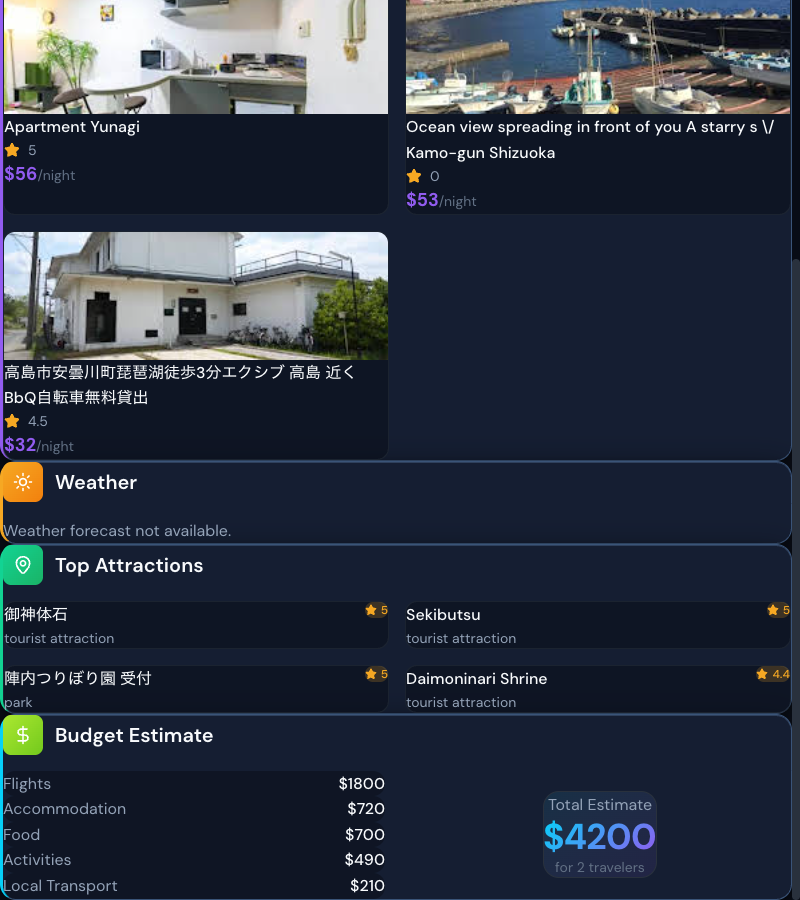 Detailed budget breakdown with itemized costs
Results Component Structure#
function ResultsOverlay({ results, onClose }: ResultsProps) { return ( <motion.div initial={{ opacity: 0 }} animate={{ opacity: 1 }} className="fixed inset-0 z-50 bg-background/95 overflow-y-auto" > <div className="max-w-4xl mx-auto px-4 py-8"> <header className="flex items-center justify-between mb-8"> <h2 className="text-2xl font-bold"> Your Trip to <span className="text-gradient">{results.destination}</span> </h2> <button onClick={onClose}>Back to Chat</button> </header> <div className="space-y-6"> <FlightsSection flights={results.flights} /> <HotelsSection hotels={results.hotels} /> <WeatherSection weather={results.weather} /> <AttractionsSection attractions={results.attractions} /> <BudgetSection budget={results.budget} /> </div> </div> </motion.div> ) }
Budget Breakdown Card#
function BudgetSection({ budget }: { budget: BudgetData }) { const items = [ { label: 'Flights', amount: budget.flights, color: 'text-cyan-400' }, { label: 'Accommodation', amount: budget.accommodation, color: 'text-violet-400' }, { label: 'Food', amount: budget.food, color: 'text-amber-400' }, { label: 'Activities', amount: budget.activities, color: 'text-emerald-400' }, { label: 'Local Transport', amount: budget.transport, color: 'text-rose-400' }, ] return ( <div className="glass-card p-6"> <h3 className="text-lg font-semibold mb-4">Budget Estimate</h3> <div className="space-y-3"> {items.map(item => ( <div key={item.label} className="flex justify-between"> <span className="text-muted">{item.label}</span> <span className={item.color}>${item.amount}</span> </div> ))} </div> <div className="border-t border-border mt-4 pt-4"> <div className="flex justify-between text-lg font-semibold"> <span>Total Estimate</span> <span className="text-gradient">${budget.total}</span> </div> <p className="text-sm text-muted mt-1"> for {budget.travelers} travelers </p> </div> </div> ) }
Step 6: Deployment to Azure#
Docker Configuration#
Backend Dockerfile:
FROM python:3.11-slim WORKDIR /app # Install uv for fast dependency management RUN pip install uv # Copy and install dependencies COPY pyproject.toml . RUN uv pip install --system -e . # Copy source code COPY src/ src/ EXPOSE 8000 CMD ["uvicorn", "travel_mcp.api:app", "--host", "0.0.0.0", "--port", "8000"]
Frontend Dockerfile:
FROM node:20-alpine AS builder WORKDIR /app COPY package*.json ./ RUN npm ci COPY . . RUN npm run build FROM nginx:alpine COPY --from=builder /app/dist /usr/share/nginx/html COPY nginx.conf /etc/nginx/nginx.conf EXPOSE 80
Azure Container Apps Deployment#
# Build and push images az acr build --registry $ACR_NAME --image travel-backend:latest ./backend az acr build --registry $ACR_NAME --image travel-frontend:latest ./frontend # Deploy backend az containerapp create \ --name travel-backend \ --resource-group $RG \ --environment $ENV \ --image $ACR_NAME.azurecr.io/travel-backend:latest \ --target-port 8000 \ --ingress external \ --env-vars \ AZURE_OPENAI_ENDPOINT=$OPENAI_ENDPOINT \ SERPAPI_KEY=$SERPAPI_KEY # Deploy frontend az containerapp create \ --name travel-frontend \ --resource-group $RG \ --environment $ENV \ --image $ACR_NAME.azurecr.io/travel-frontend:latest \ --target-port 80 \ --ingress external \ --env-vars \ VITE_API_URL=$BACKEND_URL
The Form-Based Planner#
For users who prefer traditional forms, we also have a structured planner:
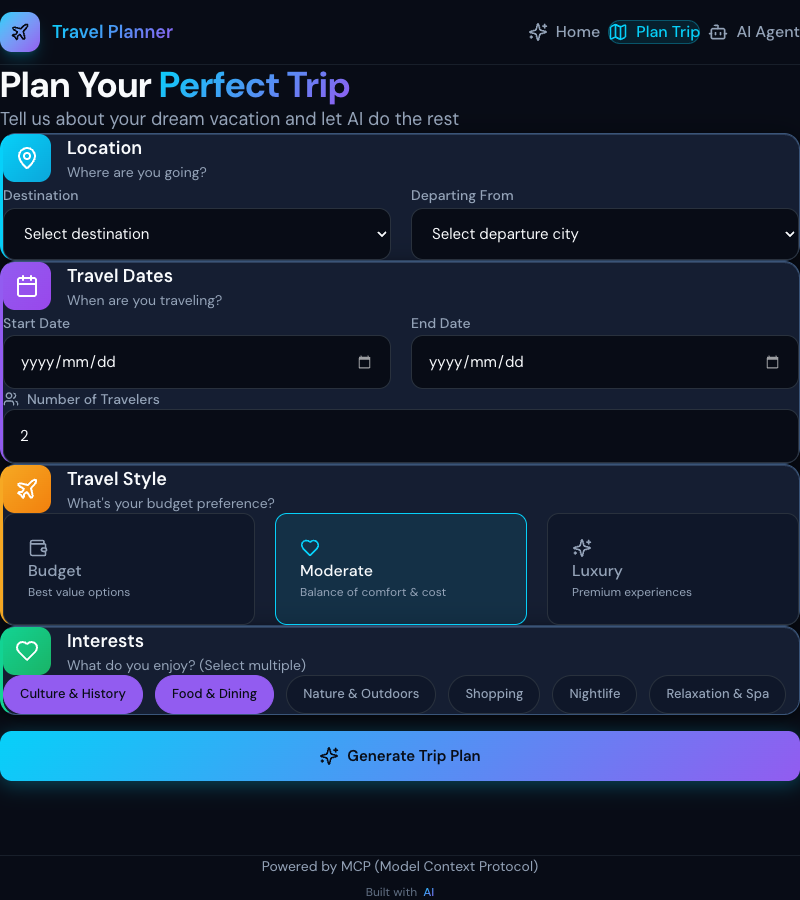 Form-based trip planner for structured input
This provides:
- Dropdown selectors for destinations
- Date pickers
- Travel style buttons (Budget/Moderate/Luxury)
- Interest tags for personalization
Performance Optimizations#
1. Parallel API Calls#
async def fetch_complete_trip_plan(params: dict) -> dict: """Fetch all travel data in parallel.""" async with asyncio.TaskGroup() as tg: flights_task = tg.create_task(search_flights(...)) hotels_task = tg.create_task(search_hotels(...)) weather_task = tg.create_task(get_weather(...)) attractions_task = tg.create_task(get_attractions(...)) return { "flights": flights_task.result(), "hotels": hotels_task.result(), "weather": weather_task.result(), "attractions": attractions_task.result(), "budget": calculate_budget(...) }
2. Redis Caching#
from redis import asyncio as aioredis redis = aioredis.from_url(settings.REDIS_URL) async def cached_search_hotels(location: str, dates: str) -> dict: cache_key = f"hotels:{location}:{dates}" # Check cache cached = await redis.get(cache_key) if cached: return json.loads(cached) # Fetch fresh data result = await search_hotels(location, dates) # Cache for 1 hour await redis.setex(cache_key, 3600, json.dumps(result)) return result
3. Smart LLM Fallback#
When Azure OpenAI returns invalid JSON, use regex extraction:
async def conversational_ai_agent(...) -> dict: try: response = await get_llm_response(messages) extracted = parse_json_response(response) except json.JSONDecodeError: # Fallback: extract based on what we asked extracted = smart_fallback_extraction( user_message, missing_fields[0] if missing_fields else None ) return extracted
Lessons Learned#
1. LLM Output is Unpredictable#
Always have fallback logic when parsing LLM responses. JSON mode helps but isn't 100% reliable.
2. Date Parsing is Hard#
Natural language dates ("next month", "the 10th to 15th") need multiple parsing strategies:
- LLM extraction first
- Regex patterns as fallback
- Relative date calculation
3. Conversation Context Matters#
Sending full conversation history to the LLM enables:
- Better context understanding
- Correction of previous misunderstandings
- More natural dialogue flow
4. Progressive Parameter Display#
Showing extracted parameters in real-time:
- Builds user confidence
- Allows quick corrections
- Makes the AI feel responsive
Next Steps#
Enhancements to Try#
- Add itinerary generation: Day-by-day travel schedules
- Price alerts: Notify when flight prices drop
- Multi-city trips: Support complex itineraries
- User preferences: Remember past travel styles
- Booking integration: Direct booking links
Advanced Features#
- Voice input: "Hey, plan me a trip to Japan"
- Map integration: Visual route planning
- Group planning: Collaborative trip planning
- Local recommendations: Restaurant and activity suggestions
Conclusion#
You've learned how to build a conversational AI travel planner that:
- Understands natural language travel requests
- Extracts parameters through intelligent conversation
- Fetches real data from multiple APIs
- Presents comprehensive results with modern UI
- Deploys to Azure for production use
The combination of MCP tools, Azure OpenAI, and modern web technologies creates a powerful foundation for any AI-powered application.
Resources#
- Source Code: GitHub - travel-mcp-server
- MCP Documentation: Model Context Protocol
- Azure OpenAI: Azure AI Services
- FastMCP: FastMCP Library
Happy travels!